Why Is an AI Writing Humanizer Useful for Everyday Content Creation?
-

- Published Updated
- 44 views

Creating good content takes more than putting words on a page. Writers need to explain ideas clearly, keep readers interested, and make sure every sentence serves a purpose. AI tools can help with the first draft, but the result may contain repeated expressions, unnatural transitions, or wording that does not fit the intended audience. An AI Writing Humanizer can help refine these areas and make the text easier to read.
Whether you are preparing a blog post, writing a business email, updating a website, or explaining a complicated topic, the way you present information matters. By understanding how to improve AI-generated drafts, you can spend less time fixing awkward sentences and more time developing useful ideas.
How Does an AI Writing Humanizer Help With Everyday Writing?
An AI Writing Humanizer is a writing tool that helps make text sound more natural by improving sentence structure, word choice, and readability. It can revise stiff expressions, reduce unnecessary repetition, and create a smoother flow between ideas.
These changes can be useful in everyday situations. A business owner might need clearer website copy, a blogger might want to improve an article, and a student might need a simpler explanation of a general subject.
The tool works best when the original draft already contains the information you want to communicate. It can help improve the presentation, but the writer should still check the accuracy, completeness, and purpose of the final text.
Good writing is not about making every sentence sound impressive. It is about helping readers understand the message without unnecessary effort.
What Makes Everyday Writing Feel More Human?
Natural writing often feels direct, clear, and appropriate for the situation. It does not need complicated vocabulary or dramatic expressions to hold someone's attention.
One important quality is variety. When every sentence has the same length and structure, a paragraph can feel repetitive. Combining shorter statements with more detailed explanations can make the reading experience smoother.
Another quality is relevance. Readers want information that relates to their needs. A detailed example can often explain an idea more effectively than several broad statements.
Natural writing also reflects its purpose. A message to a colleague may be friendly and brief, while an instruction guide may need a more precise tone. The right style depends on who will read the content and what they need to understand.
An AI writing tool can help adjust the wording, but choosing the right message and tone remains an important part of the writer's job.
How Can You Improve a Draft Without Losing Its Meaning?
Improving a draft starts with identifying what is wrong with the existing text. Sometimes the sentences are too long. Sometimes the main point appears too late, or several paragraphs repeat information that readers already understand.
Make Long Sentences Easier to Follow
Consider this sentence:
"Individuals who are interested in improving their writing skills can benefit from regularly reviewing their work and identifying areas that require further development."
A simpler version could be:
"To improve your writing, review your work regularly and identify what needs to change."
The revised sentence keeps the central message while removing unnecessary wording. Readers can understand the advice more quickly.
However, simplifying a sentence should not mean removing details that matter. If the original statement includes an important condition or explanation, preserve it in the revised version.
Remove Repeated Ideas
Writers sometimes explain the same point several times because they want to make it clear. Unfortunately, repeating an idea without adding new information can make the text feel longer than necessary.
Read each paragraph and ask whether it contributes something different. If two sentences communicate the same message, combine them or remove the weaker one.
This process makes the writing more focused and gives important information greater attention.
Keep the Intended Tone
A friendly article should not suddenly sound like a legal document. Likewise, a professional email should not become so casual that its message loses clarity.
Before making changes, consider the relationship between the writer and the reader. The language should fit that relationship and remain consistent throughout the content.
Can an AI Writing Humanizer Help With Different Writing Tasks?
Everyday writing includes many different formats, and each one has its own requirements. A humanizing tool can assist with several of them, although the final review should match the purpose of the content.
For blog writing, it can help improve paragraph flow and simplify explanations. Writers can then strengthen the article by adding relevant examples, answering reader questions, and removing information that does not support the topic.
For business emails, the tool may help make requests more polite or explanations more direct. Before sending the message, check that the important details are present and that the tone suits the recipient.
For website content, clearer wording can help visitors understand a product, service, or process. Specific information is especially valuable because broad claims often leave readers with unanswered questions.
For educational material, simpler explanations can make difficult ideas easier to understand. However, technical terms and essential details should remain accurate. A simplified explanation should never misrepresent the subject.
What Does Better Writing Look Like in a Real Example?
Imagine that you are writing a short description for an online service.
The original sentence reads:
"Our platform is designed to facilitate an improved user experience by providing convenient access to a variety of useful features."
Although the sentence sounds formal, it does not tell readers much about the service.
A clearer version might be:
"Our platform makes it easier to access the tools you need in one place."
The revised version is shorter and more direct. It also gives readers a clearer idea of the benefit being described.
There is one important consideration: the new sentence should only be used if the platform actually provides those tools in one place. If that claim is inaccurate, the wording must be changed.
This example demonstrates the difference between improving language and making unsupported claims. Effective editing should accomplish the first without introducing the second.
How Can You Get Better Results From a Humanizing Tool?
The quality of the final text depends partly on how you approach the editing process. Starting with a clear draft makes it easier to identify which changes are genuinely useful.
Begin by deciding what you want the content to achieve. If you are writing a blog, identify the question you want to answer. If you are preparing an email, identify the message you need to communicate. A clear purpose helps you judge whether a revision improves the text.
After using a humanizer, compare the new version with the original. Look for changes that may have removed important details, introduced vague wording, or altered your intended meaning.
You should also review the structure of the entire piece. Individual sentences may sound good while the overall content still feels disorganized. Make sure the ideas follow a sensible order and that each section supports the main purpose.
Finally, check facts, names, dates, figures, and other important details. If you are publishing the content, confirm that any claims can be supported. These final checks help ensure that the writing is not only readable but also reliable.
Where Does Magic Humanizer Fit Into This Process?
When you have a draft that communicates the right ideas but needs smoother wording, a dedicated tool can help you improve it more efficiently.
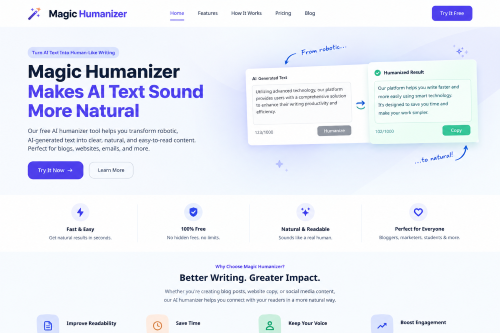
Magic Humanizer is an online tool designed to make AI-generated text more natural, clear, and readable. It can be useful for refining blog posts, website copy, SEO content, and everyday writing.
You can begin with your existing draft, use the tool to improve the language, and then review the result before using it. This approach allows you to benefit from automated editing while retaining control over the final message.
For example, you might use a humanizer to simplify a long paragraph and then add a practical example that reflects your knowledge of the topic. The tool helps with the wording, while your own judgment makes the explanation more specific and useful.
The important thing is to evaluate the result rather than accepting every change automatically. The finished content should sound appropriate for its audience and communicate information accurately.
Frequently Asked Questions
Is an AI Writing Humanizer suitable for beginners?
Yes. Beginners can use a humanizing tool to improve awkward sentences and make their writing easier to follow. It can be particularly useful when they know what they want to say but struggle to express it clearly. Reviewing the changes also helps beginners recognize unnecessary wording and improve their editing skills over time.
Can an AI Writing Humanizer make writing shorter?
It can help reduce unnecessary words and repeated expressions. However, shortening a passage should not be the main goal if important details would be lost. The best revision communicates the intended message clearly, using as many words as the explanation genuinely needs.
Will a humanizer always preserve my original message?
Not always. Some revisions may change the meaning, remove important details, or introduce wording that does not accurately reflect the original text. Compare the revised version with your draft, especially when the content includes technical explanations, business information, or specific claims.
Can I use a humanizer for professional emails?
Yes. It can help make professional emails clearer, more direct, and better suited to the intended tone. Before sending an email, check that the request, deadline, names, and other important details are correct. A natural tone is helpful, but the message must remain professional and complete.
Is humanized content automatically high quality?
No. Natural wording does not guarantee that content is informative, original, or accurate. High-quality writing also needs a clear purpose, relevant details, sensible organization, and reliable information. A humanizer can improve presentation, but the writer must ensure the content genuinely serves its audience.
How often should I use an AI Writing Humanizer?
Use it whenever a draft would benefit from clearer wording or smoother sentence flow. You do not need to rewrite every paragraph if the existing text is already effective. Focus on the areas that need improvement, then review the complete piece to ensure that the revisions work well together.
What should I do after humanizing my content?
Read the final version carefully, compare important details with your original draft, and verify factual claims. Check the tone, remove unnecessary repetition, and make sure the content answers the reader's question. If a sentence sounds unnatural or changes your intended meaning, revise it manually before publishing or sending it.
Final Thoughts
An AI Writing Humanizer can make everyday writing easier to read by improving sentence structure, reducing repetition, and helping ideas flow naturally. It can be a useful addition to the writing process when an initial draft needs refinement.
Still, effective communication depends on more than wording. The content must be accurate, relevant, and suited to the people who will read it.
Use humanizing tools to improve your draft, then apply your own judgment to the final version. When you focus on clarity, meaning, and usefulness, you can create content that communicates more effectively without making the writing unnecessarily complicated.