How Glance Transforms Android Lock Screens: Features, Privacy, and Setup
-

- Published Updated
- 1,473 views
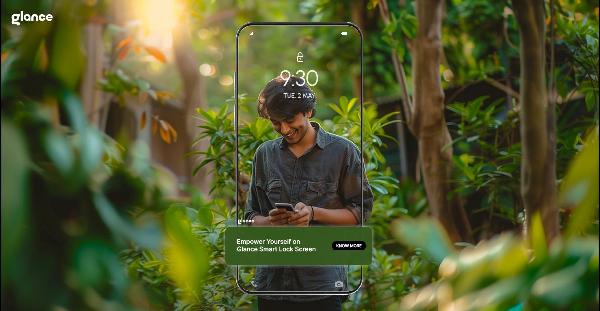
The Glance Android lock screen is a background service and content platform that delivers personalized, glanceable content on the phone lock screen. This article explains how Glance works, what features to expect, and the privacy and battery considerations users and developers should weigh before enabling it.
- Glance places curated content and interactive cards on the Android lock screen and ambient display.
- Key benefits include personalized recommendations and zero-friction engagement; trade-offs include data collection and potential battery use.
- Privacy and regulation: apps must follow platform policies and local laws such as GDPR and CCPA; review permissions and settings.
- Availability and setup vary by device and region; check device settings and app permissions to enable or disable Glance features.
What is the Glance Android lock screen?
Glance is a content-delivery experience built into or layered on top of Android lock screens. It shows short-form content such as news, images, notifications, and contextual suggestions without requiring the phone to be unlocked. The Glance Android lock screen aims to make useful information available quickly, using machine learning to personalize content and ranking.
How Glance works
Content delivery and personalization
Glance aggregates content from publishers, content partners, and algorithmic feeds. Personalization typically relies on on-device signals (for example, app usage and locale) and cloud-based models to surface content deemed relevant. The platform may optimize which cards appear based on engagement metrics and user interaction patterns.
Integration with Android system features
Glance integrates with the lock screen and ambient display APIs to present content when the screen is active or when the device wakes. On many devices, it coexists with system notifications and may use framework components that control how content appears on confined lock-screen real estate.
Key features and user experience
Glanceable cards and media
Content is shown as compact cards or media snippets designed for quick consumption. Cards can include headlines, images, short video clips, and interactive elements such as tap-to-open or swipe-to-dismiss.
Personalization and contextual suggestions
Personalization can include local news, weather updates, sport scores, and app-driven suggestions tailored to time of day, location, or recent activity. Users can usually customize or limit categories to reduce irrelevant content.
Privacy, data handling, and regulation
Permissions and data collection
Glance typically requires a limited set of permissions to offer relevant content, which may include permission to show over the lock screen and, in some configurations, access to location or usage signals. Review the app or system privacy policy for details on what data is collected, how it is stored, and how long it is retained.
Compliance and oversight
Deployments of Glance-like services must comply with platform rules and regional privacy laws. For example, apps and services should follow Google Play policies when distributed through the Play Store and respect regulations such as the European Union's GDPR and California's CCPA where applicable. Regulatory bodies like the Federal Trade Commission (FTC) in the United States provide guidance on transparency and consumer privacy practices.
Availability, setup, and disabling Glance
Where Glance appears
Availability depends on the device manufacturer, carrier, and regional partnerships. Some phone makers ship Glance preinstalled; in other cases, it is available as an optional app or system feature. Check device settings under lock screen or display options to find the setting that controls lock-screen content.
Enable or disable Glance
To enable or disable the feature, open the device's lock screen or display settings and locate 'lock screen content' or similar controls. Adjust permissions for the provider app, limit categories, or uninstall/disable the package if the device allows. For more information about Android system settings and privacy controls, consult official Android documentation.
Official Android resources provide guidance on permissions and display behavior: Android official site.
Impact on battery, performance, and accessibility
Battery and data use
Because Glance updates content periodically and may preload images or short videos, there can be measurable effects on battery life and mobile data usage. Many implementations use caching and adaptive update intervals to mitigate impact, but users with strict battery or data constraints may prefer to limit or disable background updates.
Performance and accessibility
Well-designed lock-screen content aims to avoid interfering with core device performance. Accessibility features such as larger text, screen readers, and high-contrast modes should be supported; users with accessibility needs should verify that lock-screen content does not obstruct essential interactions like unlocking or emergency calls.
Considerations for developers and publishers
Content guidelines and moderation
Publishers and developers should follow content guidelines set by platform partners and respect user preferences. Content delivered to a lock screen must be concise, immediately useful, and mindful of user privacy expectations. Misleading or intrusive content can reduce engagement and violate store policies.
Measuring engagement and compliance
Metrics such as impressions, taps, and dismissals help evaluate content relevance. Ensure data-collection practices are transparent and compliant with applicable laws; include opt-out mechanisms where required.
Conclusion
Glance delivers a new kind of lock-screen experience by placing curated, personalized content front and center on Android devices. The platform can be useful for quick updates and discovery, but users and publishers should balance convenience with privacy, battery, and accessibility considerations.
What is the Glance Android lock screen?
The Glance Android lock screen is a platform for showing personalized, glanceable content on the lock screen and ambient display. It provides short cards, images, and suggestions designed for quick consumption without unlocking the device.
Is Glance safe for privacy?
Safety depends on configuration and the permissions granted. Review the provider's privacy policy, limit permissions where possible, and follow local privacy regulations such as GDPR and CCPA. Uninstall or disable the feature if privacy concerns persist.
How can Glance affect battery life?
Periodic updates and media preloading may increase battery and data use. Use device battery settings to monitor impact and reduce background activity or limit updates to Wi-Fi where options exist.
Can Glance be disabled?
Yes. Most devices allow disabling lock-screen content providers via system settings or by disabling the associated app. Steps vary by manufacturer and Android version, so check the device's settings menu for lock-screen content controls.
Where can developers find rules for lock-screen content?
Developers should consult platform policies and developer documentation for content, privacy, and permission requirements. Complying with app store policies and regional laws is essential to avoid enforcement actions or removals.