How QuickBooks Tool Hub Can Fix Your Accounting Problems Simply
-

- Published Updated
- 3,771 views
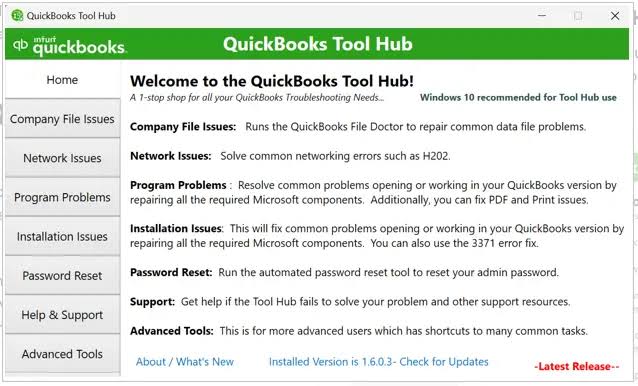
Managing business finances with QuickBooks can make accounting and bookkeeping much easier. However, technical problems can sometimes interrupt your daily work. Errors, installation failures, network issues, company file problems, and software crashes can prevent you from accessing important financial information. This is where QuickBooks Tool Hub can be a helpful troubleshooting solution.
What Is QuickBooks Tool Hub?
QuickBooks Tool Hub is a desktop troubleshooting application designed to bring several QuickBooks repair tools together in one place. Instead of searching for different solutions for every error, users can simply open the Tool Hub and choose the tool that matches their issue.
It is especially useful for QuickBooks Desktop users who frequently face company file errors, login issues, or system-related glitches. The tool is designed to simplify troubleshooting so users can quickly get back to their accounting tasks without long delays.
Fix Common QuickBooks Problems
QuickBooks Tool Hub includes multiple sections, each designed to handle specific types of issues. The Company File Issues section helps users fix problems related to opening or accessing company files. This is important because company files contain all financial data, and any disruption can affect business operations.
If QuickBooks is not working properly in a multi-user environment, the Network Issues section can help diagnose connectivity problems. This is especially useful for offices where multiple employees need simultaneous access to accounting data.
Installation and update problems are also common. The Installation Issues tool helps fix errors that occur when installing, updating, or repairing QuickBooks Desktop. These issues can often prevent the software from launching correctly.
Additionally, the Program Problems section helps resolve issues like freezing, crashing, or slow performance. These problems can be frustrating, especially during busy accounting periods such as month-end or tax season.
Why Quick Troubleshooting Matters
When QuickBooks stops working, it can directly impact business productivity. Tasks like invoicing customers, tracking expenses, generating reports, and managing payroll may come to a halt. Even a short delay can create stress and disrupt financial planning.
QuickBooks Tool Hub helps reduce downtime by offering quick access to troubleshooting tools. In many cases, users can resolve minor issues on their own without waiting for external support. This makes it a valuable resource for small businesses and accounting professionals who rely on QuickBooks daily.
However, it is important to understand that not all problems can be fixed using Tool Hub. Complex issues such as severe data corruption, advanced network errors, or repeated system failures may require expert assistance.
Get Help When You Need It
If you are unable to resolve a QuickBooks issue on your own, professional support can help guide you through the process. For assistance with QuickBooks troubleshooting, you can contact (855)-510-6487.
Before reaching out, it is helpful to note down your QuickBooks version, operating system details, and any error messages you are seeing. This information can help speed up the troubleshooting process.
Always ensure you are sharing information only with trusted and authorized support representatives, and avoid providing sensitive financial data or passwords unless necessary.
If you are facing payroll processing issues, click here to learn more about QuickBooks Payroll Error PS038, its common causes, and effective troubleshooting steps to resolve the problem and get your payroll back on track
Keep Your Accounting Workflow Running Smoothly
QuickBooks Tool Hub is a simple yet powerful solution for handling common accounting software issues. By combining multiple repair tools into one application, it helps users quickly identify and fix problems related to company files, installation, network connectivity, and program performance.
For businesses that depend on QuickBooks every day, having a reliable troubleshooting tool can save time, reduce stress, and improve efficiency. When combined with proper bookkeeping practices and timely support, it ensures smoother financial management.
Ultimately, QuickBooks Tool Hub helps businesses stay focused on what matters most—managing finances efficiently and growing their business anywhere, anytime.
FAQs
1. What is QuickBooks Tool Hub used for?
QuickBooks Tool Hub is a troubleshooting application designed to help resolve common QuickBooks Desktop problems, including installation errors, company file issues, network problems, and program errors.
2. Where can I get help with QuickBooks problems?
If you are experiencing difficulties with QuickBooks and need assistance, you can contact (855)-510-6487 for troubleshooting support. Be sure to protect your passwords and sensitive financial information when seeking technical help.
3. Can QuickBooks Tool Hub fix every QuickBooks error?
QuickBooks Tool Hub can help resolve many common QuickBooks Desktop issues, but it may not fix every problem. For persistent or complex errors, professional technical assistance may be needed. You can call (855)-510-6487 for help with QuickBooks troubleshooting.