How the Seva Sindhu Karnataka Portal Transformed Public Service Delivery
-

- Published Updated
- 1,472 views
Seva Sindhu Karnataka portal: What it is and why it matters
Detected intent: Informational
The Seva Sindhu Karnataka portal is a state-run digital gateway that centralizes hundreds of citizen-facing services to simplify interactions with government departments. Seva Sindhu Karnataka portal aims to reduce wait times, cut paperwork, and make core services—such as certificates, licenses, pensions, and registrations—accessible online for residents across the state.
Seva Sindhu is Karnataka's integrated e-governance platform that standardizes service delivery across departments. This guide explains how the portal works, the SEVA checklist for implementation, a short real-world scenario, practical tips, common mistakes, and five core cluster questions for further reading.
How Seva Sindhu works and the scope of services
The portal aggregates services from departments such as revenue, social welfare, health, transport, and municipal administration so citizens can submit applications, upload documents, pay fees, and track status online. The Seva Sindhu services list includes birth and death certificates, caste and income certificates, trade licenses, grievance redressal, and beneficiary schemes enrollment.
For official reference and service listings, the portal is maintained by the Government of Karnataka and provides department-specific workflows and digital receipts via the integrated backend system. Visit the official portal for authoritative service details: sevasindhu.karnataka.gov.in.
Implementation framework: the SEVA checklist
Use a simple named framework to evaluate or replicate the platform’s approach. The SEVA checklist summarizes core actions for governments and implementers:
- Simplify — Standardize forms and minimize required fields.
- Ensure accessibility — Provide multilingual UIs, mobile optimization, and offline support through service counters.
- Verify — Integrate identity and document verification (Aadhaar, e-sign, digital certificates) where lawful and secure.
- Automate — Create rule-based workflows, status tracking, and automated notifications to reduce manual intervention.
- Audit — Enable logs, dashboards, and citizen feedback loops to measure performance and compliance.
Real-world example: one application, many steps removed
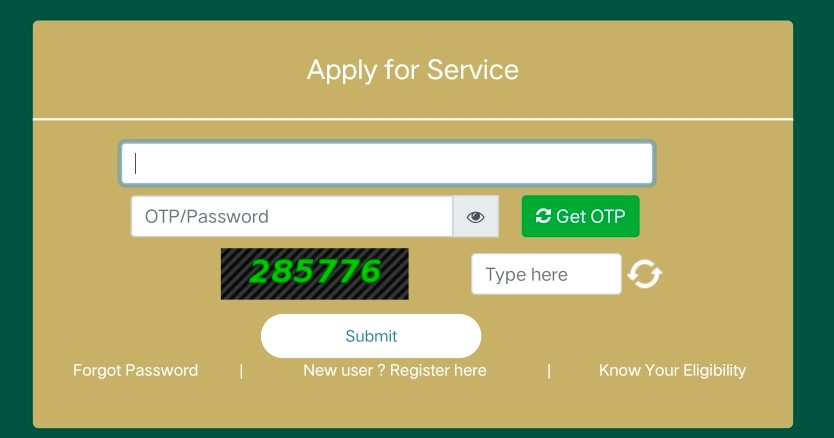
Scenario: A retired teacher needs a lifetime pension certificate and previous manual processing took weeks, requiring multiple visits to different offices. Through Seva Sindhu, the citizen logs in, selects the pension application from the Seva Sindhu services list, uploads scanned ID and pension order, pays a nominal fee, and tracks a transparent approval workflow. The integrated backend routes the file to the pension department and sends automated SMS/email updates until payment and settlement are completed—reducing physical visits and approval time.
Practical tips for using or implementing Seva Sindhu
- Keep digital copies of frequently required documents (ID proofs, certificates) in standardized formats (PDF/JPEG) to speed up uploads.
- Use authenticated logins (state ID, mobile OTP, or federated identity) and enable two-factor authentication for officials to secure access.
- Track application IDs and save digital receipts—these are legal proof of submission and improve grievance resolution.
- For implementers, prioritize a mobile-first UI and low-bandwidth modes; many rural users rely on basic smartphones and intermittent connectivity.
Trade-offs and common mistakes
Trade-offs arise between rapid rollout and robust privacy or accessibility. Rushing to migrate services online without thorough user testing can cause exclusion of digitally marginal users. Common mistakes include:
- Overcomplicating forms—too many fields deter submissions.
- Weak feedback loops—citizens need clear status updates and escalation paths.
- Poor interdepartmental integration—siloed backends recreate manual handoffs even when a front-end portal exists.
Performance indicators and governance
Measure impact using KPIs such as average processing time, applicant satisfaction scores, percentage of services fully digitalized, and grievance resolution times. Governance best practices include publishing SLAs, audit trails, and adherence to data protection norms defined by national and state authorities.
Core cluster questions
- How are documents verified on an e-governance portal?
- What are the best practices for citizen authentication in state portals?
- How can rural users access digital government services with limited connectivity?
- What KPIs should measure e-service effectiveness?
- How does interdepartmental integration improve public service delivery?
Related entities and terms to know
Key concepts: e-Governance, digital identity, Aadhaar-based verification, National Informatics Centre (NIC), Service Level Agreement (SLA), grievance redressal, and citizen-centric design. These terms help when researching implementation standards or interoperability requirements.
Final recommendations
To maximize value, pair the SEVA checklist with continuous user testing, transparent KPIs, and inclusive outreach (help desks, kiosks, and assisted channels). Prioritize security and privacy by following national guidance from standards bodies and implementing robust logging and consent mechanisms.
FAQ: What is the Seva Sindhu Karnataka portal?
Seva Sindhu Karnataka portal is an integrated online platform provided by the Government of Karnataka that centralizes citizen services—application submission, fee payment, status tracking, and grievance handling—across multiple departments.
FAQ: How to find the Seva Sindhu services list?
The complete Seva Sindhu services list is published on the official portal and grouped by department and service category; search or browse by department to locate the required form and process details.
FAQ: Is Seva Sindhu secure for submitting documents online?
Security depends on implementation: secure portals use encrypted transmission (HTTPS), authenticated logins, server-side validation, and audit logs. Confirm that the portal displays secure connection indicators and follows state data-retention policies.
FAQ: Who should be involved in implementing a similar public service portal?
Implementation teams typically include representatives from IT (system architects, developers), policy and legal (data protection, compliance), operations (departmental process owners), and user support (help desks, outreach), plus monitoring and evaluation specialists.
FAQ: Where to get official details or support for services?
Official service pages and contact information are available on the Seva Sindhu portal maintained by the Government of Karnataka (sevasindhu.karnataka.gov.in), which lists department-wise processes and helpdesk contacts.