AI Video Generator: Features, Benefits, Pricing & How It Works (2026)
-

- Published Updated
- 96 views
Artificial intelligence is transforming the way people create videos, images, and digital content. Tasks that once required expensive equipment, professional editing skills, and hours of work can now be completed with AI-powered tools. Whether you are a content creator, marketer, business owner, or beginner, these tools can help simplify your creative workflow.
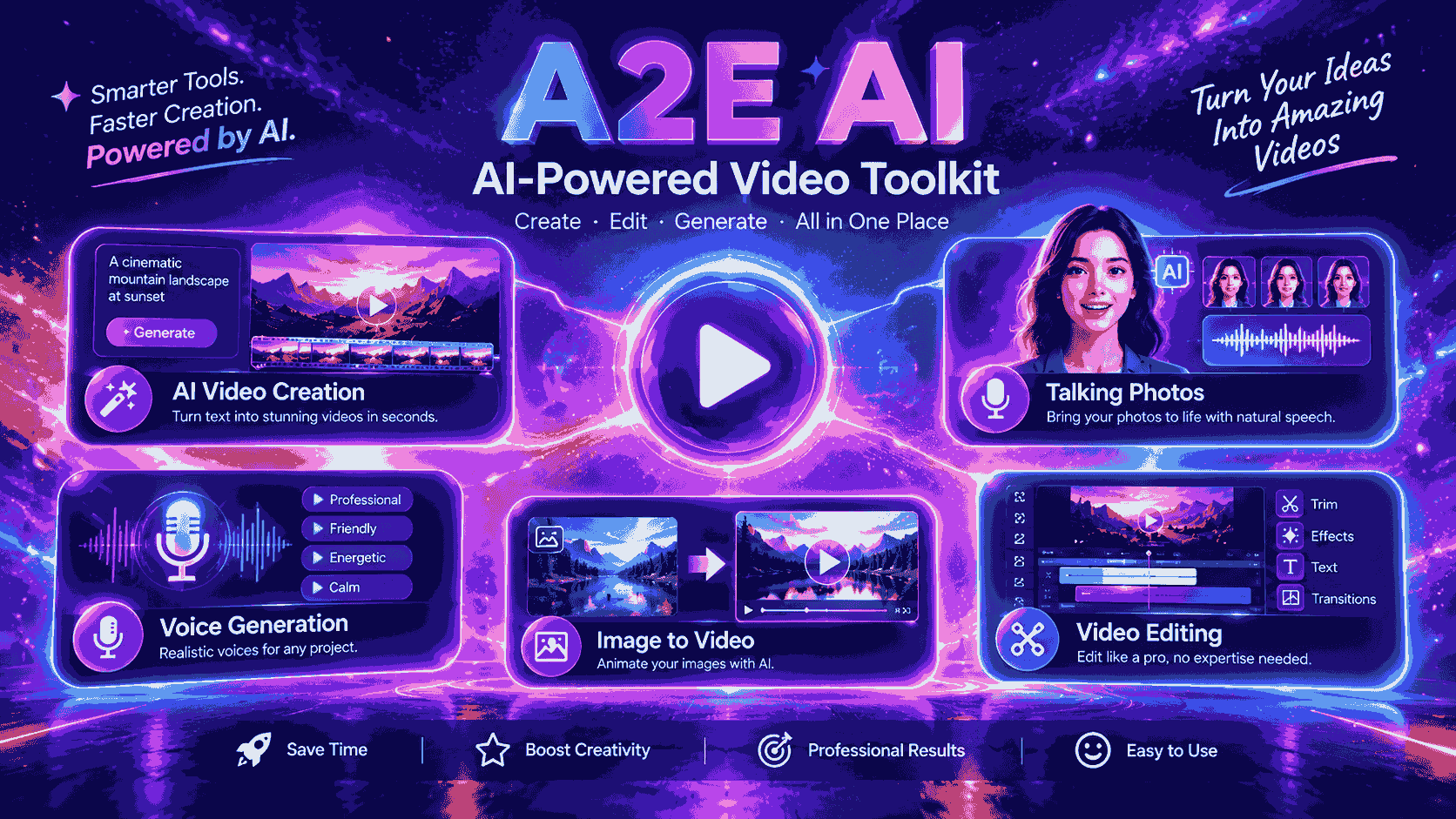
One platform worth exploring is A2E AI, which offers different capabilities for AI-generated media, including digital avatars, talking photos, voice generation, and video creation. In this guide, we will cover the main A2E AI features, A2E AI pricing, benefits, and limitations to help you understand whether it is suitable for your needs.
What Is A2E AI?
A2E AI is an AI-powered media creation platform designed to help users explore video generation, digital avatars, voice tools, and other creative features. Instead of relying entirely on traditional recording and editing methods, users can experiment with artificial intelligence to produce different types of digital content.
For example, imagine you want to create a product presentation but do not have access to a recording studio. You could explore an AI avatar generator, prepare a script, and use supported video generation features to develop a presenter-style video.
This approach can be useful for social media content, marketing campaigns, online education, and business presentations.
An AI video generator does not eliminate every production task, but it can reduce the effort required for certain projects and help creators experiment with new ideas.
Key A2E AI Features
Understanding the available A2E AI features can help you decide whether the platform matches your content creation goals.
1. AI Video Generation
AI video generation allows users to create video content from supported inputs, such as text prompts or images, depending on the selected tool.
This feature can be useful for promotional clips, short social media videos, creative storytelling, and product demonstrations. Instead of creating every scene manually, users can generate an initial result and refine it.
The quality of generated videos depends on the model, input quality, and selected settings. For professional use, reviewing the output and making necessary edits is important.
2. AI Avatar Generator
An AI avatar generator helps users create digital presenters for videos and presentations. These avatars can be useful when you want a person-like presenter without recording yourself for every project.
Businesses can explore digital avatars for product explanations, training videos, and educational presentations. Content creators may also use them to develop videos without appearing on camera.
The realism of an avatar can vary depending on the selected model and settings, so testing different options is worthwhile.
3. Talking Photos and AI Lip Sync
Talking-photo technology can animate a still image to make it appear as though the person is speaking. AI lip sync tools help coordinate mouth movements with audio.
For example, you could use an approved portrait and a narration track to create a short presentation or an engaging social media clip.
These features can make visual content more interactive. However, generated facial movements may sometimes appear unnatural, so always review the final video before publishing it.
4. AI Voice Generation
Voice generation can simplify the process of adding narration to digital content.
Text-to-speech tools convert written scripts into spoken audio, while voice cloning may reproduce characteristics of a particular voice when supported by the platform.
These capabilities can help creators produce tutorials, advertisements, product explanations, and educational videos.
If you plan to clone someone's voice, obtain the necessary permission and follow the platform's usage policies. For commercial projects, also check the applicable licensing terms.
5. Face Swap and Image Editing
Some AI video creation tools provide face-swapping and image-editing features for creative projects.
These capabilities may be useful for approved visual experiments, digital mock-ups, and content production. However, results can vary depending on the source image and selected settings.
Use face-swapping tools responsibly. Avoid creating misleading or harmful content involving real people without their consent.
How Does A2E AI Work?
Getting started with an AI video generator is generally straightforward. Although the exact process depends on the selected feature, the following steps provide a useful starting point.
Step 1: Visit the official website
Open the A2E AI website and create an account if required. Review the available tools to identify the features that match your project.
Step 2: Choose a suitable tool
Select the feature you want to use, such as video generation, digital avatars, talking photos, or voice generation.
Step 3: Upload your content or enter a prompt
Depending on the feature, you may need to provide a text prompt, upload an image, enter a script, or supply an audio file.
Step 4: Adjust the settings
Choose the available options for appearance, voice, resolution, or other supported settings. Clear instructions and suitable input files can improve the results.
Step 5: Generate your content
Start the generation process and wait for the platform to produce the output. More complex tasks may require additional processing time.
Step 6: Review and download
Check the generated content for visual errors, unnatural movements, or audio problems. Make any necessary adjustments before downloading or sharing the final result.
Following this process can help beginners understand the platform and get more value from its available features.
A2E AI Pricing: What Should You Know?
A2E AI pricing is an important consideration if you plan to use the platform regularly. Free access, paid subscriptions, credit allowances, and feature availability can influence the overall cost.
Before selecting a plan, review the official pricing information and consider the following factors:
Free plan: Check whether a free option is available and what features it includes.
Credit limits: Understand how many credits different generation tasks consume.
Video quality: Confirm which output resolutions are available with each plan.
Watermarks: Check whether exported videos contain watermarks.
Commercial usage: Review the terms for using generated content in business projects.
Additional features: Determine whether advanced tools or API access require a separate subscription.
For current plan details, visit the aisuites.ai. Pricing, credit limits, and included features can change, so verify the latest information before purchasing.
If you are a beginner, testing the available free features before committing to a subscription is a practical way to evaluate the platform.
Benefits of AI Video Creation Tools
AI video creation tools can offer several advantages for individuals and businesses.
Saves Time
Creating videos traditionally involves recording, editing, and coordinating different production tasks. AI tools can simplify some of these steps, especially for short videos and presenter-style content.
Makes Content Creation Easier
Beginners can experiment with AI-powered video creation without needing extensive video production experience. Although editing skills remain useful, AI can make certain tasks more accessible.
Supports Marketing Campaigns
Businesses can explore AI-generated videos for product demonstrations, promotional campaigns, social media posts, and educational content.
Encourages Creative Experimentation
AI tools make it easier to test different visual styles, scripts, and presentation formats. This can help creators explore new ideas before deciding on a final concept.
Brings Multiple Tools Together
A platform that offers avatars, voice generation, and video-related features can simplify certain workflows by making different creative capabilities available in one place.
These benefits are particularly valuable for people who need to produce content regularly without increasing their production workload.
Limitations You Should Consider
Although AI-powered video creation offers several advantages, it also has limitations.
First, generated videos may contain visual inconsistencies, unnatural facial expressions, or inaccurate details. Human review and editing may still be necessary.
Second, credit-based systems can become expensive when generating content frequently. Understanding the cost per task can help you manage your budget.
Third, AI-generated voices and avatars may not always deliver the emotional expression or natural appearance required for every project.
Privacy is another important consideration. Before uploading photographs, recordings, or personal information, review the platform's privacy policy and data-handling practices.
Finally, do not assume that every generated result is ready for commercial use. Check licensing terms, copyright considerations, and consent requirements before publishing your content.
Who Should Use A2E AI?
A2E AI may be worth exploring for several types of users.
Content creators: Produce short videos, talking photos, and digital presentations.
Digital marketers: Experiment with promotional videos and advertising concepts.
Small businesses: Create product explainers without organizing a traditional video shoot for every project.
Educators: Explore digital presenters and video-based learning materials.
Developers: Investigate AI media generation capabilities for applications and automated workflows.
However, users who need highly precise cinematic production may still benefit from combining AI tools with traditional recording and professional editing software.
A2E AI Review: Is It Worth Trying?
This A2E AI review shows that the platform is worth exploring if you want to experiment with AI-powered video creation. Its combination of video-related features, avatars, voice tools, and image capabilities offers different possibilities for content creators and businesses.
The main advantages are convenience, creative flexibility, and the ability to experiment with digital content without relying entirely on traditional production methods.
However, the right choice depends on your goals, budget, and quality expectations. Some projects may require additional editing, and frequent generation can increase costs.
Before subscribing, test the available features, compare the results with your requirements, and review the current pricing and usage terms.
Final Thoughts
AI video generators are opening new opportunities for creators, marketers, educators, and businesses. Platforms such as A2E AI allow users to explore different ways of producing digital videos, avatars, and other media.
Whether you want to create social media content, explain products, or experiment with digital presenters, understanding the platform's features and limitations can help you make a better decision.
At AISuites, we aim to make AI tools easier to understand through practical guides, informative reviews, and useful insights. Visit the AISuites homepage to discover more AI video creation tools and resources that can support your creative workflow.