How to Choose the Best Ghost Mannequin Services for E‑Commerce Photos
-

- Published Updated
- 1,369 views
Detected intent: Commercial Investigation
The primary decision for apparel sellers is how to present products professionally—ghost mannequin services are the standard for clean, consistent e‑commerce imagery that shows shape without a visible model. This guide explains what to expect, how to compare providers, and the criteria that separate reliable vendors from disappointing results.
Ghost mannequin services: what they are and why they matter
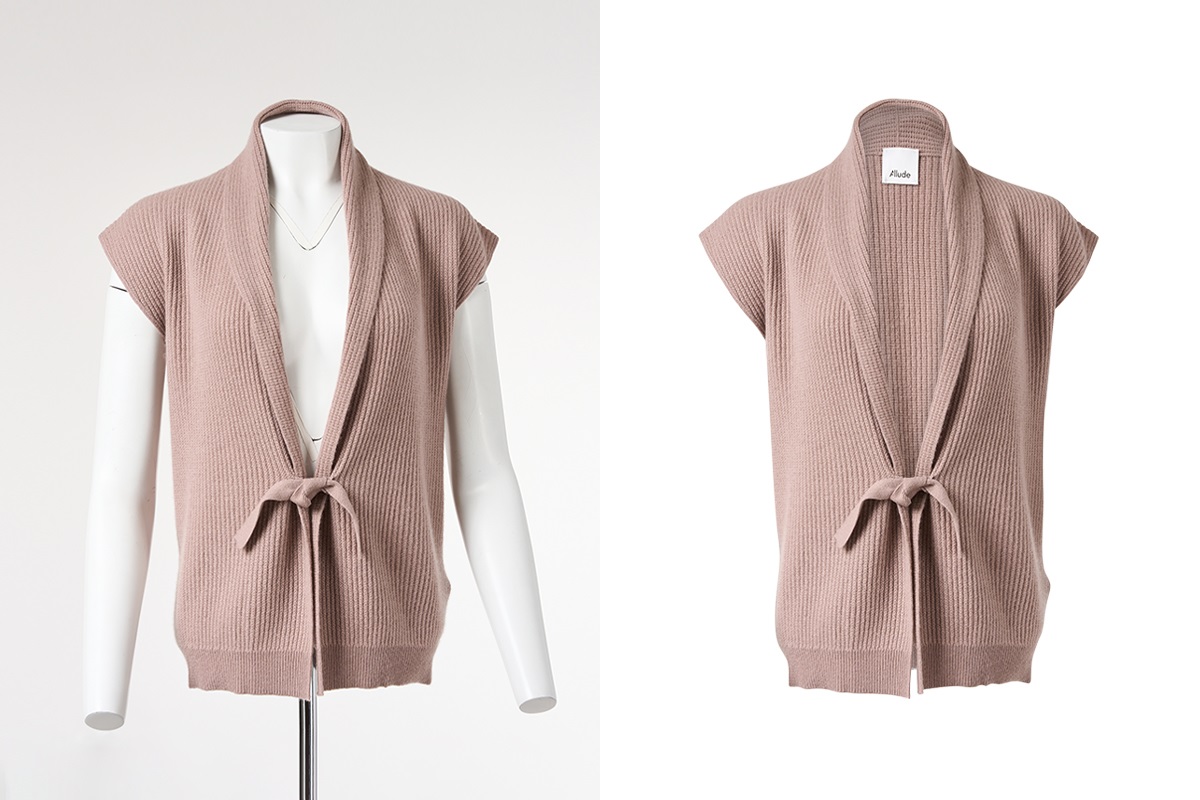
Ghost mannequin services produce images that show apparel shape without a live model or visible mannequin. This technique—also called invisible mannequin or hollow man photography—improves conversion rates by highlighting fit, structure, and drape while keeping a consistent catalog aesthetic. High-quality ghost mannequin photo editing reduces returns and speeds listing production for marketplaces and brand sites.
How ghost mannequin services differ (types and outputs)
Common service types
- Standard hollow mannequin composition: Outer shot + inner shot stitched to remove the stand/manual neck plug.
- 3D ghost mannequin retouching: Advanced compositing and shadow recreation for a more natural 3D effect.
- Packshot + mannequin removal: Quick background removal with minimal stitching for catalog thumbnails.
File and delivery formats
Top vendors provide layered PSDs, high‑resolution TIFFs, and web‑optimized JPEGs with transparent PNG options. Request clipping paths and separate shadow layers if marketplace templates or on‑site editors will be used.
How to choose a vendor: an actionable model and checklist
Adopt the GHOST workflow to evaluate providers quickly:
- Groom: Sample prepping and consistent mannequin mounting procedures.
- Harmonize: Color matching and white balance across shots.
- Optimize: File formats, resolution, and compression for the intended channel.
- Stitch: Accuracy of inner/outer compositing and neck/joint removal.
- Touch‑up: Final retouching, shadow recreation, and quality control.
Quick Hire Checklist:
- Request 10 recent samples similar to the garments on file.
- Confirm turnaround time per SKU and batch capacity.
- Verify delivered file types (PSD with layers, TIFF, PNG, JPEG).
- Ask about color management and proofing workflow.
- Confirm revision policy and per‑image retouch allowance.
Pricing, turnaround, and quality trade-offs
Lower prices often reflect less meticulous stitching, missing shadow recreation, or weaker color matching. Faster turnaround may use batch automation that produces acceptable thumbnails but not hero images. Decide which images require premium work (hero/product detail) and which can use scaled or automated ghost mannequin photo editing for volume listings.
Common mistakes to watch for
- Poor neck seam blending that leaves unnatural edges.
- Inconsistent shadows or missing inner shadows that make the garment appear flat.
- Color shifts between inner and outer shots when white balance is not harmonized.
- Low‑resolution deliverables that fail for zoom or marketplace lightbox views.
Practical tips for working with ghost mannequin services
- Provide a style guide with exact color swatches, margin/bleed specifications, and shadow preferences to reduce revision cycles.
- Batch similar garments together—heavy coats, delicate knits, and swimwear require different handling and often different retouching times.
- Request layered PSDs with separate shadow and garment layers; this allows reuse and faster edits later.
- Set up an approval process with a single point of contact and a standard sample sign‑off to maintain consistency across suppliers.
Short real-world example
A boutique with 500 SKUs split hero images and thumbnail needs. Using ghost mannequin services, product teams selected premium 3D ghost mannequin retouching for 150 hero SKUs and automated ghost mannequin photo editing for the remaining 350. The split approach preserved conversion for key products while controlling costs and meeting marketplace deadlines.
Core cluster questions (ideas for related content or internal links)
- What is the difference between ghost mannequin and flat lay photography?
- How much do ghost mannequin services cost per image?
- How to prepare garments for ghost mannequin photography?
- When is 3D ghost mannequin retouching worth the extra cost?
- What file formats should be requested from a ghost mannequin provider?
For best practices on masking and layered file delivery, many studios follow established compositing techniques used in professional imaging tools; see Adobe's guidance on selection and masking for recommended workflows: Adobe: Select and Mask.
Measuring results and quality control
Track return rates, zoom engagement (time spent on product images), and conversion for SKUs that received premium ghost mannequin services. Use A/B tests where possible: compare a hero image with premium 3D retouching versus a standard hollow composite to quantify impact.
Final decision framework
Match service level to SKU value. Use the GHOST workflow and the Quick Hire Checklist when onboarding a provider. For large catalogs, use a hybrid approach combining automated ghost mannequin processing for volume and higher‑end retouching for hero SKUs.
FAQ: How to pick and use ghost mannequin services
What are ghost mannequin services and do they improve e‑commerce conversion?
Ghost mannequin services remove visible mannequins to create hollow product views that highlight fit and structure, which typically improves perceived product quality and can increase conversion when compared with poorly lit or inconsistent images.
How much do ghost mannequin services usually cost per image?
Costs vary by region and complexity. Expect lower rates for bulk automated edits and higher rates for 3D retouching, layered PSDs, or bespoke shadow recreation. Always request a tiered price list and sample images before signing a contract.
How long does 3D ghost mannequin retouching take?
Turnaround depends on provider capacity and image complexity. Typical ranges are 24–72 hours for single images with standard retouching, and longer for large batches or custom shadow work. Confirm SLA and peak‑season impact on delivery times.
What should be included in a ghost mannequin services sample pack?
Ask for full‑size hero images, thumbnails, layered PSDs (if available), and a brief description of the workflow used (inner/outer shots, color correction, shadow recreation). Include examples of similar garments to verify capability.
Can marketplaces accept images from ghost mannequin services?
Yes—most marketplaces accept images created via ghost mannequin services as long as they meet specifications for background color, resolution, and file type. Confirm marketplace guidelines for image size, padding, and allowed retouching before final delivery.