Bulk SMS Service Provider in India: Complete Guide for Startups and Enterprises
-

- Published Updated
- 1,187 views
Bulk SMS Service Provider in India: Complete Guide for Startups and Enterprises
A customer places an order and waits. No message comes. They wonder if the payment failed. Soon they call your support team, and your agents spend the day answering the same question.
This happens when businesses do not send timely updates. Companies need to share OTPs, payment alerts, order updates, appointment reminders, offers and important notices. Sending these one by one is not practical.
SMS is still a strong choice for this job. It reaches the phone directly and does not need an app or an internet connection. A Bulk SMS Service lets you send thousands of messages in a short time from one dashboard or through an API.
Many companies now look for a bulk SMS service provider in India that can handle high volumes and follow telecom rules. This guide explains what bulk SMS is, how it works, the types and features, DLT compliance, API integration and cost. It also shows how to choose the right provider.
What Is Bulk SMS?
Bulk SMS means sending a large number of text messages at one time. Businesses use software to do this instead of typing each message on a phone.
With manual sending, one person types one message for one number. It is slow and easy to get wrong. With a bulk platform, you upload contacts, write the message once and send it to the whole list.
Here is how businesses usually send bulk messages:
Web dashboard: You log in, upload a contact list and send a campaign.
SMS API: Your website or app sends messages automatically when a customer takes an action.
Contact lists: You group customers by city, product or status.
Personalized messages: The system adds each customer's name, order number or date.
Delivery reports: You see which messages were delivered, which failed and which are pending.
Here is a simple example. A company has 20,000 customers and wants to send an order update to all eligible buyers. Sending each message by hand would take days. With a bulk SMS platform, the company uploads the list, picks a template and sends the update in one campaign. Then it checks the delivery report.
How Does Bulk SMS Work?
Bulk SMS follows a clear process. Each step affects whether your message reaches the customer.
Upload or Connect Your Contacts
Everything starts with your contact data. You can upload a file with mobile numbers. You can also connect your customer database or CRM through an API.
Keep your data clean. Remove duplicate or wrong numbers. Clean lists reduce failed messages and wasted spend.
Create Your SMS
Next, write the message. Most platforms let you save templates so you can reuse them.
You can add variables to a template. A variable is a blank that fills in for each customer, such as name, amount or delivery date. For example: "Hi {name}, your order {order_no} will arrive today."
Keep the message short and clear. Tell the reader what happened and what to do next.
Select the SMS Type
Choose the type that matches your purpose:
OTP for one-time codes
Transactional for service updates
Promotional for marketing
The type you choose affects how the message is set up and delivered. We explain each type in the next section.
Configure Sender and Compliance Details
Every message needs a sender ID, which is the name or number that appears on the customer's phone. In India, businesses also register message templates and other details under the DLT framework.
Your provider can guide you through this. Rules can change, so always check the current requirements before you launch.
Send the SMS
After setup, you send the campaign right away or schedule it for later. The platform passes the message to the telecom network, and the network delivers it to each phone.
Track Delivery
After sending, check the delivery report. You will usually see these statuses:
Delivered: the message reached the phone.
Failed: the message did not reach the phone.
Pending: the network has not confirmed the result yet.
Campaign analytics help you spot problems early. If many messages fail, check the number list and the template.
The full flow looks like this:
Business → SMS Platform/API → Sender & Compliance → Telecom Network → Customer → Delivery Report
Types of Bulk SMS Services
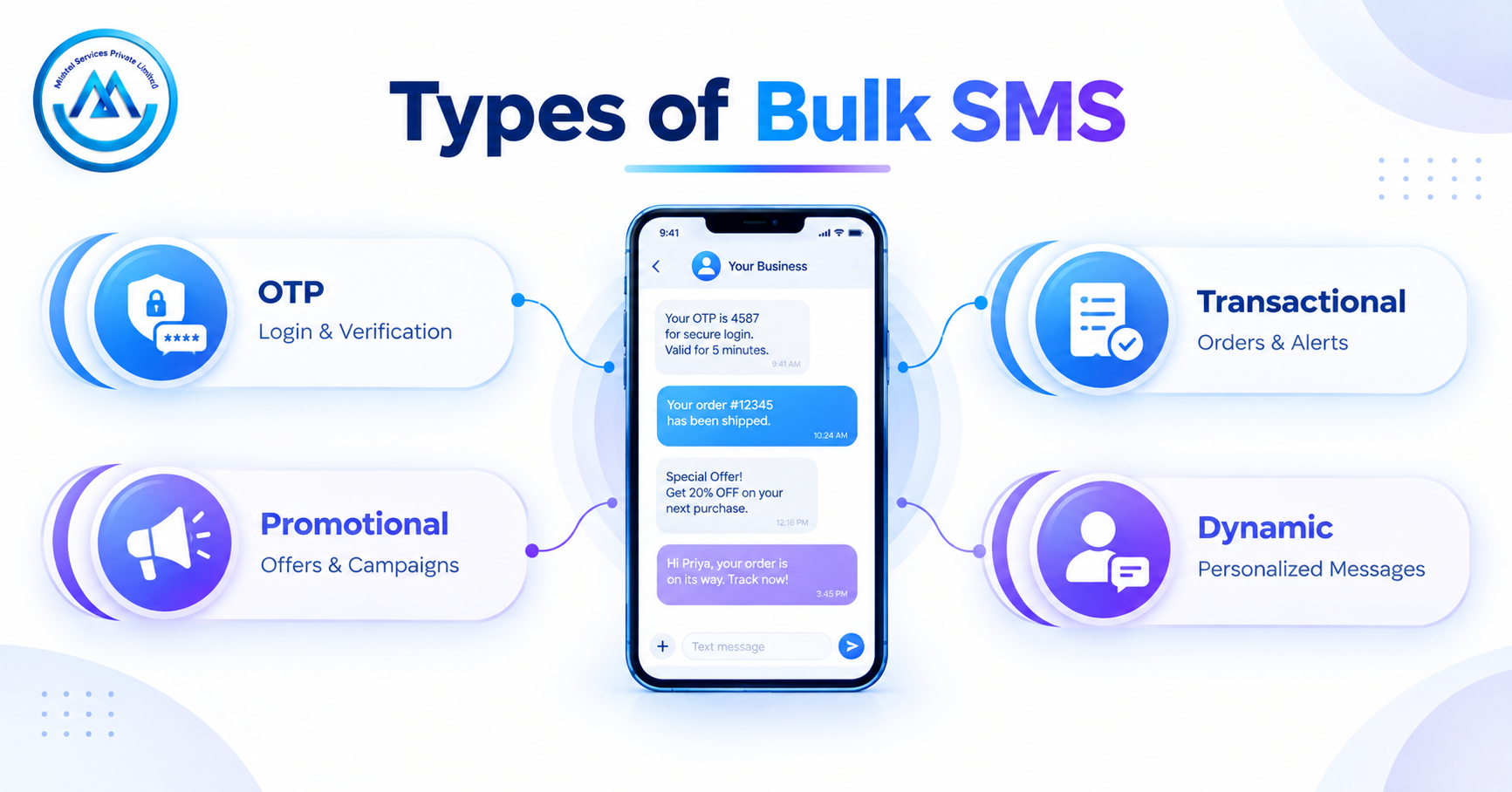
The type of SMS depends on why you are sending it. OTP, transactional and promotional messages have different purposes.
OTP SMS Service
An OTP SMS Service sends a one-time password to a user's phone. The code is valid for a short time and can be used only once.
Common uses include:
Login verification
Account sign-up verification
Password reset
Payment authentication
Secure access to apps and portals
Speed matters most here. A late OTP can make a customer leave the page.
Transactional SMS Service
A Transactional SMS Service sends messages about something the customer has done or an account they hold. These messages give useful information.
Common examples include:
Order confirmation
Payment received alerts
Account balance updates
Service notifications
Appointment updates
These messages help customers stay informed and reduce support calls.
Promotional SMS Service
A Promotional SMS Service is used to market your products or services. The goal is to get the customer's attention and drive action.
Common examples include:
Offers and discounts
Product launches
Event invitations
Festival sale campaigns
Keep promotional messages separate from service messages. Also follow the consent and preference rules that apply in India.
Advanced Bulk SMS Services and Features
Basic sending is only the start. Advanced options help you personalize, track and reach more people.
Dynamic SMS Service
A Dynamic SMS Service sends messages with content that changes for each customer. The platform pulls details such as name, bill amount or due date from your data.
For example, a school can send each parent the child's name and fee due date in one campaign. Each parent gets a message that feels personal.
Smart Link SMS Service
A Smart Link SMS Service adds a trackable link to your message. When a customer taps the link, the platform records the click.
This helps you measure:
How many people clicked
Which campaign got more response
How customers engage with a page or offer
Smart links also keep long web addresses short and neat in a text message.
Short Code SMS Service
A Short Code SMS Service uses a short number, instead of a full-length number, to send and receive messages. These numbers are easy to remember.
Businesses use short codes for things like:
Campaign responses
Polls and contests
Customer requests by text
Availability and setup depend on the provider and telecom rules.
Long Code SMS Service
A Long Code SMS Service uses a full-length number, like a regular mobile number. Customers may find it more familiar and personal.
Here is a simple way to see the difference. A short code is a brief number for large campaigns and quick replies. A long code is a full-length number that feels closer to a normal phone number. Ask your provider which option fits your use case.
International SMS Service
An International SMS Service lets you send messages to customers in other countries. It suits companies with overseas clients, travelers or global user bases.
Rules and costs differ by country. Ask your provider about coverage and message format before you launch a global campaign.
Flash SMS Service
A Flash SMS Service shows the message on the phone screen right away, without the user opening the inbox. It suits time-sensitive alerts.
Depending on the phone, a flash message may not be saved in the inbox. Use it only for short, urgent notes.
Key Features of a Bulk SMS Platform
Not every provider offers every feature. Check your plan before you sign up. Here are the features that matter most:
Feature |
Why It Matters |
High-volume sending |
Lets you reach large lists quickly |
SMS API |
Connects your apps and systems to the platform |
Sender ID management |
Keeps your brand name visible on messages |
Message templates |
Saves time and keeps messages consistent |
Personalization |
Adds customer details to each message |
DLT compliance support |
Helps you follow telecom requirements |
Delivery reports |
Shows delivered, failed and pending messages |
Real-time tracking |
Lets you watch campaign progress |
Contact management |
Keeps lists organized and clean |
Scheduling |
Sends messages at the right time |
Campaign management |
Tracks results across campaigns |
Scalability |
Handles growth in message volume |
Multi-language messaging |
Reaches people in their own language, where supported |
Analytics |
Helps you learn what works |
Benefits of Bulk SMS for Businesses
Direct Customer Communication
SMS goes straight to the customer's phone. There is no feed or inbox to compete with. A bank can send a security alert and know it will show up on the phone screen.
Fast Message Delivery
Bulk platforms send large volumes quickly. This is useful for time-sensitive messages such as OTPs or delivery updates.
Useful for OTP and Authentication
SMS works on any mobile phone with a network signal. This makes OTP delivery practical for apps, wallets and online portals across India.
Supports Marketing Campaigns
You can announce a sale or a new product to a targeted list. A retailer can send a festive offer to customers in one city, and a different offer to customers in another.
Improves Customer Updates
Timely updates keep customers calm. A clinic that sends appointment reminders can reduce missed visits and phone calls.
Easy Automation
You can set messages to send when something happens. For example, when an order ships, the customer gets an update without anyone pressing a button.
API-Based Integration
An API lets developers connect SMS to websites, apps and internal tools. Messages then flow from your existing systems with no manual work.
Scalable Communication
As your customer base grows, you can send more messages without hiring more people. The same platform can serve 1,000 customers or many more.
Bulk SMS Use Cases
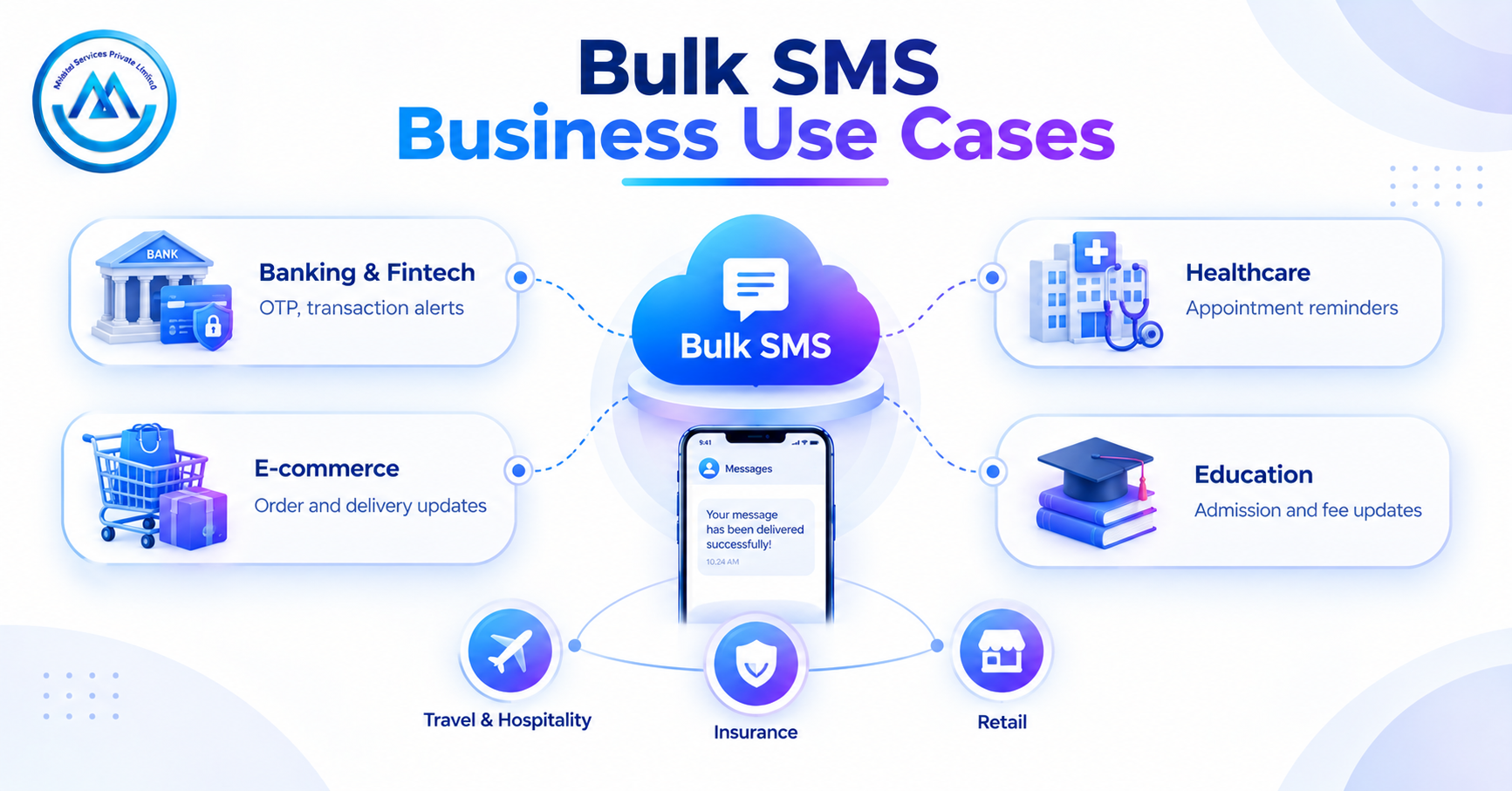
Banking and Fintech
Banks and fintech apps rely on SMS for trust and security. Typical messages include:
OTPs for login and payments
Transaction alerts
Payment reminders
Security notifications
Healthcare
Hospitals, clinics and labs use SMS to stay in touch with patients. Typical messages include:
Appointment reminders
Test result updates
Follow-up notifications
Health check-up reminders
E-commerce
Online stores use SMS to keep buyers informed at every step. Typical messages include:
Order confirmation
Shipping updates
Delivery notifications
Return and refund alerts
Education
Schools, colleges and coaching institutes use SMS to reach students and parents. Typical messages include:
Admission updates
Exam notifications
Fee reminders
Class schedule changes
Travel and Hospitality
Travel companies and hotels use SMS for quick, clear updates. Typical messages include:
Booking confirmations
Flight or train alerts
Check-in details
Itinerary changes
Insurance
Insurers use SMS to keep policyholders informed. Typical messages include:
Policy updates
Renewal reminders
Claim status alerts
Retail
Retail brands use SMS to bring customers back. Typical messages include:
Offers and promotions
Loyalty program updates
Order updates
Store event alerts
Bulk SMS for Marketing vs Transactional Communication
Marketing and service messages have different goals. Treat them as separate streams.
Factor |
Promotional SMS |
Transactional SMS |
Main purpose |
Marketing |
Customer and service communication |
Typical use |
Offers and campaigns |
Alerts and updates |
Content |
Promotional |
Service-related |
Example |
Discount offer |
Order confirmation |
Audience |
Target customers and leads |
Existing users and customers |
Do not mix the two. A message that mixes an offer into a service update can create confusion and may not follow the rules. Check with your provider if you are unsure which category your message falls into.
Bulk SMS and DLT Compliance in India
DLT stands for Distributed Ledger Technology. In India, telecom operators use a DLT-based system to manage commercial SMS. Its purpose is to control unwanted messages and keep senders accountable.
Here is what businesses should understand:
Sender information: Businesses register their details and sender IDs on the DLT platform.
Message templates: Message formats are registered and approved before use. A message that does not match an approved template may fail.
Consent and preferences: Where required, businesses should respect customer consent and communication preferences.
Compliant setup: Using a provider that supports the compliance process reduces delivery problems.
Rules and processes can change. Before you launch, check the latest guidance from TRAI and your telecom operators, and ask your provider what support they offer.
SMS API Integration
An SMS API is a bridge between your software and the messaging platform. Your app sends a request. The platform turns it into an SMS and delivers it. You do not need to log in and send manually.
Here is where businesses use it:
Website integration: Send a confirmation after a form is submitted.
Mobile app integration: Send an OTP when a user logs in.
CRM integration: Send follow-ups when a lead status changes.
ERP integration: Send invoice or dispatch alerts from back-office systems.
Automated OTP: Trigger a code the moment a user asks for one.
Automated transactional alerts: Send payment and order updates as events happen.
API-triggered messages: Start a message from any event in your system.
The workflow looks like this:
Customer action → Business application → SMS API → Messaging platform → Customer receives SMS
Developers should look for clear documentation, test options and error messages that are easy to understand.
How Much Does Bulk SMS Cost in India?
There is no fixed price that suits everyone. The cost depends on how you use the service. Common factors include:
Message volume
SMS type
Promotional or transactional use
Sender configuration
Destination
API requirements
International messaging
Extra platform features
Do not choose only by the lowest price per SMS. A cheap plan with poor delivery costs more in lost messages. Compare these points:
Per-SMS pricing
Delivery quality
Platform features
API support
Reporting
Customer support
Compliance support
Ask for a written quote that lists what is included. Also ask how extra volume is charged.
Bulk SMS vs WhatsApp vs Email
Each channel has its own strengths. The best choice depends on your goal.
Feature |
Bulk SMS |
||
Mobile reach |
High |
High |
Medium |
Internet required |
No |
Yes |
Yes |
OTP use |
Common |
Depends on setup |
Possible |
Rich media |
Limited |
Strong |
Strong |
High-volume messaging |
Yes |
Policy-dependent |
Yes |
API integration |
Yes |
Yes |
Yes |
Marketing use |
Yes |
Yes |
Yes |
[Image 5: Bulk SMS vs WhatsApp vs Email. Minimal text]
No channel is better in every case. SMS suits short, urgent messages such as OTPs and alerts. WhatsApp suits rich content and conversations. Email suits detailed updates and documents.
Many businesses use more than one channel. If a customer does not reply to a message, a follow-up call can help. A Bulk Voice Service can send recorded voice messages to many people at once, which works well for reminders and announcements.
Using Bulk SMS With Voice and Support Channels
SMS works well on its own. It works even better when paired with calls and support tools.
A customer who gets an SMS may want to talk to someone. Adding a Toll-Free Number Service lets them call your business for free. You can print the number in your message so help is one tap away.
You can also use an IVR Service to handle those calls. The IVR plays a menu so callers reach the right team, such as billing or support. This keeps the experience smooth after a text.
For sales, a Click to Call Service helps when a lead clicks a link from your SMS and lands on your website. They can start a call to your team with one click, while their interest is high.
For larger teams, a Cloud Call Center Service lets agents manage customer calls from one system. SMS can send the alert, and the call center can handle the conversation.
How to Choose a Bulk SMS Service Provider in India
Picking the right partner matters as much as writing the message. Use this checklist when you compare options.
Delivery reliability: Ask how the provider handles delivery and failed messages.
SMS API availability: Check that the API is well documented and easy to test.
DLT and compliance support: Confirm they can guide you through setup.
Sender ID management: See how you can add and manage sender IDs.
Delivery reports: Look for clear reports for every campaign.
Real-time tracking: Check whether you can watch progress as messages go out.
Scalability: Make sure the platform can handle your future volume.
Dashboard usability: The dashboard should be easy for non-technical staff.
Customer support: Find out how and when you can reach the support team.
Pricing transparency: Know what you pay for and what costs extra.
Security: Ask how your contact data and messages are protected.
Integration options: Check for CRM, ERP and app support.
Business use-case support: Confirm they support OTP, transactional and promotional needs.
Run a small test campaign before you commit. It shows you real delivery speed, report quality and support response.
Why Choose Mishtel for Bulk SMS?
Businesses need a partner that supports messaging as they grow. Mishtel offers business communication services, including messaging and voice, so teams can manage more channels with one provider.
For messaging, Mishtel's Bulk SMS Service page describes high-volume sending, DLT-compliant messaging, sender management, API integration, delivery tracking and scalable workflows.
Here is what you can look at when you evaluate Mishtel:
Bulk SMS for large campaigns
OTP SMS for login and verification
Transactional SMS for service updates
Promotional SMS for marketing
SMS API for automated messages
DLT-focused messaging
Delivery tracking
Scalable messaging
Multi-channel communication with voice services
A business can start with one use case, such as OTP or order alerts, and add more as needs grow. Ask the team to walk you through the setup for your industry.
Frequently Asked Questions About Bulk SMS
1. What is Bulk SMS?
Bulk SMS is a way to send a large number of text messages at the same time. Businesses use a web dashboard or an API to send OTPs, alerts, reminders and offers. It saves time because teams do not send each message by hand, and it gives delivery reports for each campaign.
2. How does Bulk SMS work?
A business adds contacts, writes the message, picks the SMS type and sets the sender details. The platform then sends the message through telecom networks to each phone. After sending, the business can check delivery reports to see which messages were delivered, failed or are still pending.
3. What is a Bulk SMS Service Provider?
A bulk SMS service provider offers the platform and connections needed to send messages at scale. This usually includes a dashboard, an SMS API, sender ID support, templates and reports. Some providers also help with DLT setup and offer support when messages fail or need review.
4. What is the difference between OTP and Transactional SMS?
An OTP SMS carries a one-time code for login, verification or payment. A transactional SMS shares service information such as order confirmations, account alerts or appointment updates. Both are tied to a customer's action or account, but an OTP is time-sensitive and used only once.
5. What is Promotional SMS?
Promotional SMS is used to market products or services. Examples include discounts, sale alerts, product launches and event invites. These messages aim to attract interest, so they are treated differently from service messages. Businesses should follow the consent and preference rules that apply in India.
6. What is DLT in SMS?
DLT stands for Distributed Ledger Technology. In India, it is the system telecom operators use to manage commercial SMS. Businesses register their details, sender IDs and message templates on it. This helps control unwanted messages. Check current TRAI and operator rules before you start sending.
7. Can Bulk SMS be integrated with an API?
Yes. An SMS API connects your website, app, CRM or ERP to the messaging platform. When a customer takes an action, such as placing an order, your system sends a request and the platform sends the SMS. Developers usually get documentation and test options to set this up.
8. Can businesses personalize Bulk SMS?
Yes. Businesses can add variables such as name, order number, amount or date to a template. The platform fills these in for each customer when the message goes out. Personalized messages feel more relevant and suit alerts and reminders. Templates must follow the approved format.
9. How much does Bulk SMS cost in India?
There is no single price. Cost depends on message volume, SMS type, sender setup, destination, API needs and extra features. Compare the price per SMS along with delivery quality, reports, support and compliance help. Ask providers for a written quote that lists what is included.
10. How do I choose a Bulk SMS provider?
Check delivery reliability, DLT support, API options, sender ID management, reports, security, support and pricing clarity. Run a small test campaign before you commit. Also confirm the platform can handle your future message volume and supports the SMS types you need.
Final Thoughts
Timely messages build trust. Whether you send an OTP, an order update or a sale alert, the right message at the right time helps your customer and your business. A good bulk SMS service provider in India gives you speed, compliance support and clear reports in one place.
Start by listing your message types, expected volume and integration needs. Then compare providers using the checklist above. If you want to see how a Bulk SMS Service can fit your workflow, you can request a demo or a quote.
Ready to plan your setup? Contact the team at Mishtel to discuss your SMS and business communication needs.