Calendar Printing for 2027: How to Avoid Blurry Photos, Awkward Crops and Ordering Mistakes
-
- Published Updated
- 63 views
A photo calendar sounds like a simple gift until you start making one. Which pictures should you choose? Will a family portrait fit without cutting someone out? Will the dates be readable? And should you order a desk calendar or a wall calendar?
Getting these decisions right helps you create something the recipient will enjoy using throughout the year. Here’s a practical guide to planning your personalised calendar before sending it for printing.
Start With Where the Calendar Will Be Used
Before choosing photographs, think about where the calendar will go.
A desk calendar can suit a home office, workplace or bedside table. A wall calendar may work better in a kitchen or shared family space, where several people need to check dates.
If you prefer seeing the year together, consider a poster calendar. A magnetic calendar offers another option for a fridge or suitable metal surface.
Check the dimensions before ordering. A calendar should fit its intended space and have dates that are comfortable to read from the distance at which it will be used.
Choose Original Photos for Clearer Prints
One common disappointment is a photograph that looks clear on a phone but appears blurry in print.
Whenever possible, use the original image from your camera or phone. Screenshots and compressed copies shared through messaging apps may have less detail.
Cropping also matters. If you remove most of a photograph and enlarge the remaining section, the result may look softer.
Review any image-quality warnings in the design tool. If a picture is unsuitable for a large photo space, try a smaller placement or replace it with a clearer image.
Match Your Photos to the Layout
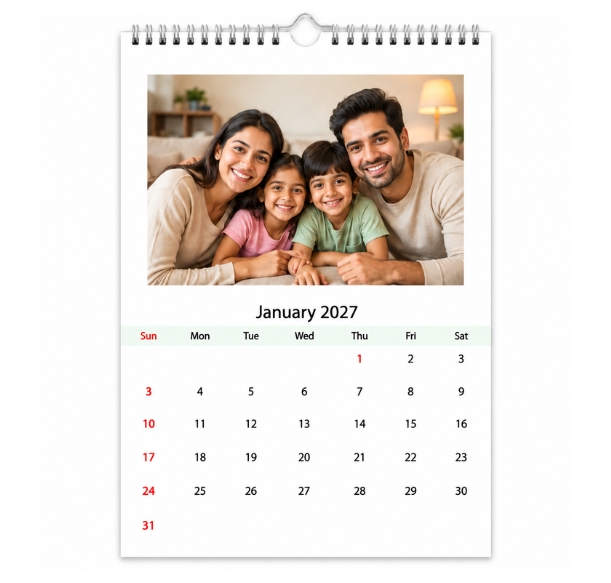
A wide group photograph may not fit comfortably inside a tall or square photo space. The layout may crop people standing at the edges.
Choose templates that suit the shape of your pictures. Wider layouts are often easier for group photos and landscapes, while taller spaces can suit individual portraits.
Check every image after placing it. Pay attention to faces, heads and important background details. Leave some space around the subject rather than positioning it directly against the edge.
A different layout is usually a better choice than forcing a favourite photograph into an unsuitable frame.
Build a Theme That Feels Personal
You don’t need twelve professionally photographed moments to make a meaningful calendar. Everyday pictures can be just as enjoyable.
A family calendar might combine birthdays, outings and relaxed moments at home. A travel calendar could feature a different destination each month. For grandparents, photographs of their grandchildren can make the calendar especially personal.
Couples can include shared adventures and anniversaries. Businesses can use team photographs, workplace events or images connected to their brand.
A theme helps the calendar feel connected, but keep some variety. Mix group pictures with smaller moments and choose layouts that give each photograph room to be seen.
Keep the Dates Easy to Read
Photos attract attention, but the calendar still needs to work as a calendar.
Check the size and contrast of the date text. Decorative fonts may suit a heading, but simple lettering is usually easier to read for dates and short notes.
If you add birthdays or anniversaries, keep the messages brief. Too much text can make a small calendar crowded.
For corporate calendars, balance the logo with the photographs and date area. Branding should be clear without overwhelming the useful parts of the design.
Review Colours Before Printing
Screen brightness and filters can change how you judge a photograph. An image that looks bright on your display may appear darker when printed.
Use well-lit pictures and avoid excessive editing. Check skin tones and shadow details, especially in indoor photographs.
For business orders where brand colours matter, ask about samples or proofing options before approving a large quantity.
Check the Year, Names and Important Dates
Before ordering a 2027 calendar, review the year throughout the design—not just on the cover.
Check any personalised dates against a reliable calendar. Confirm the spelling of names, captions and business details. If the template includes holidays, make sure they suit the recipient’s country or region.
Review every month separately. Ask someone else to check the design too; they may notice a repeated photo or spelling mistake you have missed.
Compare Calendar Options Before Ordering
Different formats suit different needs, so compare the available styles before committing to a design. For example, Photojaanic’s personalised calendar printing options include desk, wall, poster, wall hanging and magnetic calendars, giving you several ways to display your photographs.
Alongside the format, check the dimensions, final price and delivery estimate. Confirm the quantity and address before paying.
For bulk orders, ask for a detailed quote and clarify the design approval process. Include enough time for reviewing artwork, printing, delivery and distributing the calendars.
Make the Calendar Around the Recipient
The best starting point is the person who will use it. Think about their space, the photographs they enjoy and the dates they want to remember.
Choose clear images, keep the layout readable and review each page before ordering. These small decisions can turn a collection of photographs into a thoughtful calendar that earns its place on a desk or wall.