What Makes Custom Web App Development Suitable for Workflow-Heavy Enterprise Applications?
-

- Published Updated
- 3,200 views
Enterprise workflows are rarely as simple as “click a button and move on.” A single business process may involve multiple departments, approval levels, data sources, compliance rules, and dozens of small decisions. Add a growing workforce and thousands of transactions, and suddenly that innocent-looking workflow becomes a maze.
This is where custom web app development becomes particularly valuable.
We build applications around the way a business actually operates rather than forcing teams to reshape their processes around rigid software. For workflow-heavy enterprises, this difference matters. The application needs to understand who does what, when an action should happen, which approval comes next, and what should happen when something goes off-script.
In other words, the software should support the workflow—not become another workflow employees have to manage.
What Are Workflow-Heavy Enterprise Applications?
Workflow-heavy enterprise applications are systems designed to manage business processes involving multiple steps, users, departments, rules, and decisions.
For example, a procurement workflow might look simple from the outside:
Request → Review → Approval → Purchase → Delivery → Payment
Behind those six words, however, there may be dozens of conditions.
A purchase above a specific amount may require senior management approval. A request from one department may follow a different route from another. Inventory availability may influence the decision. Finance may need to validate the budget before procurement proceeds.
This is where enterprise applications become more than simple data-entry tools.
Common workflow-heavy applications include:
- Healthcare management platforms
- Financial processing systems
- Manufacturing applications
- Logistics management platforms
- Real estate systems
- HR and employee management software
- Procurement platforms
- Insurance applications
- Enterprise CRM and ERP solutions
The more interconnected these processes become, the more important flexibility becomes.
Why Generic Software Often Falls Short
Off-the-shelf software can be useful—and there is absolutely nothing wrong with using it when it fits the requirement.
The problem begins when a business tries to squeeze a highly specialized workflow into software designed for a completely different operating model.
We have seen businesses compensate for software limitations with spreadsheets, emails, manual approvals, and creative workarounds. At some point, the “temporary solution” becomes so permanent that nobody remembers why it started in the first place.
Generic software typically provides predefined workflows and configuration options. But enterprise processes can be highly specific.
For example, a standard approval system may support:
Employee → Manager → Finance
But an enterprise might require:
Employee → Department Manager → Compliance → Regional Manager → Finance → Executive Approval
And that is before exceptions enter the picture.
Custom applications allow these workflows to be designed around the organization's actual requirements.
How Custom Web App Development Fits Complex Workflows
The biggest advantage of a custom application is simple: the software can be designed around the business process.
During development, we can map how work moves through an organization—from the initial request to the final outcome.
This can include:
- Workflow stages
- User responsibilities
- Approval rules
- Business conditions
- Notifications
- Escalations
- Exceptions
- Integrations
- Reporting requirements
Instead of asking employees to learn an application that dictates how work should happen, the application can be designed to reflect the established business process.
That distinction becomes increasingly important as enterprise operations become more complicated.
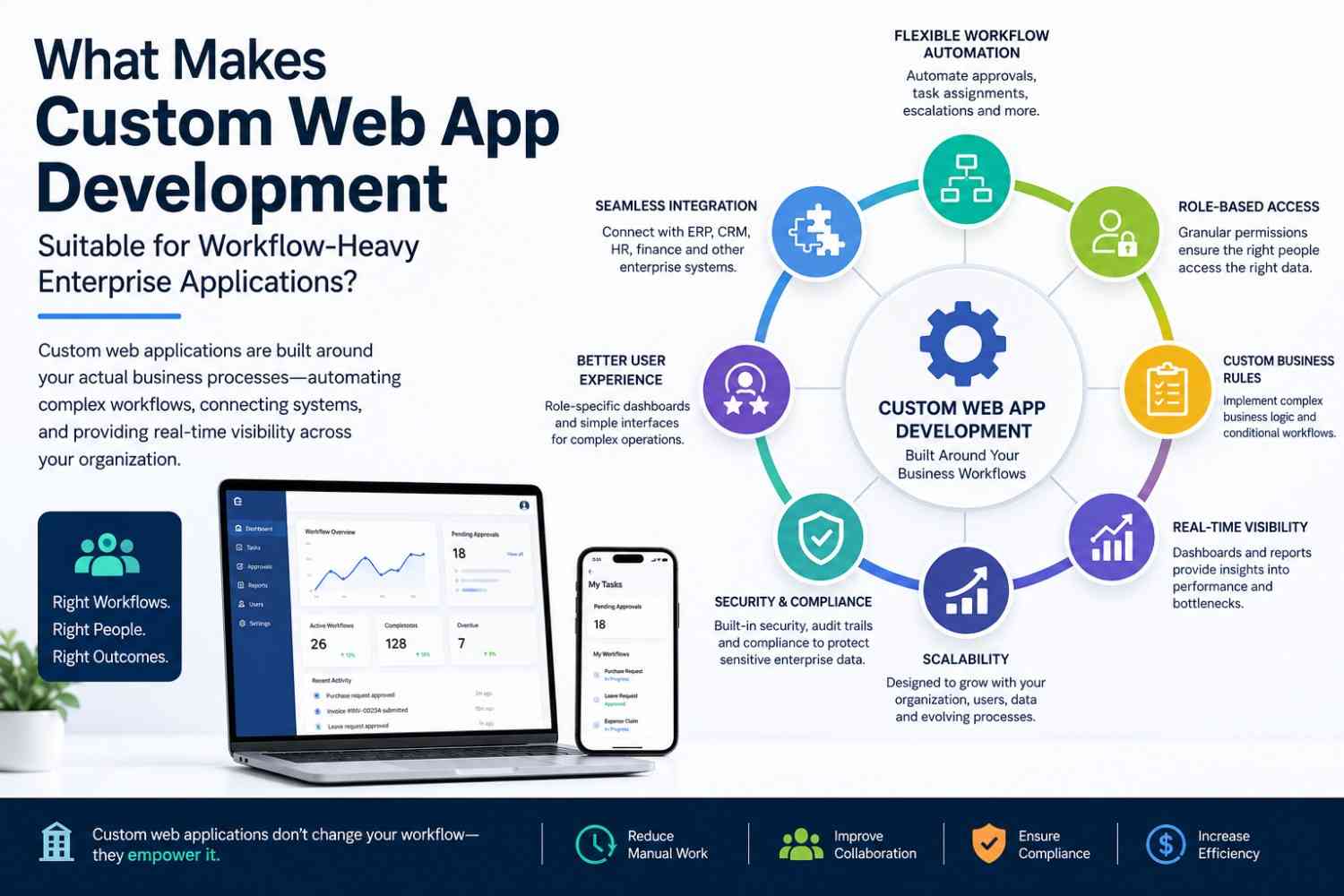
Flexible Workflow Automation
Manual workflows create friction.
Employees send emails. Managers wait for approvals. Someone forgets to follow up. Another person checks a spreadsheet. Then somebody asks, “Where is that request now?”
Not exactly the future of enterprise productivity.
Custom web applications can automate many of these repetitive activities.
For example, an application can automatically:
- Assign tasks to the appropriate employee
- Route requests to the correct approver
- Send notifications
- Escalate overdue approvals
- Change workflow status
- Trigger follow-up actions
- Generate reports
- Record workflow activities
This reduces the amount of administrative coordination required from employees.
More importantly, automation creates consistency. The workflow follows predefined rules instead of depending entirely on someone remembering what needs to happen next.
Role-Based Access and Permission Management
Workflow-heavy applications often involve sensitive information and different levels of authority.
An employee may create a request but should not approve it. A department manager may approve requests within a certain financial limit. A finance administrator may access payment information but not confidential HR records.
Custom applications can implement these permissions according to organizational requirements.
Role-based access can determine:
- What users can see
- What they can create
- What they can edit
- Which actions they can perform
- Which approvals they can provide
- Which reports they can access
This creates a more controlled environment while keeping the user experience relevant to each role.
A finance manager does not need to see every operational feature in the system. Showing everything to everyone is rarely a sign of good enterprise UX.
Custom Business Rules and Decision Logic
Enterprise workflows are often governed by business rules.
For example:
- Orders above $50,000 require executive approval.
- Certain products require compliance review.
- High-priority service requests must be escalated within two hours.
- International transactions require additional verification.
- Certain employee requests require HR approval.
These rules can be incorporated into the application.
A custom system can evaluate conditions and determine what should happen next.
This is particularly valuable when workflows contain multiple paths rather than one fixed sequence.
For example:
Request → Check Amount →
- Under threshold → Manager approval
- Above threshold → Senior approval
- Restricted category → Compliance review
- Emergency request → Priority workflow
Instead of relying on employees to remember every variation, the application can manage the decision logic.
Seamless Integration With Enterprise Systems
Most large organizations do not operate with a single application.
They may already use an ERP, CRM, accounting platform, HR system, payment gateway, analytics platform, or data warehouse.
A workflow application that cannot communicate with these systems can quickly become another information silo.
Custom development can support API-based integrations that allow systems to exchange information.
For example, a custom procurement application could:
- Receive a purchase request.
- Check inventory through an ERP.
- Validate customer or vendor information through another system.
- Send the request through an internal approval workflow.
- Forward approved information to finance.
- Update the central system after payment.
The result is a connected workflow rather than a collection of disconnected applications.
Experienced web developers can design these integrations around the organization's technical environment and data requirements.
Centralized Data and Real-Time Visibility
Workflow problems are often visibility problems.
If information is scattered across emails, spreadsheets, documents, and multiple applications, managers have difficulty understanding what is actually happening.
Custom web applications can provide centralized dashboards where teams can monitor:
- Pending tasks
- Completed workflows
- Delayed approvals
- Department performance
- Transaction status
- Exceptions
- Operational metrics
Instead of asking several employees for updates, managers can access current information from the system.
This improves decision-making and helps identify bottlenecks before they become larger operational problems.
Scalability for Growing Enterprises
Enterprise software needs to survive growth.
An application that performs well for 100 users may struggle when thousands of employees begin using it. Similarly, workflows that were simple when a company was small can become significantly more complex after expansion.
Custom applications can be designed with scalability in mind.
This may involve:
- Modular architecture
- Optimized databases
- Scalable infrastructure
- Efficient APIs
- Caching strategies
- Load management
- Background processing
The objective is not simply to build something that works today.
The better objective is to build something that can evolve tomorrow.
New departments may be added. New approval rules may appear. Additional integrations may become necessary. The application should have enough architectural flexibility to accommodate these changes.
Better User Experience for Complex Operations
Complex backend processes do not necessarily require complicated interfaces.
This is one of the most important principles in enterprise application design.
A warehouse employee may only need a task list and inventory information. A manager may need approval dashboards. An administrator may require system configuration tools.
Each user should be able to access the information and actions relevant to their role.
Custom applications allow organizations to design:
- Role-specific dashboards
- Personalized menus
- Simplified workflows
- Task-focused screens
- Contextual notifications
- Responsive interfaces
The complexity can stay behind the scenes while the interface remains straightforward.
That is usually a much better arrangement than presenting employees with 47 buttons and hoping they figure it out.
Workflow Tracking, Audit Trails, and Accountability
Enterprise workflows often require accountability.
Organizations need to know:
- Who performed an action?
- When did it happen?
- What information changed?
- Who approved the request?
- Why was it rejected?
- How long did the process take?
Custom applications can maintain detailed audit trails.
Every significant workflow event can be recorded, creating a history of activity.
This can support compliance requirements, internal investigations, operational analysis, and general accountability.
It also helps managers understand where workflows are slowing down.
If approvals consistently remain pending for three days at the same stage, the problem is no longer a mystery. The data can point directly toward the bottleneck.
Data Security and Enterprise Control
Workflow-heavy applications often process sensitive business information, making security a fundamental consideration.
A custom application can incorporate security requirements throughout its architecture.
Important areas include:
- Authentication
- Authorization
- Role-based permissions
- Secure API communication
- Data encryption
- Activity monitoring
- Backup strategies
- Session management
- Security testing
Custom development does not automatically make an application secure. Security still requires proper architecture, implementation, testing, and ongoing maintenance.
The advantage is that security controls can be designed around the application's actual data and workflow requirements rather than being treated as an afterthought.
Why Web-Based Applications Work Well for Enterprise Teams
Web applications offer another practical advantage: accessibility.
Employees can generally access a browser-based enterprise application without installing the software separately on every machine.
Centralized deployment also makes updates easier to manage.
When improvements are released, the application can be updated centrally rather than requiring every employee to install a new version.
This can be particularly useful for organizations with:
- Multiple offices
- Remote employees
- Distributed teams
- Field workers
- Regional operations
- Large internal user bases
A properly designed web application can therefore provide both centralized control and broad accessibility.
Custom Development vs. Off-the-Shelf Enterprise Software
The choice between custom and off-the-shelf software should not be based on fashion.
Custom development is not automatically better.
If an existing product already handles the organization's requirements effectively, purchasing and configuring it may be the smarter decision.
Custom development becomes more compelling when the business has requirements such as:
| Requirement | Custom Application |
|---|---|
| Unique workflows | Highly flexible |
| Complex business rules | Can be built specifically |
| Specialized integrations | Designed around requirements |
| Role-specific interfaces | Fully customizable |
| Frequent process changes | Easier to adapt |
| Proprietary processes | Can support unique operations |
| Long-term scalability | Architecture can be planned accordingly |
The real question is not “Which option is more modern?”
The better question is:
Which option fits the way the business actually operates?
When Should an Enterprise Consider a Custom Web Application?
Several warning signs suggest that standard software may no longer be enough.
A business should consider custom development when:
- Employees depend heavily on spreadsheets.
- Teams repeatedly exchange information through email.
- Approvals are frequently delayed.
- Multiple systems contain disconnected information.
- Employees use manual workarounds.
- Reporting requires significant manual effort.
- Existing software cannot support unique business rules.
- Integrations are difficult or unreliable.
- Workflow changes require expensive customization.
- Management lacks real-time operational visibility.
When several of these problems appear together, the issue may not be employee productivity.
The software itself may be part of the problem.
How a Custom Web Application Development Company Approaches Enterprise Workflows
A successful enterprise application starts long before development begins.
The first step is understanding the workflow.
A typical approach includes:
1. Workflow Discovery
We identify how work currently moves between employees, departments, and systems.
2. Requirement Analysis
Business requirements, technical requirements, security expectations, and integration needs are documented.
3. Process Mapping
The complete workflow is visualized—including normal paths and exceptions.
4. UX/UI Planning
Interfaces are designed around different user roles and responsibilities.
5. Architecture Design
The technical architecture is planned for security, performance, integrations, and scalability.
6. Development
Frontend and backend components are developed according to the approved architecture.
7. Integration
APIs and external systems are connected to create a unified workflow.
8. Testing
Functional, security, performance, integration, and user acceptance testing are performed.
9. Deployment
The application is introduced into the production environment.
10. Continuous Improvement
Enterprise workflows change. The application needs to evolve with them.
This approach helps ensure that the final product solves a business problem rather than simply delivering another piece of software.
Common Challenges to Consider
Custom development has significant advantages, but it is not a magic wand.
There are challenges.
The initial investment can be higher than purchasing a standard product. Requirements can also be complex, especially when multiple departments have different expectations.
Other challenges may include:
- Data migration
- Legacy integrations
- Change management
- Employee training
- Requirement changes
- Testing complexity
- Long-term maintenance
Planning can reduce many of these risks.
The most important step is to avoid starting development before the workflow itself is properly understood.
After all, building the wrong application very efficiently is still building the wrong application.
Key Benefits at a Glance
For workflow-heavy enterprise environments, custom web applications can provide:
- Workflow flexibility — Processes can reflect actual business operations.
- Automation — Repetitive tasks can be handled automatically.
- Integration — Existing enterprise systems can communicate through APIs.
- Visibility — Managers can monitor workflow status and bottlenecks.
- Scalability — Applications can evolve as organizations grow.
- Security — Access controls can be designed around business requirements.
- Better UX — Users can receive interfaces relevant to their roles.
- Accountability — Audit trails provide visibility into workflow activities.
- Operational efficiency — Manual coordination can be reduced.
These benefits become especially valuable when business processes are too specialized for generic software.
Conclusion
Workflow-heavy enterprises do not need more software simply for the sake of having more software. They need software that understands how work actually moves through the organization.
That is where custom web application development can make a meaningful difference.
From automated approvals and role-based access to enterprise integrations, real-time visibility, scalability, and detailed audit trails, a well-designed application can turn complicated workflows into structured digital processes.
The goal is not to make every business process look impressive on a dashboard. The goal is to make the work easier, faster, more visible, and more manageable.
And if employees still need three spreadsheets, twelve email threads, and a mysterious “final_final_v3.xlsx” file to complete one workflow, perhaps the workflow—and the software supporting it—deserves another look.
For enterprises where workflows are genuinely complex, building around those workflows can be far more practical than continually working around software limitations.
Frequently Asked Questions
What is a workflow-heavy enterprise application?
A workflow-heavy enterprise application manages complex business processes involving multiple users, departments, approval stages, business rules, data sources, and automated actions.
Why is custom web app development suitable for complex workflows?
Custom web applications can be designed around an organization's specific processes, business rules, approval structures, integrations, and user roles instead of forcing the business to follow rigid predefined workflows.
Can custom web applications automate enterprise approvals?
Yes. They can automate approval routing, notifications, escalation rules, status changes, and conditional approval processes based on predefined business requirements.
How do custom web applications integrate with ERP and CRM systems?
They can connect with ERP, CRM, accounting, HR, and other systems through APIs and integration services, allowing relevant information to move between platforms.
Are custom web applications scalable for large enterprises?
Yes. Scalability can be considered during architecture and development through database optimization, modular design, scalable infrastructure, efficient APIs, and appropriate performance strategies.
How does custom web application development improve workflow visibility?
Custom applications can provide dashboards, reports, activity logs, real-time status information, and workflow analytics so managers can identify delays and bottlenecks more easily.
What role do web developers play in enterprise workflow applications?
Web developers handle areas such as frontend interfaces, backend logic, APIs, databases, integrations, security implementation, testing, performance optimization, and application maintenance.
Is custom web application development more expensive than off-the-shelf software?
The initial cost can be higher, but the long-term value may justify the investment when a business requires specialized workflows, integrations, scalability, or operational automation that standard software cannot provide effectively.
Related Articles