Gaming Monitor vs Regular Monitor: Which One Should You Choose?
-

- Published Updated
- 65 views
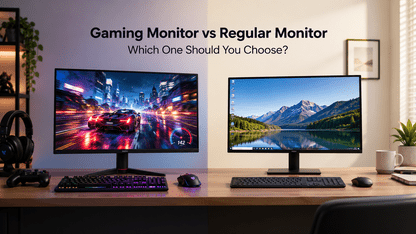
Choosing a monitor is not as simple as picking a screen that fits your desk. If you play games after work, attend online classes, or spend hours on office tasks, the right display can make a noticeable difference.
A gaming monitor is built to deliver smoother motion and faster responses, while a regular monitor focuses more on everyday activities such as browsing, documents, and video calls. But is spending extra on a gaming display worth it? That depends on how you use your computer.
What Is the Difference Between a Gaming Monitor and a Regular Monitor?
The biggest differences come down to refresh rate, response time, and features designed for gaming. A regular monitor can handle games, but a gaming monitor usually offers a more responsive experience, particularly in fast-paced titles.
| Feature | Gaming Monitor | Regular Monitor |
|---|---|---|
| Refresh rate | Often 144Hz, 165Hz or higher | Commonly 60Hz or 75Hz |
| Response time | Often 1ms to 5ms, depending on the model and measurement | Varies by model |
| Best use | Competitive and fast-paced gaming | Office work, browsing and entertainment |
| Adaptive sync | Common on gaming models | Available on some models |
| Price | Often higher for comparable specifications | Generally affordable for basic use |
These are typical differences, not fixed rules. Some regular monitors offer high refresh rates, while certain gaming monitors prioritise resolution or image quality over speed.
4 Key Differences You Should Know
1. Refresh Rate and Smoothness
Refresh rate measures how many times a screen updates per second, expressed in hertz (Hz). A 60Hz monitor refreshes 60 times per second, while a 144Hz gaming monitor can refresh up to 144 times per second.
The difference is easy to notice in fast-moving games. Camera movements, character animations, and quick turns can look smoother at higher refresh rates.
For everyday office work, 60Hz may be sufficient. If you play racing games, shooters, or competitive multiplayer titles, a 144Hz or 165Hz display is worth considering.
2. Response Time and Input Lag
Response time measures how quickly a pixel changes from one colour or shade to another. A lower response time can reduce visible ghosting, where moving objects appear to leave faint trails.
Input lag is different. It refers to the delay between an input, such as moving your mouse, and the corresponding action appearing on screen.
Gaming monitors often prioritise both responsive pixel transitions and low input lag. For spreadsheets, emails, and general browsing, these differences usually matter much less.
3. Resolution and Picture Quality
A monitor's resolution affects how sharp text, images, and game environments appear. Full HD (1920 × 1080) is a practical starting point for budget gaming, while QHD (2560 × 1440) provides more detail and workspace.
Your computer's graphics card matters here. Higher resolutions require more graphics processing power, especially when paired with high refresh rates.
When comparing monitors, consider panel type, brightness, contrast, and colour accuracy alongside resolution. A regular monitor with a good IPS panel can deliver excellent visuals for work and entertainment.
4. Price and Extra Features
Gaming monitors may cost more because of their higher refresh rates, adaptive sync support, gaming-focused settings, and faster pixel response.
Regular monitors are often more affordable for basic computing. However, prices overlap, so compare specifications rather than relying on the product category alone.
Before buying, check for:
- Adaptive sync: Helps reduce screen tearing when supported by your monitor and graphics card.
-
- Connectivity: HDMI and DisplayPort options should suit your PC or console.
-
- Ergonomics: Height adjustment and tilt can improve comfort during long sessions.
-
- Eye comfort: Flicker reduction and suitable brightness can help make extended use more comfortable.
Which Monitor Should You Choose?
The right choice depends on your priorities, not just the name printed on the box.
Choose a gaming monitor if you:
Play competitive or fast-paced games regularly.
Want smoother motion and quicker pixel transitions.
- Have a PC or console capable of taking advantage of higher refresh rates.
-
- Prefer gaming-focused features such as adaptive sync.
Choose a regular monitor if you:
Mainly use your computer for office work, studying, or browsing.
Watch videos and play games occasionally.
Want a straightforward display without paying extra for features you may not use.
What if you do both? A monitor with a 144Hz refresh rate, a good IPS panel, and a suitable resolution can be a practical middle ground for gaming, work, and entertainment.
FAQs
1. Is a gaming monitor better than a regular monitor?
A gaming monitor is generally better for fast-paced games because it often has a higher refresh rate and faster pixel response. A regular monitor can be the better value for everyday computing.
2. Can I play games on a regular monitor?
Yes. A regular monitor can run PC games as long as your computer supports the connection and resolution. You may simply miss out on the smoother motion offered by higher refresh rates.
3. Is a 144Hz gaming monitor worth buying?
A 144Hz gaming monitor can be worthwhile if you play regularly and your computer can produce enough frames per second. For basic office work or casual gaming, a 60Hz or 75Hz monitor may be sufficient.
4. Is a gaming monitor suitable for office work?
Yes. Gaming monitors work well for documents, browsing, video calls, and multitasking. A model with good text clarity, comfortable brightness, and ergonomic adjustments can serve as an everyday work display.
5. What should I check before buying a gaming monitor?
Start with refresh rate, resolution, response time, panel type, connectivity, and your graphics card's capabilities. Also consider screen size, desk space, warranty, and budget.
Final Verdict
A Frontech gaming monitor is the better choice if smooth gameplay and responsiveness are priorities. A regular monitor makes more sense if your main tasks involve work, study, and everyday entertainment.
If you need one screen for everything, compare models that balance refresh rate, resolution, image quality, and price. The best monitor is the one that fits your daily routine without making you pay for features you rarely use.