Google RCS Messaging Service for Business | Mishtel
-
- Published Updated
- 1,786 views
What Is Google RCS Messaging Service and How Can It Help Your Business?
Introduction
A customer gets a plain text message from a business. There are no pictures. There are no buttons. The customer has to open a browser and search for the website. This takes effort. Many customers just ignore the message instead.
Google RCS Messaging Service fixes this problem. RCS stands for Rich Communication Services. It turns a plain text message into something much better. You can add images, buttons, and a verified business name. In this guide, you will learn what RCS is. You will learn how it works. You will also see how different businesses use it every day.
What Is Google RCS Messaging Service?
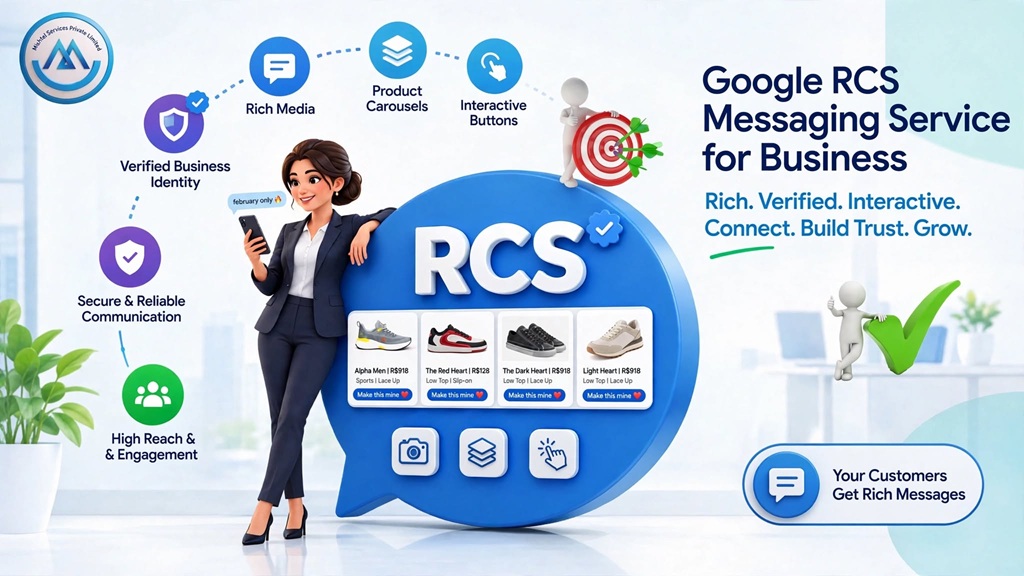
Google RCS Messaging Service is an upgrade to normal SMS. It works inside the Android messaging app. Instead of plain text, businesses can send images, buttons, and product carousels. Customers see all of this right inside their normal chat app.
Marketing teams use RCS. Banks use it. Support teams use it too. Why? Because RCS feels like a real message, not an ad. A verified name and logo show up on the message. Customers trust it more because of this.
The biggest difference is simple. A normal SMS only has text and a link. An RCS message can have a photo, a "Buy Now" button, and a map. All of this stays in one message. The customer never has to leave the chat app.
How Does Google RCS Messaging Service Work?
RCS messages travel through the customer's normal messaging app. They use mobile data or Wi-Fi, not the old SMS network. Here is a simple example of how it works.
The business sets up a sender profile. This includes a verified name, logo, and brand colors.
The business creates the message. They add images, buttons, or quick replies.
The system sends the message. It goes to customers with RCS-enabled Android phones.
The customer sees the rich message. It shows up inside their normal chat app.
The customer taps a button. They might confirm an order or ask a question.
The business checks the results. They can see delivery and read reports.
Some phones do not support RCS. In that case, the message turns into a normal SMS. This way, no customer is left without a message.
Key Features of Google RCS Messaging Service
Verified Sender Identity
Every RCS message shows the business name and logo. A small badge proves it is real. Customers know right away it is not spam.
Rich Media Support
Businesses can add photos, GIFs, and short videos. A clothing brand can show a real photo of a new item. This works better than just describing it in words.
Interactive Buttons
Buttons let customers reply with one tap. They might see "Track Order" or "Confirm Appointment." No typing needed.
Carousels for Multiple Options
A carousel shows several items in one message. Customers can scroll through them. This works well for showing a small product list.
Suggested Replies
RCS lets businesses add ready-made replies. Customers can pick one instead of typing. This makes simple replies faster.
Read Receipts and Typing Indicators
Businesses can see when a message is delivered. They can see when it is read too. This works like the chat apps people already use.
Location Sharing
A message can show a live map. This works well for store locations or delivery tracking.
Use Cases for Google RCS Messaging Service
E-commerce brands use RCS for order updates and delivery tracking. They often add a "Buy Now" button right in the message.
Banks and finance companies use RCS for account alerts and payment reminders. A verified name adds extra trust for sensitive messages.
Healthcare providers use RCS for appointment reminders. Patients can confirm or reschedule with one tap. No phone call needed.
Travel companies use RCS for booking confirmations and check-in reminders. They often add a map or trip details.
Retail brands use RCS for sale announcements. Product carousels show items without sending customers to a website.
Logistics companies use RCS for delivery updates. Customers can track a package or change the delivery time using buttons.
Schools and colleges use RCS for admission updates and fee reminders. Parents can confirm or ask a quick question.
Google RCS vs Traditional SMS
Feature |
Google RCS Messaging |
Traditional SMS |
Main purpose |
Rich, interactive messages |
Basic text messages |
Customer experience |
Visual and branded |
Plain text only |
Media support |
Images, video, carousels |
None |
Automation |
Buttons, quick replies |
Manual typing needed |
Business use |
Marketing, support, updates |
Basic alerts and OTPs |
Best suited for |
Engaging the customer |
Short, simple alerts |
Both channels still matter. SMS still works well for OTPs and short alerts. It reaches every phone, even old ones. RCS works better when you want the customer to see visuals or take quick action.
Google RCS vs WhatsApp Business Messaging
RCS and WhatsApp Business both offer rich messages. But they work differently.
RCS shows up inside the phone's normal messaging app. No extra app is needed. WhatsApp Business needs the customer to have WhatsApp installed. In many cases, customers must also opt in before they get promotional messages.
RCS works well when you want to reach many Android users without an extra app. WhatsApp Business works well when your customers already use WhatsApp daily. The right choice depends on where your customers already spend their time.
Benefits of Google RCS Messaging Service for Businesses
Better customer experience
Customers get clear, visual messages instead of plain text. This feels more like a real conversation.
Faster customer action
Buttons let customers reply right away. They don't need to type a full message.
Stronger brand visibility
A verified name and logo show up on every message. Customers recognize the business right away.
Better engagement
Images and buttons hold attention better than plain text. This helps with sales and product messages.
Better tracking
Read receipts show how customers respond. This gives businesses clear data.
One place for all messages
Support, marketing, and order updates can all use the same channel. This makes things simpler for your team.
Wide reach on Android
RCS works through the default messaging app. Customers don't need to install anything new.
How to Use Google RCS Messaging Service Effectively
Keep the Message Clear
Put the main point in the first line. Customers should understand it fast.
Use Relevant Visuals
Add a photo or button only when it truly helps. A product photo for a sale makes sense. Extra images do not.
Add One Clear Call-to-Action
Give customers one clear next step. Use "Confirm Booking" or "Track Order." Don't give too many choices.
Keep Branding Consistent
Use the same logo, name, and tone every time. This helps customers recognize you fast.
Personalize When It Helps
Use the customer's name or order details when useful. Don't add too much personal information.
Check Your Results Often
Look at delivery and read rates. This shows which messages work best.
Plan for Fallback
Not every phone supports RCS. Make sure your message still makes sense as a plain SMS.
Can Google RCS Work With Other Business Communication Channels?
RCS rarely works alone. It often works with other channels, based on the customer and the message type.
The Toll-Free Service helps customers who want to call after seeing an RCS message. This works well for big transactions, like bank alerts or bookings. Bulk SMS acts as a good backup for phones that don't support RCS. This makes sure every customer still gets the message. For bigger outreach, the OBD Service can send a voice reminder too. This helps confirm important updates through a second channel.
This mix of channels means a business does not rely on just one message type. This helps when phones or customer habits are different.
Google RCS for Lead Generation and Customer Engagement
RCS can help at many points in the customer journey.
A customer first sees a promo RCS message with a product carousel. They tap a button to see more. This shows the business that the customer is interested. If they want more help, they tap "Contact Us." This can connect them to support or start a follow-up message. After a purchase, RCS can send a confirmation and tracking details. Later, it can ask for feedback too.
This flow does not promise a sale every time. But it gives customers more ways to act without leaving the chat. This can make the whole journey smoother.
Why Businesses Should Consider Google RCS Messaging Service
Customer habits have changed. People are used to rich, visual messages in the apps they use every day. A plain text message can feel old and easy to ignore.
RCS helps businesses match this new habit. Customers don't need to install a new app. RCS offers richer content, clear buttons, and a verified name. This makes routine messages feel more trustworthy and easier to act on. If your business already uses SMS, RCS is often an easy next step.
Why Choose Mishtel for Google RCS Messaging Service?
Mishtel offers a Google RCS Messaging Service for businesses that want richer customer messages, without a complex setup.
The platform lets you create messages with images, buttons, and carousels. You also get delivery tracking, so you can see how customers respond. Mishtel's RCS service can work with other tools too, like bulk messaging and voice services. This gives your business more ways to reach different customers. It also means you can manage many channels from one place, instead of using separate systems for each one.
Conclusion
Google RCS Messaging Service brings SMS into a modern, richer format. It adds verified branding, images, and one-tap buttons right into the message. From order updates to sale offers, it helps businesses talk to customers more clearly. It also helps customers respond faster. Mishtel gives you the tools to set this up. You can also manage it along with other communication channels. This makes it a smart option for any business ready to upgrade how it messages customers.
FAQs
What is Google RCS Messaging Service?
It is an upgraded messaging format. Businesses send rich, interactive messages with images, buttons, and a verified name, through the Android messaging app.
How does Google RCS work?
It sends messages over mobile data or Wi-Fi, through the customer's normal messaging app. If the phone doesn't support RCS, it falls back to normal SMS.
What are the benefits of Google RCS Messaging?
It gives a better customer experience, faster replies with buttons, stronger branding, and clearer tracking than plain SMS.
Who can use Google RCS Messaging Service?
Any business that wants richer messages for Android users. This includes e-commerce, banks, healthcare, and retail businesses.
Is Google RCS suitable for small businesses?
Yes. Small businesses can use RCS for order updates, reminders, and offers. They can grow their use as their customer base grows.
Can Google RCS work with other communication channels?
Yes. It often works with bulk SMS as a backup. It can also pair with voice services for wider outreach.
How can a business get started with RCS messaging?
A business can sign up with a provider, get its sender profile verified, and start creating messages using ready-made templates.
What should businesses check before choosing an RCS provider?
Check for good delivery rates, easy message tools, clear tracking, and SMS fallback support.