How Global Teams Can Build a Reliable PDF Translation Workflow
-

- Published Updated
- 4,964 views
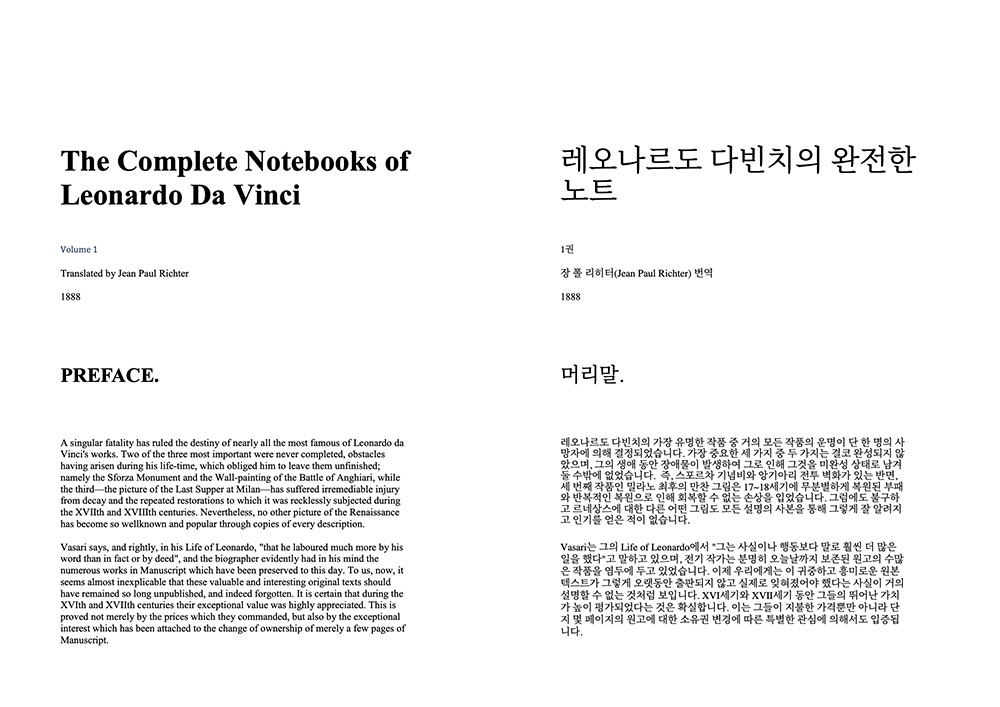
International teams regularly exchange reports, contracts, manuals, research papers, product specifications, and training materials in PDF format. These files are convenient because they preserve the appearance of a document across different devices, but the same structure can make them difficult to translate accurately.
A reliable PDF translation process involves much more than selecting two languages and clicking a button. Teams must consider document layout, scanned pages, tables, terminology, formulas, numbers, and the final review process.
Using a layout-aware PDF translator(https://pdf-translation.com/) can reduce much of the manual work, but the quality of the final document still depends on how the source file is prepared and reviewed.
Below are some of the most common PDF translation errors and practical ways to avoid them.
1. Translating Without Checking the Source File
One of the most common mistakes is uploading a document without first examining its structure.
Two PDF files may look similar on screen but behave very differently during translation. One may contain selectable digital text, while another may consist entirely of scanned page images.
Before translating a document, check whether:
The text can be selected and copied
Some pages are scanned images
The file contains multiple columns
Text appears inside images
Tables contain merged cells
The document includes formulas or variables
Pages are rotated or poorly scanned
Handwritten notes cover printed text
This quick inspection helps identify which parts of the document are most likely to require additional review.
A clean, text-based report is generally easier to process than a photographed contract containing shadows, stamps, handwritten corrections, and unusual fonts.
2. Ignoring OCR Errors in Scanned PDFs
Scanned PDFs require optical character recognition before the text can be translated.
OCR examines the image of each page and attempts to identify letters, numbers, punctuation, and symbols. If the system reads a character incorrectly, the mistake can pass directly into the translated document.
For example:
The letter O may be mistaken for the number 0
The letter I may be confused with the number 1
A decimal point may disappear
A minus sign may be missed
A company name may be recognized as a normal word
A handwritten note may be ignored
These mistakes are particularly dangerous because the translated sentence may still look natural.
Teams should therefore review scanned documents more carefully than digitally created PDFs. Names, dates, addresses, quantities, prices, invoice numbers, reference codes, and product identifiers should always be compared with the original file.
Whenever possible, improve the scan before translation. Pages should be straight, sharp, evenly lit, and free from large shadows or blurred areas.
3. Treating Every Term as Ordinary Language
Business, technical, legal, and academic documents often contain terms that have specialized meanings.
A word that is common in everyday English may mean something completely different in engineering, finance, medicine, or law. Without context, a translation engine may choose the wrong interpretation.
Long documents can also suffer from inconsistent terminology. The same component, department, legal term, or process may receive different translations on separate pages.
Before translating an important document, create a short terminology list containing:
Company names
Product and service names
Department names
Technical expressions
Industry abbreviations
Legal definitions
Words that should remain untranslated
Preferred translations for repeated terms
The list does not need to be extensive. Even 10 to 20 carefully selected terms can improve consistency across a long document.
A subject specialist should review the most important terminology before the final file is distributed.
4. Translating Codes, Formulas, and Identifiers
Not every character in a PDF should be translated.
Scientific, technical, and financial documents may contain:
Mathematical variables
Chemical symbols
Software commands
File paths
Product model numbers
Patent references
Serial numbers
Account codes
Programming code
Standards and specification numbers
A translation engine may treat these items as ordinary words unless they are protected.
For example, a single letter in an academic paper may represent a variable rather than an English word. A short product code may identify a specific machine component. A software command must remain exactly as written.
Teams should identify protected content before translation and verify it again afterward.
Even when a document translation system includes formula or character-preservation settings, the final equations, codes, and identifiers should still be compared directly with the source.
5. Failing to Review Tables
Tables are among the most difficult parts of a PDF to translate correctly.
A financial statement may contain numbers whose meaning depends entirely on the correct row, column, currency, and reporting period. A product specification sheet may contain measurements, model numbers, units, and fixed abbreviations.
Some parts of a table should be translated, while others should remain unchanged.
Before translating a table, decide:
Whether column headings should be translated
Whether product codes should remain unchanged
Whether units should be translated
Whether abbreviations have official translations
Whether formulas appear inside cells
Whether longer translated text will fit inside the layout
After translation, compare the table row by row.
Check that:
Numbers remain in the correct columns
Percentages are unchanged
Decimal points remain visible
Negative signs have not disappeared
Currency symbols correspond to the correct values
Measurements remain connected to the correct products
Footnotes still refer to the correct rows
A table can look professionally formatted while still containing serious data errors.
6. Assuming Natural Language Is Always Accurate
Modern AI translation can produce sentences that sound fluent and professional. However, fluency does not guarantee accuracy.
A sentence may read naturally while changing the meaning of:
A legal obligation
A payment condition
A deadline
A safety warning
A technical instruction
A limitation or exception
A negative statement
Words such as “not,” “unless,” “before,” “after,” and “except” can completely change the meaning of a sentence.
High-risk content should always receive manual review. This includes contracts, financial reports, medical information, patents, immigration documents, safety instructions, and official certificates.
AI translation can reduce repetitive work, but it should not replace certified or professional review when accuracy has legal, financial, medical, or safety consequences.
7. Choosing the Wrong Output Format
Teams should also consider how the translated PDF will be used.
A translated-only PDF is usually better for final distribution. It provides a cleaner reading experience for people who only need the target language.
A bilingual PDF is more useful during review because it places the original and translated content together.
Bilingual output can help reviewers:
Compare terminology
Verify names and numbers
Identify missing text
Review legal clauses
Check technical instructions
Compare table headings
Discuss corrections with colleagues
A practical workflow is to use a bilingual version during proofreading and a translated-only version for final delivery.
This approach combines transparency during review with a cleaner document for the final reader.
8. Reviewing Only the Text and Ignoring the Layout
PDF translation quality is not limited to sentence accuracy.
The layout also affects how readers understand the document.
Reviewers should check whether:
Headings remain above the correct sections
Paragraphs appear in the correct order
Captions remain beside the correct images
Footnotes are placed on the correct pages
Text from separate columns has not been mixed
Tables fit within the page
Translated text overlaps images
Page numbers and references remain consistent
Languages use different amounts of space. A short English sentence may become much longer in German. Chinese, Japanese, and Arabic require different font and layout handling.
The translated file may not look exactly like the source, but it should remain readable and logically organized.
9. Failing to Assign Review Responsibilities
Important documents often require several types of review.
A language reviewer can check grammar, tone, and readability.
A subject specialist can verify technical terminology, formulas, codes, and industry-specific language.
A document owner can confirm that the translated file meets its intended business purpose.
A final quality reviewer can inspect page order, formatting, tables, images, and missing content.
Assigning clear responsibilities prevents everyone from assuming that someone else checked the most important details.
For major projects, teams can use a simple checklist showing who reviewed each part and whether corrections were completed.
A Practical PDF Translation Checklist
A repeatable workflow can reduce errors and improve consistency.
Before translation:
Confirm the document’s purpose and audience.
Check whether the PDF contains digital text or scanned images.
Identify tables, formulas, codes, and complex layouts.
Prepare a short terminology list.
Decide which content should remain untranslated.
During translation:
Select the correct source and target languages.
Use settings appropriate for tables, formulas, and scanned pages.
Generate a bilingual version when detailed review is required.
After translation:
Check names, dates, numbers, warnings, and important conditions.
Compare tables and formulas with the source.
Review the document layout page by page.
Create a clean translated-only version for final distribution.
Conclusion
A successful PDF translation workflow is not based on translation technology alone.
Source-file quality, OCR accuracy, terminology consistency, table handling, formula protection, layout review, and human judgment all influence the final result.
International teams can reduce errors by inspecting documents before translation, protecting important content, using bilingual output during review, and assigning clear quality-control responsibilities.
The goal is not simply to produce translated sentences. It is to create a complete document that remains readable, accurate, and practical for the people who need to use it.