How to Create a Pitch Deck
-

- May 21st, 2026
- 6,600 views
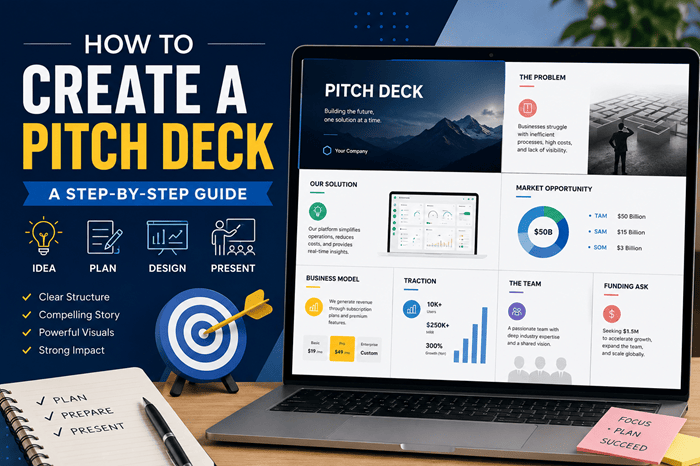
A pitch deck is one of the most important tools for startups, entrepreneurs, marketers, and business professionals. Whether you are looking for investors, presenting a business idea, or pitching a product to clients, a professional pitch deck helps you communicate your message clearly and effectively.
In this guide, I will explain how to create a pitch deck step-by-step, what slides to include, common mistakes to avoid, and how AI tools can help you build presentations much faster.
What Is a Pitch Deck?
A pitch deck is a short presentation used to explain:
- A business idea
- Startup vision
- Product or service
- Market opportunity
- Financial potential
- Business growth strategy
Pitch decks are commonly used during:
- Investor meetings
- Startup funding rounds
- Client presentations
- Sales pitches
- Business proposals
Most pitch decks contain around 10–15 slides.
Why Is a Pitch Deck Important?
A strong pitch deck helps you:
- Make a professional first impression
- Explain ideas clearly
- Build trust and credibility
- Showcase business potential
- Attract investors or clients
- Increase funding opportunities
Even a great business idea may fail if the presentation is confusing or poorly designed.
Essential Slides Every Pitch Deck Should Include
1. Title Slide
Your first slide should contain:
- Company name
- Logo
- Tagline
- Presenter name
- Contact information
Keep the design simple and professional.
2. Problem Statement
Explain the problem your target audience faces.
Focus on:
- Customer pain points
- Existing challenges
- Market gaps
Investors must understand why your solution matters.
3. Solution Slide
Now explain how your product or service solves the problem.
Include:
- Product overview
- Key features
- Main benefits
- Unique selling points
Use visuals whenever possible.
4. Market Opportunity
Show the size and potential of your target market.
You can include:
- Total Addressable Market (TAM)
- Serviceable Available Market (SAM)
- Serviceable Obtainable Market (SOM)
This demonstrates scalability and growth potential.
5. Product Demo or Screenshots
Visuals help audiences understand your product quickly.
Add:
- Screenshots
- Product walkthroughs
- Interface previews
- Workflow diagrams
Keep slides visually clean.
6. Business Model
Explain how your company generates revenue.
Examples include:
- Subscription model
- SaaS pricing
- Advertising revenue
- Licensing
- Marketplace commissions
Keep explanations short and easy to understand.
7. Competitor Analysis
Compare your business with competitors.
Highlight:
- Better features
- Lower costs
- Faster performance
- Better user experience
Avoid attacking competitors directly.
8. Traction and Growth
Investors prefer businesses with momentum.
Include:
- Revenue growth
- Active users
- Customer acquisition
- Partnerships
- Monthly recurring revenue (MRR)
- Download statistics
Real numbers improve credibility.
9. Financial Projections
Show estimated:
- Revenue
- Expenses
- Profit margins
- Growth forecasts
Most startups include projections for 3–5 years.
Keep projections realistic.
10. Team Slide
Introduce your core team members.
Include:
- Founder background
- Skills
- Industry experience
- Previous achievements
Strong teams increase investor confidence.
11. Funding Ask
Clearly explain:
- How much funding do you need
- Where the investment will be used
- Future goals after funding
For example:
- Product development
- Hiring
- Marketing
- Infrastructure
How to Create a Pitch Deck Step-by-Step
Step 1: Define Your Goal
Before creating slides, decide:
- Who is your audience?
- What action do you want them to take?
- What message should they remember?
This helps structure your presentation properly.
Step 2: Collect Your Content
Gather:
- Business information
- Market research
- Financial data
- Product visuals
- User metrics
Well-organized content improves slide quality.
Step 3: Choose a Presentation Design
Use:
- Clean layouts
- Consistent fonts
- Professional colors
- Minimal text
Good design improves readability.
Step 4: Keep Slides Short
Avoid long paragraphs.
Use:
- Bullet points
- Visuals
- Charts
- Icons
- Infographics
Simple slides are more engaging.
Step 5: Add Visual Storytelling
A good pitch deck should feel like a story:
- Problem
- Solution
- Opportunity
- Growth
- Future vision
Storytelling keeps audiences interested.
Step 6: Practice the Presentation
Even the best slides need strong delivery.
Practice:
- Timing
- Confidence
- Slide transitions
- Investor questions
Preparation improves presentation success.
Create Professional Pitch Decks Faster
MagicSlides AI is an AI Pitch Deck Generator that helps users create professional pitch decks within minutes. Instead of building slides manually, users can simply enter a topic, startup idea, business summary, or content source, and the AI automatically generates structured slides with layouts, visuals, and presentation-ready formatting. The tool works directly with Google Slides, making pitch deck creation much faster and easier.
During our testing, we found that MagicSlides is especially useful for startup founders, marketers, educators, and business professionals who need presentations quickly. The AI automatically organizes important sections like problem statement, solution, market opportunity, business model, and financial overview into clean and professional slides. Users can also customize themes, fonts, colors, and layouts according to their branding needs. For anyone preparing investor presentations or business pitches, MagicSlides can significantly reduce the time spent creating slides manually.
Common Mistakes to Avoid While Creating Pitch Decks
Too Much Text
Overloaded slides reduce audience attention.
Solution
Use concise bullet points instead of paragraphs.
Poor Design Consistency
Different fonts and colors make presentations look unprofessional.
Solution
Maintain consistent branding throughout the deck.
Weak Problem Statement
If the audience does not understand the problem, they may lose interest.
Solution
Clearly explain customer pain points.
Unrealistic Financial Forecasts
Exaggerated revenue projections can reduce credibility.
Solution
Use realistic and data-supported estimates.
Ignoring Visuals
Text-heavy slides are harder to understand.
Solution
Add charts, screenshots, icons, and diagrams.
Best Practices for Creating Winning Pitch Decks
- Keep presentations between 10–15 slides
- Use visuals instead of long text
- Focus on storytelling
- Maintain clean formatting
- Use real numbers and metrics
- Highlight unique advantages
- Practice before presenting
Who Can Benefit From Pitch Decks?
Pitch decks are useful for:
- Startup founders
- Entrepreneurs
- Sales teams
- Marketers
- Business consultants
- Product managers
- Students
- Agencies
Anyone presenting ideas professionally can benefit from a well-designed deck.
Final Thoughts
Learning how to create a pitch deck is an essential skill for startups and business professionals. A strong pitch deck should clearly explain your business idea, market opportunity, growth potential, and future vision while maintaining a clean and engaging design.
Instead of spending hours creating slides manually, AI-powered tools like MagicSlides can help generate professional presentations much faster. With the right structure, visuals, and storytelling approach, your pitch deck can leave a strong impression on investors, clients, and audiences.