Printer Repair and Maintenance: Complete Practical Guide for Home and Office
-
- Published Updated
- 559 views
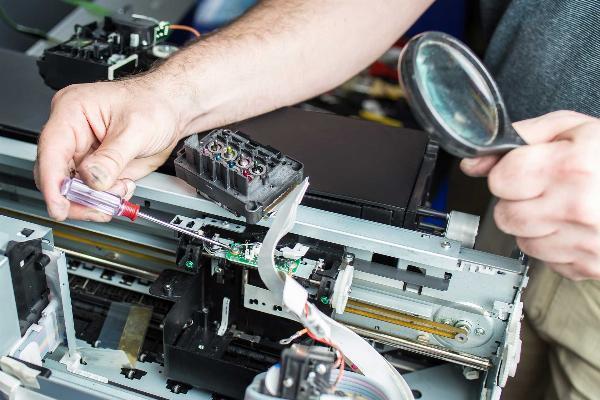
Understanding printer repair and maintenance is essential for keeping devices reliable, reducing downtime, and avoiding unnecessary service costs. This guide explains what to inspect, when to act, and how to follow a repeatable maintenance process that fits home offices and enterprise fleets.
- Inspect feeds, consumables, and firmware weekly; perform deeper maintenance monthly or quarterly depending on volume.
- Use the PRINTER maintenance checklist to standardize tasks and reduce human error.
- Address common printer problems—paper jams, streaks, connectivity—using targeted troubleshooting before replacing parts.
- Follow electrical and chemical safety guidance when servicing components (OSHA electrical safety).
Intent: Informational
Printer repair and maintenance: basic concepts and scope
Printer repair and maintenance covers preventive tasks, diagnostic steps, minor repairs, and decisions about professional servicing or replacement. It includes consumable replacement (toner, ink, rollers), mechanical cleaning (rollers, printheads, fusers), software upkeep (drivers, firmware), network checks, and safety practices. Knowing the lifecycle costs and common failure modes helps prioritize actions that deliver the most uptime per dollar spent.
Key components and common failure points
Familiarity with main components speeds diagnosis: printheads, ink or toner cartridges, drum units, fuser assemblies, pickup and feed rollers, sensors, and the control board. Common issues include paper jams, faint prints or streaks, ghosting, slow printing, intermittent network connectivity, and error lights. Recognizing which symptoms map to worn parts or settings reduces unnecessary replacements.
Related terms and systems
Include firmware updates, print spooler, duplex unit, calibration, alignment, and the difference between inkjet and laser mechanisms. For large installations, add SNMP monitoring, fleet management software, and service-level agreements (SLAs).
Routine schedule and the PRINTER maintenance checklist
Use a simple, named framework to standardize tasks. The PRINTER maintenance checklist organizes steps for recurring use and handoff to contractors or in-house teams.
- P — Parts and consumables: check toner/ink, drums, rollers.
- R — Rollers and feeds: clean and replace pickup/feed rollers as needed.
- I — Inspection: visual inspection for paper debris, leaks, and damaged gears.
- N — Network and drivers: verify drivers, firmware, and network connectivity.
- T — Test prints and calibration: run alignment and print quality tests.
- E — Environment: verify humidity, dust control, and adequate ventilation.
- R — Records: log maintenance actions, error codes, and part replacements.
Apply the PRINTER checklist weekly for high-volume devices, monthly for moderate use, and quarterly for infrequent use. Track dates and outcomes in a maintenance log or fleet management tool.
Printer maintenance checklist (sample)
A concise printer maintenance checklist: clean feed rollers; run printhead cleaning; replace low toner; update firmware; inspect fuser; remove paper dust and debris; verify network settings; run test page; log results.
Troubleshooting common printer problems
Diagnosing common printer problems begins with a clear examination and stepwise elimination. For example, when prints are streaky, check toner or ink levels, run printhead/nozzle cleaning, inspect rollers for debris, and test with a different document or driver. When connectivity is intermittent, verify IP settings, test via USB or a different network switch, and confirm firmware is current.
Practical troubleshooting steps
- Recreate the problem with a test page to separate device issues from document or driver problems.
- Consult built-in diagnostics and error codes—manufacturer error codes usually map to specific parts.
- Swap consumables (known good cartridge) to confirm the source of print-quality issues.
- Reset the printer and print spooler if jobs are stuck; clear and restart in order.
Safety, standards, and when to call a professional
Follow safety guidance for electrical and chemical hazards. Live electrical work, fuser replacement, or dealing with toner/ink spills often requires professional attention. For electrical safety procedures consult authoritative guidance such as the Occupational Safety and Health Administration (OSHA) electrical safety advice to prevent shock and fire risk (OSHA electrical safety).
When to call a professional
- Recurring hardware failures after standard maintenance (e.g., repeated paper jams from worn feed mechanism).
- Burning smells, smoke, or electrical arcing.
- Complex PCB or sensor replacements that require calibration tools.
- Large fleet upgrades or changes that affect network authentication, drivers, or print servers.
Real-world example: reducing downtime in a small office
Scenario: A 25-person office relied on a single multifunction laser printer and experienced daily paper jams and slow print speeds. Applying the PRINTER checklist revealed worn pickup rollers and outdated firmware. Replacing rollers, cleaning paper paths, and scheduling a monthly inspection reduced jam frequency by 90% and returned average job times to acceptable levels. Logging actions enabled quick diagnostics when a later firmware update introduced a network bug that was quickly rolled back.
Practical tips to extend printer life
- Keep firmware and drivers current—but validate updates in a test environment for managed fleets before broad deployment.
- Store consumables in a climate-controlled area to prevent toner/ink degradation and clumping.
- Use OEM or high-quality compatible parts and inspect them before installation to avoid defects.
- Establish a maintenance log with dates, actions, and photos for warranty claims and trend analysis.
- Schedule light preventive maintenance during low-use hours to minimize disruption.
Trade-offs and common mistakes
Trade-offs
Purchasing lower-cost compatible cartridges can reduce short-term expenses but may increase service needs and lower print quality. Frequent preventive maintenance reduces emergency repairs but increases scheduled labor costs. Centralized fleet management simplifies updates and tracking but requires initial setup and possible licensing costs.
Common mistakes
- Replacing parts without verifying symptoms—this increases costs and downtime.
- Neglecting firmware and driver mismatches, which can create network and job spool issues.
- Failing to control the environment: dust, humidity, and heat accelerate wear on rollers and electronics.
- Skipping safety precautions when working with high-voltage parts like fusers.
Core cluster questions for further reading and internal links
- How often should printers be serviced in a small office?
- What are the most common printer problems and how are they diagnosed?
- What should a printer maintenance checklist include?
- How to decide between repairing a printer and replacing it?
- What safety precautions are required when servicing a printer?
FAQ
What does printer repair and maintenance include?
Printer repair and maintenance include inspecting and replacing consumables (toner, ink), cleaning rollers and printheads, updating firmware and drivers, calibrating print quality, checking network and spooler settings, and logging service actions. It may also include part replacements and professional servicing for electrical or mechanical repairs.
How often should a printer maintenance checklist be followed?
High-use devices: weekly checks; medium-use: monthly; low-use: quarterly. Immediate checks should occur after error alerts or unusual print quality changes. Adjust frequency based on page volume and environmental factors like dust and humidity.
How can common printer problems be resolved without professional service?
Start with test pages to isolate the issue, run built-in cleaning routines, replace or reseat cartridges, clean paper paths and rollers, update drivers/firmware, and reset the print spooler. If problems persist after these steps, consider professional diagnosis.
Are there safety standards to follow when doing printer repair?
Yes. Follow electrical safety procedures and manufacturer safety documentation. Avoid live electrical work unless trained; use personal protective equipment for toner and chemical exposure. See OSHA guidance for electrical safety for baseline precautions (OSHA electrical safety).
What costs should be expected for ongoing printer maintenance?
Budget for consumables, periodic part replacements (rollers, drums, fusers), firmware support, and expected labor. For fleets, include monitoring tools and potential contract service costs. Track mean time between failures (MTBF) and mean time to repair (MTTR) to forecast budgets accurately.