Reset Fiat 500 Dashboard After Maintenance: A Practical Step-by-Step Guide
-
- Published Updated
- 1,632 views
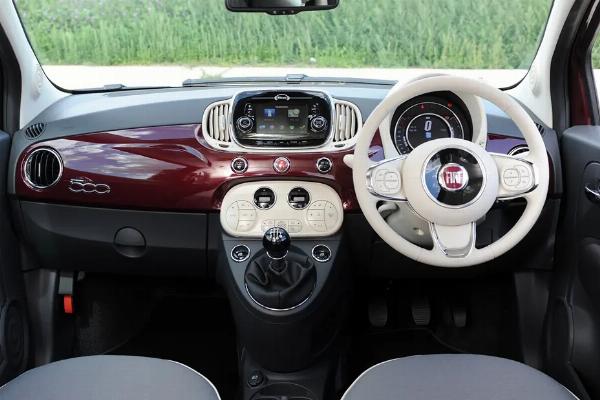
The following guide explains common, safe methods to reset Fiat 500 dashboard indicators after maintenance. If a maintenance reminder, service light, or fault icon remains on the instrument cluster after repairs, these steps describe how to reset Fiat 500 dashboard systems using basic ignition procedures, battery disconnect, or an OBD-II diagnostic tool.
- Check the owner’s manual for model-specific instructions and warnings.
- Try the ignition and trip/reset button sequence before disconnecting the battery.
- Disconnect the negative battery cable for 10–30 minutes to clear some electronic reminders (may reset clock/radio).
- Use an OBD-II scanner to read and clear diagnostic trouble codes if a fault light persists.
- If lights remain after procedures, consult a certified technician or authorized service center.
How to reset Fiat 500 dashboard after maintenance
Before attempting any resets, confirm that the underlying issue was resolved during maintenance. The most reliable approach is to consult the vehicle’s owner’s manual or maintenance record to confirm the service was completed. Resetting a dashboard reminder only clears the indicator; it does not fix unresolved faults reported by the vehicle’s control modules (ECU).
Basic steps to reset dashboard indicators
1. Check the owner’s manual and service records
The owner’s manual often lists model-specific reset sequences for service reminders and display messages. Recordkeeping from the servicing shop may also note whether software resets were applied after maintenance. Manufacturer guidance from Stellantis or dealer service bulletins can be relevant for specific model years.
2. Ignition and instrument-cluster button sequence
Many dashboard reminders can be reset with an ignition-cycle procedure: turn the key to the accessory or ON position (without starting the engine) and use the trip/reset button on the dash to access the service menu. Holding or cycling the button for several seconds often clears the timer or reminder. Exact timing and button names vary by model year; follow the manual for the correct sequence.
3. Battery negative disconnect (power reset)
Disconnecting the negative battery cable for 10–30 minutes can clear certain electronic reminders and reset some control units back to default states. Steps:
- Turn off everything and remove the key.
- Disconnect the battery negative terminal using appropriate wrenches.
- Wait 10–30 minutes to allow capacitors and modules to discharge.
- Reconnect the negative terminal and start the vehicle; check the instrument cluster.
Note: a battery disconnect can reset the clock, radio presets, and may require re-entering anti-theft radio codes on older systems. It also may clear transient errors but will not repair mechanical or electrical faults.
4. Use an OBD-II scanner or diagnostic tool
An OBD-II code reader or a manufacturer-level diagnostic tool can read stored fault codes and clear them once the fault has been resolved. For service reminders that are stored in body control modules, a more advanced scan tool or dealer-level software might be necessary. When using a scanner, record codes before clearing them so the repair history is preserved.
Common dashboard lights and what they mean
Service or maintenance reminder
These indicate scheduled maintenance intervals. After required maintenance, use the ignition sequence or diagnostic tool to reset the reminder.
Check engine or fault indicators
These lights indicate stored diagnostic trouble codes. If a code persists after repair, retrieve the code with an OBD-II scanner to confirm whether the repair cleared the problem.
Battery, oil, and brake warnings
Warnings related to charging, oil pressure, or braking require prompt attention. Do not assume these can be reset without verifying system health; consult a technician if any of these lights appear.
Troubleshooting and precautions
Safety and electronic considerations
Avoid repeated disconnects of the battery as it can affect adaptive systems and require initialization procedures (e.g., throttle, steering angle sensor). When in doubt, follow dealer guidance or have a certified technician perform resets that require manufacturer tools.
When a reset does not work
If a dashboard indicator cannot be cleared with the ignition sequence, battery reset, or an OBD-II tool, persistent codes may indicate an unresolved electrical fault or damaged sensor. Professional diagnosis using manufacturer-level diagnostic software is recommended.
When to seek professional service
Seek a certified technician or authorized service center when there are persistent warning lights for safety systems (airbags, brake system), when diagnostic trouble codes return after clearing, or when the procedure requires manufacturer software. Dealers and independent shops that follow Stellantis service guidance can perform module-level resets and validate that repairs were completed correctly.
References and further reading
Consult the vehicle’s owner’s manual and official manufacturer resources for exact procedures and warnings. For manufacturer guidance and owner resources, visit the Stellantis site: https://www.stellantis.com.
Common questions
How do I reset Fiat 500 dashboard after maintenance?
Use the ignition/trip-button reset sequence described in the owner’s manual, disconnect the battery for a short power reset, or clear codes with an OBD-II scanner once the underlying issue is fixed. If the light persists, have a technician read stored codes and perform a module-level reset.
Will disconnecting the battery damage my Fiat 500?
Short battery disconnects normally do not cause damage, but they can reset settings (clock, radio presets) and may require reinitialization of some electronic modules. Follow safe procedures and disconnect the negative terminal first.
Can an OBD-II reader clear all dashboard warnings?
An OBD-II reader can read and clear many engine and emissions-related diagnostic trouble codes, but body-control and manufacturer-specific reminders sometimes require dealer-level tools to reset properly.
What should be done if a safety light stays on after a reset?
If a safety-related warning (airbag, ABS, brakes) remains illuminated, stop driving as appropriate and arrange professional inspection. These systems affect vehicle safety and should be diagnosed with manufacturer guidance.