Revit Structure Course and Revit MEP Course: Build Job-Ready BIM Skills for a Modern AEC Career
-
- Published Updated
- 1,635 views
Here is a tightened ~800-word version, keeping the language simple, SEO-friendly, and suitable for Easyfie.
Revit Structure Course vs Revit MEP Course: Which Learning Path Fits Your AEC Career?
The Architecture, Engineering and Construction (AEC) industry is increasingly adopting digital workflows, and Building Information Modeling (BIM) has become an important part of modern project delivery. For civil, structural, mechanical, electrical, and plumbing professionals, learning Autodesk Revit can help develop practical skills in BIM modeling, coordination, documentation, and project development.
Two common learning paths for engineering professionals are a Revit Structure Course and a Revit MEP Course. Both introduce learners to BIM-based workflows, but each focuses on different areas of building development. Understanding these differences can help students, graduates, and working professionals select training that matches their educational background and career interests.
Why Learn Revit for Your AEC Career?
Traditional 2D drafting mainly communicates designs through lines, symbols, dimensions, and drawings. BIM workflows connect three-dimensional building elements with relevant project information.
Autodesk Revit allows users to develop building models, create views and drawings, organize project information, and coordinate building components within a digital environment.
For students and professionals in India interested in BIM-related work, Revit training can provide a foundation for roles such as:
BIM Modeler
Revit Technician
Structural BIM Modeler
MEP BIM Modeler
BIM Coordinator
Design and Documentation Professional
Effective Revit training should cover more than individual software commands. It should help learners understand how Revit is applied in actual AEC workflows, including modeling, documentation, coordination, and project revisions.
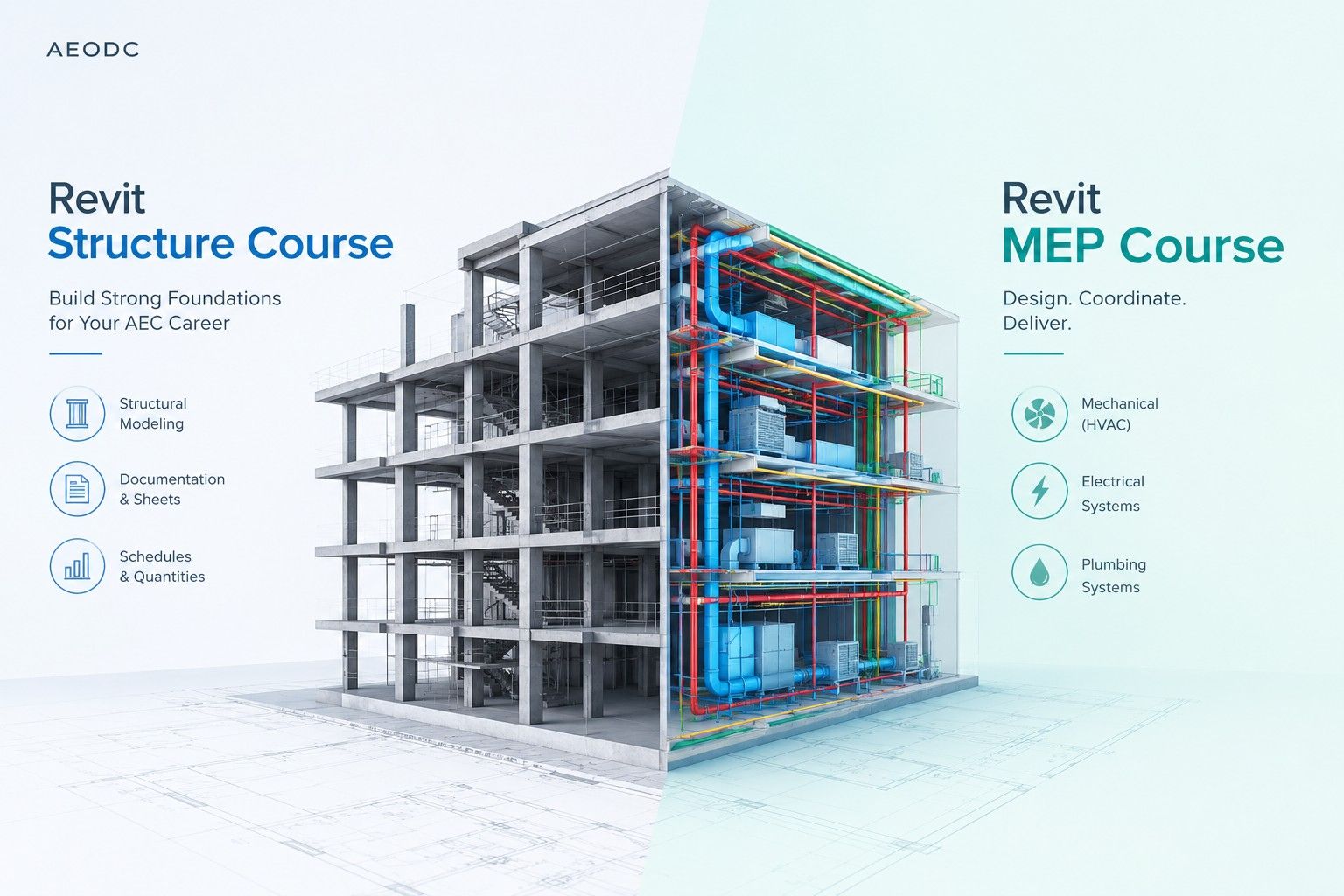
Revit Structure Course: Structural Modeling and Documentation
A Revit Structure Course is generally suitable for civil engineering students, structural engineering graduates, structural designers, and professionals who want to develop structural BIM modeling skills.
Depending on the training level, common topics can include:
Grids and levels
Structural columns
Beams and framing
Structural walls
Foundations
Floors
Reinforcement modeling
Structural views
Sheets and annotations
Schedules and quantities
Construction documentation
The learning process can begin with fundamental modeling concepts and progress toward documentation and coordination.
For example, learners can understand how structural columns and beams are positioned according to grids and levels. They can then create structural views, add annotations, prepare sheets, and organize project information.
This approach helps beginners connect Revit tools with practical structural project workflows.
Revit MEP Course: Building Services Modeling
Mechanical, electrical, and plumbing systems are important parts of modern buildings. These services need to work within the available building spaces and coordinate with architectural and structural elements.
A Revit MEP Course introduces learners to BIM-based modeling for mechanical, electrical, and plumbing systems.
Depending on the course level, learners may study the following areas.
Mechanical and HVAC
Mechanical training may cover:
Ductwork modeling
Mechanical equipment
Air terminals
HVAC system layouts
System connections
Basic coordination
Learners can understand how HVAC components are represented within a building model and how they relate to other disciplines.
Electrical
Electrical modeling can include:
Electrical fixtures
Panels
Electrical equipment
Cable trays
Conduits
Circuits
Electrical documentation
These topics help learners understand how electrical components can be placed, connected, and documented within a BIM project.
Plumbing
Plumbing training may cover:
Pipes
Pipe fittings
Plumbing fixtures
Drainage systems
Pipe layouts
Plumbing documentation
The focus is on understanding how plumbing components are modeled and connected within the building environment.
Revit Structure vs Revit MEP
The main difference between these learning paths is their area of focus.
Revit Structure concentrates on structural elements such as columns, beams, foundations, framing, reinforcement, and structural documentation.
Revit MEP focuses on building services, including mechanical, electrical, and plumbing systems.
Both use BIM principles, but their modeling methods, project information, tools, and coordination requirements can differ.
A civil or structural engineering student may choose structural training because it relates closely to their academic background. A mechanical, electrical, or plumbing professional may choose MEP training to focus on building services.
Which Revit Course Should You Choose?
The appropriate course depends on your educational background, existing knowledge, and intended area of work.
Civil and structural engineering students:
A Revit Structure Course can provide focused training in structural BIM modeling and documentation.
Mechanical professionals:
A Revit MEP Course can introduce HVAC and mechanical system modeling.
Electrical professionals:
MEP training can cover electrical components, panels, circuits, cable trays, and documentation.
Plumbing professionals:
MEP training can introduce pipe modeling, fittings, fixtures, and plumbing layouts.
Working professionals:
Intermediate or advanced training can build on existing Revit knowledge and introduce more detailed modeling, documentation, and coordination workflows.
When selecting training, look for practical assignments, project-based exercises, documentation tasks, and coordination activities rather than software commands alone.
Build Practical BIM Skills with Revit
The continued use of digital workflows in the AEC industry has increased the importance of professionals who understand BIM software and project information.
Whether you choose a Revit Structure Course or a Revit MEP Course, consistent practice is important. Working on realistic building examples can help learners understand how individual tools and workflows are connected.
A structured Revit program can help bridge the gap between software knowledge and practical BIM activities such as modeling, documentation, coordination, and information management.
The appropriate learning path depends largely on your discipline. Structural-focused learners can concentrate on Revit Structure, while mechanical, electrical, and plumbing professionals can explore Revit MEP.
Frequently Asked Questions
1. Who can join a Revit Structure Course?
Civil engineering students, structural engineering graduates, structural professionals, and beginners interested in structural BIM can consider this course.
2. Who should learn a Revit MEP Course?
Mechanical, electrical, and plumbing students and professionals can consider Revit MEP training to develop building services modeling skills.
3. Is Revit suitable for beginners?
Yes. Beginners can start with fundamental modeling concepts and gradually progress toward documentation and coordination workflows.
4. Can working professionals learn Revit?
Yes. Working professionals can learn Revit through structured training and practical exercises while using their existing industry knowledge.
5. Which course should I choose?
Revit Structure focuses on structural modeling, while Revit MEP focuses on mechanical, electrical, and plumbing systems. Your educational background and intended area of work can help determine which course is relevant to your learning goals.