SK Checkout Customizer: The Best Shopify Checkout Customization App in 2025
-

- September 19th, 2026
- 3,362 views
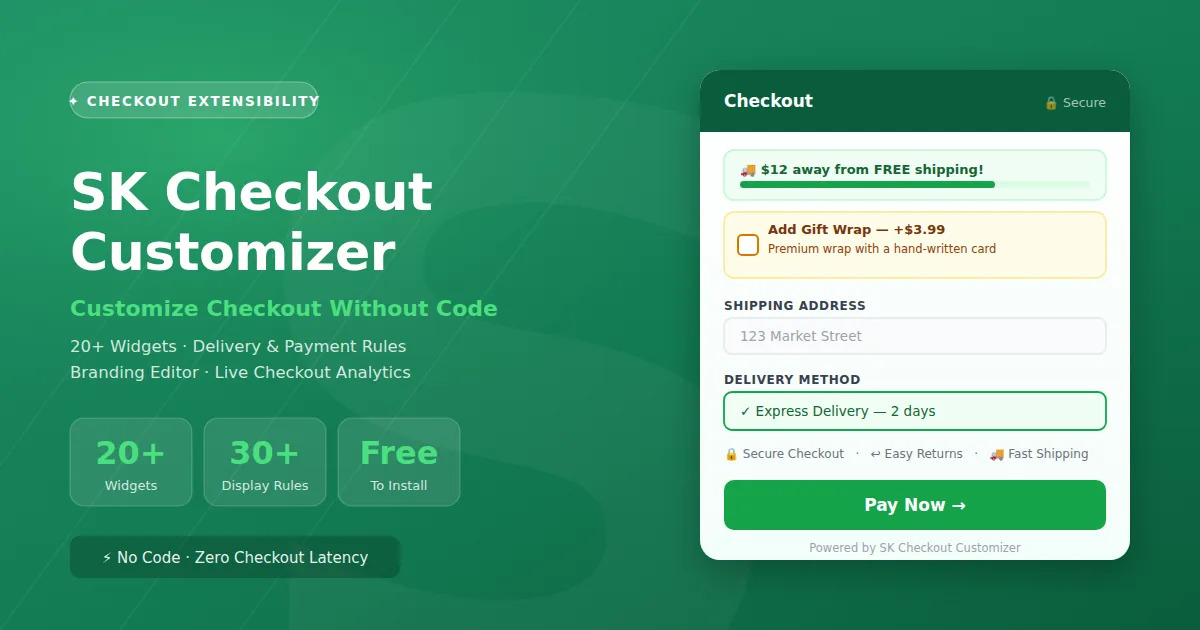
If you've ever wished you could add an upsell box, a trust badge row, or a free-shipping progress bar to your Shopify checkout and been told "checkout can't be customized" that's outdated advice. A proper Shopify checkout customization app can do exactly that, and a lot more, without a single line of Liquid. SK Checkout Customizer is one of the more complete options in this category, so I went through every feature to see what it actually does.
For a long time, "you can't customize Shopify checkout" was true. Then Shopify introduced checkout extensibility a system of app-embedded blocks and server-side Functions that run directly inside the native checkout, without merchants forking or hard-coding checkout.liquid. That opened the door for apps like SK Checkout Customizer to plug in real functionality: upsell widgets, conditional content, delivery and payment method rules, and full branding control.
SK Checkout Customizer is a Shopify-native app built entirely on this system. It ships 20+ checkout widgets, a rule engine with 30+ display conditions, native Shopify Functions for delivery and payment customization, a full checkout branding editor, and a built-in analytics dashboard all managed from one embedded admin screen, and all free to install.
What Is SK Checkout Customizer?
SK Checkout Customizer is a no-code checkout customization app for Shopify stores. Instead of editing theme files (which isn't even possible for the native checkout on current plans), you add and configure widgets from the app's dashboard, and they render directly inside the customer's checkout, thank-you page, and order-status page.
Under the hood it uses two separate Shopify systems together: Checkout UI Extensions for anything visual (banners, upsells, forms, trust badges), and Shopify Functions for anything that changes checkout logic (hiding a delivery method, renaming a payment option, blocking checkout below a minimum order value). Functions run on Shopify's own servers, so there's no added latency on checkout a detail that matters a lot for conversion rate.
Key Features at a Glance
| Feature | SK Checkout Customizer |
|---|---|
| Checkout Widgets | 20+ (upsells, banners, forms, trust badges, progress bar) |
| Content Templates | 16 ready-made dynamic content templates |
| Display Rules | 30+ conditions (cart, product, customer, shipping, market, UTM) |
| A/B Testing | Per-widget variant testing |
| Scheduling | Auto-publish / auto-expire widgets by date |
| Delivery Customization | Hide, rename & reorder delivery methods (Shopify Functions) |
| Payment Customization | Hide, rename & reorder payment methods (Shopify Functions) |
| Checkout Validation | Order subtotal min/max limits with custom messages |
| Checkout Branding | Full color, typography, header/footer & button editor |
| Multiple Checkout Profiles | Edit and switch between all published profiles |
| Analytics Dashboard | Impressions, clicks, conversions, revenue, CTR, trend chart |
| Email Reports | Automated daily / weekly / monthly performance emails |
| Shopify Flow | HMAC-verified webhook for order-conversion tracking |
| Import / Export | JSON export & import for widgets and branding settings |
| Translations | Per-locale content translation on every widget |
20+ Checkout Widgets Built for Three Different Goals
Most checkout apps give you one type of block and call it a day. SK organizes its widgets into three groups depending on what you're trying to accomplish, which makes it a lot easier to pick the right one instead of guessing.
Revenue-Boosting Widgets
- Product Upsell (Checkout Upsell): recommend related products right at checkout, one click to add.
- Order Bump: a highlighted add-on box (gift wrap, warranty, insurance) shown before payment.
- Checkbox Add-on: a simple checkbox offer that adds a product when ticked.
- Free Shipping Bar: a live progress bar showing how much more unlocks free shipping.
- Quantity Discount: tiered "buy more, save more" messaging.
- Discount Code Revealer: reveal and auto-apply a code at checkout.
- Countdown Timer: urgency timer for time-limited offers.
- Thank You Page Upsell: a second upsell chance right after purchase.
Targeted Content Widgets
- Dynamic Content: rule-driven blocks built from the template library above.
- Custom Form Fields: collect gift messages, delivery instructions, Tax ID / B2B info.
- Line Item Content: add badges or text to individual cart items.
- Quantity Editor: let customers adjust quantities without leaving checkout.
- Address Block: content and validation at the address step.
- Shipping Date Estimator: configurable, realistic delivery-date estimates.
Content for All Customers
- Banner / Notice: 7 container styles (plain text, info/success/warning/critical banner, and more).
- Trust Badges: secure checkout, easy returns, fast shipping signals.
- Shipping & Payment Icons: show every accepted payment/shipping method visually.
- Checkout Progress Indicator: a visual step tracker across checkout.
Every widget regardless of category supports the same core toolkit: display rules, scheduling, A/B testing, translations, section styling (padding, columns, container style), and one-click duplicate/import/export.
Display Rules Show the Right Widget to the Right Customer
A checkout widget that shows to everyone all the time gets ignored fast. SK's rule engine covers 30+ conditions across six categories, combinable with AND/OR logic:
| Rule Category | Examples |
|---|---|
| Cart | Subtotal, total, quantity, cart note, cart attributes, discount code, currency |
| Product | Specific products, collections, product type, vendor, metafields, subscriptions |
| Customer | Logged-in state, new vs. returning, language, metafields, day & time |
| Billing / Address | Billing country, billing province, shipping zip codes |
| Shipping | Shipping method title, carrier, method type |
| Market & UTM | Shopify Markets region, UTM campaign source |
Delivery & Payment Rules Powered by Shopify Functions
This is where SK goes beyond content blocks into actual checkout logic. Delivery and payment customization run as native Shopify Functions server-side code Shopify executes directly, so there's zero added checkout latency compared to a JS-based workaround.
| Function | What It Does |
|---|---|
| Delivery Customization | Hide, rename (currency-aware), or reorder delivery methods based on rules |
| Payment Customization | Hide, rename, or reorder payment methods based on rules |
| Checkout Validation | Enforce minimum/maximum order subtotal, block checkout with a custom message |
Say a merchant wants to hide "Cash on Delivery" for orders above $200, or rename "Standard Shipping" to "Free Delivery (5–7 days)" only for a specific product collection that's exactly what this layer is for. It uses the same condition engine as the display rules above, so there's nothing new to learn.
Checkout Branding Full Design Control
Beyond widgets, SK includes a complete Checkout Branding editor that talks directly to Shopify's Checkout Branding API. It covers:
- Global styles: brand colors, typography pairs, corner radius
- Header & footer: layout, alignment, custom content
- Form fields & buttons: input styling, borders, primary/secondary button design
- Favicon upload for the checkout tab
- Multiple checkout profiles: fetch, edit, and switch between every published profile on the store
- Import / export of full branding configs as JSON, plus one-click reset to default
Analytics See What's Actually Working
Adding widgets is only half the job; knowing whether they're converting is the other half. SK's built-in analytics dashboard tracks every impression, click, and conversion per widget, with revenue attribution.
- Overview cards: total/active/draft widgets, delivery & payment rule counts, impressions, clicks (CTR), conversions (rate), attributed revenue, and total store orders for the period
- Performance trend chart: daily impressions, clicks, and conversions plotted over any date range
- Per-widget table: impressions, clicks, CTR, conversions, conversion rate, and revenue broken down widget by widget
- Shopify Flow integration: an HMAC-verified webhook lets Flow report order conversions back into the same analytics, so revenue attribution isn't limited to checkout-fired events only
Who Should Use SK Checkout Customizer?
- Stores wanting more checkout revenue: order bumps, upsells, and free-shipping bars are proven conversion levers, and here they're built into checkout itself rather than living on the cart page only.
- Multi-region / Shopify Markets stores: market-based display rules and per-locale translations mean one widget can behave differently by region without duplicating content.
- Stores that need delivery/payment control: hiding COD above a certain order value, renaming shipping options, or blocking small orders are all handled without custom Function development.
- Brand-conscious merchants: the branding editor plus multi-profile support suits stores running more than one checkout experience.
- Data-driven teams: built-in per-widget analytics and scheduled email reports mean you don't need a separate BI tool to know what's converting.
How to Get Started in 3 Steps
1. Install the app & add a widget:Install SK Checkout Customizer from the Shopify App Store, open the dashboard, and add your first widget pick a template or start from a blank canvas.
2. Set display rules & publish:Choose who sees the widget (cart, product, customer, or shipping rules), set an optional schedule, and switch it from Draft to Active.
3. Track it in Analytics:Watch impressions, clicks, and conversions roll in on the Analytics dashboard, and set up a weekly email report so performance lands in your inbox automatically.
Frequently Asked Questions
Can you actually customize the Shopify checkout page now?
Yes, since Shopify introduced checkout extensibility, apps like SK Checkout Customizer can add widgets and logic directly inside the native checkout using Checkout UI Extensions and Shopify Functions. This works without editing checkout.liquid, which isn't accessible on current Shopify plans anyway. Note that checkout customization availability depends on your Shopify plan check your plan's checkout extensibility eligibility in Shopify Admin.
Is SK Checkout Customizer free to use?
Yes, the app is currently free to install and use, including widgets, display rules, delivery & payment Functions, the branding editor, and analytics.
Does adding checkout widgets slow down checkout?
Content widgets render through Shopify's Checkout UI Extensions, which are sandboxed and designed by Shopify to avoid blocking checkout performance. Delivery and payment logic runs through Shopify Functions, which execute server-side on Shopify's own infrastructure not in the customer's browser so there's no added latency from that layer either.
Can I hide a payment or delivery method for certain orders?
Yes. The Payment Customization and Delivery Customization Functions let you hide, rename, or reorder methods based on rules cart subtotal, product, customer, shipping, or market conditions. For example, hiding Cash on Delivery above a certain order value, or renaming a shipping method for a specific collection.
Does SK Checkout Customizer work with Shopify Markets?
Yes. Display rules include market-based targeting, and every widget supports per-locale translations, so the same widget can show different content depending on the customer's region and language.
Can I track how each checkout widget is performing?
Yes. The built-in Analytics dashboard tracks impressions, clicks, and conversions per widget, with revenue attribution and a performance trend chart. You can also schedule automated email reports (daily, weekly, or monthly) summarizing the same data.
Does it support A/B testing on checkout widgets?
Yes, each widget supports A/B test configuration so you can compare variants and see which one performs better in the Analytics dashboard.