Softaken PDF Champ Review: Tested in the Real-World
-

- September 16th, 2026
- 4,161 views
Introduction
Are you looking for an all-in-one solution to merge, split, and secure PDF documents? Managing PDFs can often feel unnecessarily challenging. From merging multiple documents and splitting large files to compressing PDF documents, these tasks usually need a reliable tool to handle them.
Softaken PDF Champ is designed to handle all these tasks with just a few clicks. And its 18+ features make it stand out from the others. Does this tool really offer what it claims? To find out, let’s take a closer look at whether this tool is the right PDF solution for your needs.
Why Do People Need a PDF Champ?
· Merge PDF Files Easily
Professionals and students regularly handle multiple documents. With the help of a PDF tool, it will become easier to merge all your documents
· Split Large PDF Documents
It is difficult to manage large PDF documents. But using a dedicated PDF tool, you can split them into smaller sections, which helps you in sharing the pages that are required and reduces file complexity.
· Compress PDF size for Easy Sharing
Commonly, there are file size restrictions on email services and online platforms. But compressing your files makes them easy to upload, store, and send without affecting usability.
· Protect Sensitive Information
To secure your confidential data using a PDF tool will be easy with password protection, and encryption helps secure files from unauthorized access.
What Is Softaken PDF Champ?
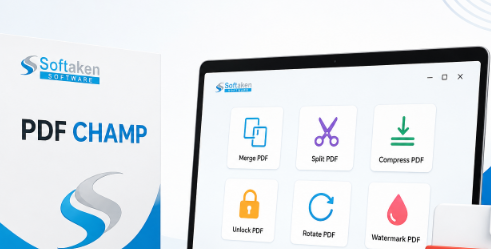
The Softaken PDF Champ's simple interface and modern design make it stand out as a better option for users without technical knowledge. The PDF champ software application aims to provide a reliable and convenient solution for regular PDF management needs. You can say it’s an all-in-one tool because of its multitasking features.
By allowing you to perform multiple PDF-related tasks quickly and efficiently, it can save your time, cut down on efforts, and boost overall productivity. The software is compatible with all Windows operating systems, including 11, 10, 8.1, 8, and 7. As a comprehensive PDF solution designed to handle all your document management requirements singlehandedly, its latest version is available on the company’s website without needing Adobe Acrobat.
Who Is It Designed For?
· Students
· Business professionals
· Legal teams
· Researchers
· Office administrators
PDF Champ all Features
- · PDF merger
- · PDF split
- · PDF compress
- · Image extractor
- · Text extractor
- · PDF to image
- · Image to PDF
- · Rotate PDF
- · Copy PDF
- · Add watermark
- · Header/footer
- · Page number
- · Edit metadata
- · PDF file encryption
- · PDF file decryption
- · Remove PDF page
- · Compare PDFs
- · Digital signature inserter
Real-World Testing and User Experience
To evaluate the PDF Champ, I put the software through its paces using common PDF management tasks such as merging numerous PDF files, splitting large files, compressing file sizes, and adding password protection. It was so easy to navigate that I didn’t face any challenge during this process with its straightforward interface. Even users who don’t have technical knowledge can use this easily.
During testing, without slowing down the process, the software worked smoothly. All features like splitting, merging, editing, etc., worked as expected. The feature of protection added an extra layer of security for my confidential files. The one aspect that stood out to me was its ability to perform multiple PDF-related tasks from a single platform.
Additionally, the software performed all tasks alone, eliminating the need for any external plug-ins or Adobe Acrobat. Overall, it gave me a user-friendly experience and has proved itself useful for every PDF task.
Pros & Cons
Pros
· All in one PDF solution
· Simple and user-friendly interface
· Remove common PDF restrictions
· Support batch processing
· Preserve original formatting
· No Adobe Acrobat required
· Fast processing speed
· Portable application
· Works offline
· Supports security features
· Wide Windows Compatibility
· Free trial available
Cons
· Windows-only software
· Demo version limitations
· English language support only
System Requirements
1. Windows Hardware Requirements:
· 1 GHz Processor (2.4 GHz recommended)
· 512 MB RAM (1 GB recommended)
· 100 MB free space in the hard disk + storage for files
2. Windows Operating System:
· Windows 10 (32-bit & 64-bit editions)
· Windows 8.1/8 (32-bit & 64-bit editions)
· Windows 7/Vista/XP (32-bit & 64-bit editions)
3. Recommended Settings:
· Administrator rights
· Higher specifications for large PDF files
· SSD recommended for faster processing
User Guide
Step 1: Install and Launch the Software
Step 2: Select the desired PDF tool (PDF merger, PDF split, etc.)
Step 3: Add PDF files
Step 4: Configure settings
Step 5: Choose the destination folder
Step 6: Start the process by clicking the Process, Convert, or Apply button
Final Verdict
Overall, this tool is a user-friendly and practical solution regarding PDF issues. This tool combines multiple features, including editing, splitting, compressing, encrypting, decrypting, and many more in a single platform, which eliminates the need for any other external application.
The simple interface of this tool makes it accessible for both beginners and experienced users. Additionally, it’s a reliable choice for students, professionals, and businesses who are seeking an all-in-one PDF tool.
FAQs
Ques. 1. Do I need to install any other program to run this tool?
Ans. No, there isn’t any need to install any other program. It is a standalone program, so you can get access to this easily.
Ques. 2. Is an internet connection mandatory to use this tool?
Ans. No, this tool can easily run locally. An internet connection isn’t required to use this application.
Ques. 3. Does PDF Champ need installation?
Ans. There is no need to install or set it up on your computer; you can easily open the software just from its extension.
Ques. 4. What is this tool about, and what can it do?
Ans. A PDF Champ is a software utility with 18+ features. With the help of these features, you can solve your PDF-related issues, such as splitting large PDF files, extracting images or text, rotating, cropping, inserting a watermark, encrypting or decrypting files, and converting.