TGZ to PST Conversion: Debunking Common Myths About Emails, Folders, and Attachments
-

- Published Updated
- 64 views
Introduction
TGZ files are often used to save exported Zimbra mailbox data. If users want to access this information using Microsoft Outlook, then converting TGZ to PST is an important step of migration. But the process can look harder than it is because of a few assumptions regarding email messages, folder hierarchy, attachments, and data preservation.
Some of these assumptions are based on past experiences with conversion, and others are based on a misunderstanding of how mailbox data is stored and transported. Let’s break some popular myths about TGZ to PST conversion and see what users should really expect.
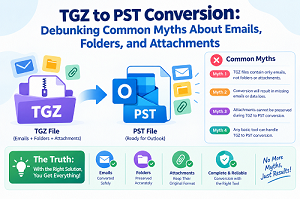
Myth 1: TGZ Files Can Be Opened Directly in Outlook
Fact: A TGZ file is not an Outlook data file; thus, Outlook cannot just open it like it would a PST file. TGZ files are typically used to export Zimbra mailbox data, and PST files are used to store Outlook mailbox data.
Therefore, renaming the file extension or opening the archive directly in Outlook does not convert the underlying mailbox data. To make the PST file compatible with Outlook, you need a correct conversion process.
Myth 2: Converting TGZ to PST Automatically Removes Folder Structure
Fact: Email migration doesn’t have to mean losing folder hierarchy. If the conversion is well planned, the resulting PST can reproduce the source mailbox structure.
Important folders might be Inbox, Sent Items, Drafts, or custom folders to help you organize years of stored messages. This structure makes the converted mailbox easier to navigate and removes the need to manually re-sort emails. The conversion of TGZ to PST permits reconstruction of folder structure if the conversion tool enables folder hierarchy preservation.
Myth 3: Attachments Are Always Lost During Conversion
Fact: Attachments are part of the data in an email that can be transferred during a correct mailbox conversion. The outcome depends on the source data, the conversion process, and the software capabilities.
Since the TGZ files are plain text files, the contents of emails and attachments should be considered for a proper TGZ to PST conversion. DataVare’s product literature indicates that its converter retains email characteristics and attachments while converting TGZ to PST.
Myth 4: Every Email Must Be Converted Individually
Fact: It is not the single method for migrating a TGZ mailbox. You can batch convert to process numerous TGZ files or larger collections of mailbox data together.
This can be quite helpful for enterprises with a large number of archived mailboxes or users who want to move their Zimbra email data into Outlook. Batch processing can help decrease repetitive effort and make the whole migration process more manageable.
Myth 5: All TGZ Data Must Be Converted at Once
Fact: You don’t necessarily have to convert a whole mailbox. In rare cases, users may want only specific mailboxes, folders, or some selected email data.
You might choose to employ selective conversion if you have old data in the archive that you don’t want to convert to Outlook. Some specialist conversion software has filtering or selection options. Users can decide which data should be transferred instead of processing everything unnecessarily.
Myth 6: Metadata Does Not Matter After Conversion
Fact: Email metadata is vital for making archived messages useful and recognizable when migrated. Converted emails have information such as sender, receiver, subject, dates, and other attributes of the message.
For a mailbox migration, it is not enough to have readable messages. Additionally, users should assess if important email properties are still present in the resultant PST and if messages still have their original context.
Myth 7: A Successful PST File Means Every Email Was Converted Correctly
Fact: Having the capacity to access a PST does not necessarily mean that all essential items were transferred correctly.
After TGZ to PST conversion, users need to examine essential folders, look for specific messages, read emails with attachments, and compare selected records with the original archive. You can check the output for missing messages, odd folder modifications, or attachment issues before the original TGZ files are deleted.
Myth 8: TGZ to PST Conversion Is Only Useful for Outlook Migration
Fact: Zimbra archive to PST conversion helps users make the archived email information centralized in an Outlook-compatible data file. PST files can be a useful method to archive and manage historical mailbox data within the Outlook environment.
The conversion might be part of a larger email management process, such as when users are migrating to a new email platform, merging archived messages, or enabling access to older Zimbra data in Outlook.
Choosing a Suitable Conversion Approach
The ideal strategy will depend on the amount of mailbox data, the folder structure you want, whether you need attachments, and how much control you want to have during the transfer. A specialist solution like DataVare TGZ to PST Converter Expert Tool can offer capabilities like mailbox preview, selective conversion, and preservation of email structure and attachments.
However, users should check the converted PST after the operation. Regardless of the conversion method used, checking the output is an important step as it verifies that the required mailbox data has been migrated as intended.
Conclusion
Converting TGZ to PST does not involve losing emails, rebuilding folders manually, or losing attachments. The majority of the worries regarding Zimbra mailbox migration arise from the widespread myths, not the real capabilities of the latest conversion procedures.
Knowing what is fact and what is fiction can
assist users in adopting a more measured approach to the conversion process.
Users can review the email content, folder hierarchy, attachments, metadata,
and the final PST to make the migration more organized and easy to verify.
Visit here: