How to Turn a Selfie into Art with a Selfie Paint by Numbers Kit
-

- March 08th, 2026
- 617 views

Get a free topical map and start building content authority today.
Turn a Selfie into a Custom Painting with a selfie paint by numbers kit
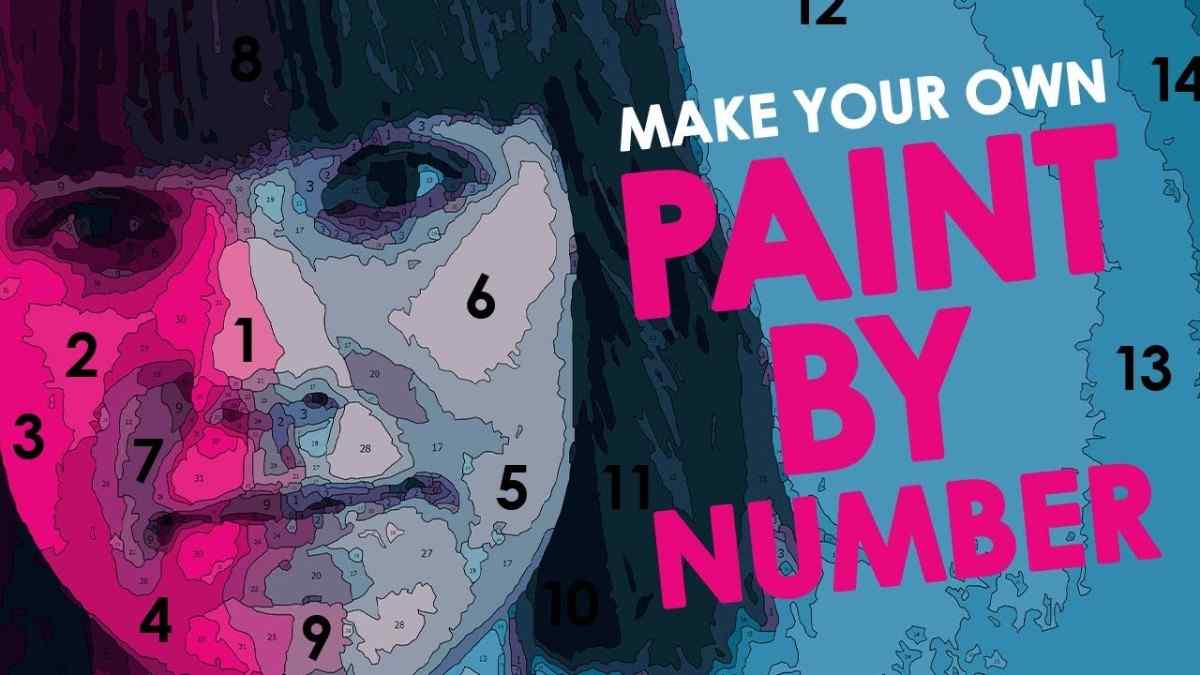
Turning a selfie into framed art is simple with a selfie paint by numbers kit: a digital conversion turns a photograph into numbered color regions, a printed canvas, and a matching paint set so anyone can paint the portrait in guided tones. This guide explains the process, gives a named checklist for reliable results, and lists practical tips to avoid common mistakes when creating a custom paint by number from photo.
Convert a selfie into a paint-by-number canvas by choosing the right photo, using conversion software or a service, refining the color map, and following a simple painting workflow. Use the PAINT checklist for consistent results and review trade-offs like detail vs. color simplicity.
Detected intent: Procedural
How a selfie paint by numbers kit works
A selfie paint by numbers kit packages three things: a digitally simplified color map derived from the photo, a printed canvas with numbered regions, and a set of paints labelled to match the numbers. Software reduces a photo into a manageable palette and contiguous regions so the portrait is paintable. Many services output files for DIY printing or ship a ready-made kit.
Step-by-step: Convert a selfie into a paint-by-number kit (PAINT checklist)
The following PAINT checklist is a compact framework to follow for predictable results.
- Prepare the photo — pick a high-resolution selfie with clear light and simple background.
- Analyze composition — crop and adjust contrast to emphasize the subject.
- Import to converter — use software or an online service to generate a numbered color map.
- Number refinement — reduce or expand the color palette, smoothing edges where needed.
- Test print and paint — print a small test, match paints, and do trial strokes before committing to the full canvas.
Suggested settings and why they matter
Set the converter to 10–25 colors for portraits depending on desired realism. Fewer colors simplify painting and reduce time, while more colors preserve subtle tones but increase complexity. Use a slightly higher contrast crop to keep facial features readable in numbered regions.
Practical example: a short scenario
A family member selected a graduation selfie (2000×1500 px), cropped to remove a busy background, and converted it at 15 colors. After smoothing small islands and printing a small test, the final kit shipped with a 16"×20" canvas and 15 labeled paint pots. Painting took two weekend afternoons and the finished piece hung in a home office. The result matched the photograph's pose while using clear numbered regions to guide color placement.
Practical tips for best results
- Choose natural, even lighting in the selfie to preserve skin tones; avoid heavy filters that distort color data.
- Crop tightly to the subject and simplify background elements before conversion to improve region clarity.
- Prefer a medium palette (12–20 colors) for most portraits to balance realism and ease.
- Test-print a small section at actual size to confirm numbers stay legible on the final canvas.
- Label spare paint containers with both number and a short hex/RGB value if possible to reproduce colors later.
Trade-offs and common mistakes
Trade-offs to consider
Choosing more colors increases realism but raises time and skill needed. Simplifying the palette speeds completion but can flatten facial detail. Printing larger canvas sizes preserves more detail but also exposes any conversion artifacts.
Common mistakes
- Using selfies with heavy motion blur or extreme shadows — these create confusing regions in the converter.
- Overlooking background simplification — busy backgrounds create many small regions that add unnecessary work.
- Skipping a test print — unreadable numbers or poor contrast often only become obvious after printing.
Options: DIY vs. service and file formats
Conversion tools range from downloadable software to browser-based services. Choose formats (PNG, PDF, or scalable vector output) depending on whether the canvas will be printed at home or by a professional lab. If health or well-being benefits of art-making are relevant, authoritative sources such as the National Endowment for the Arts document community and personal benefits of arts participation (arts.gov).
Core cluster questions (use for related articles or internal links)
- How to pick the best selfie for a paint-by-number portrait?
- What image resolution is required for a print-ready paint-by-number canvas?
- How many colors should a paint-by-number portrait use?
- Can a painted portrait be color-corrected after painting?
- What tools help smooth small regions before printing a numbered canvas?
Supplies checklist
- Printed numbered canvas or transfer paper
- Paint set matched to numbered palette
- Brushes in small and medium sizes
- Palette for mixing and labeled spare containers
- Clear workspace with good light and a reference print
Final workflow summary
Prepare the selfie, convert and refine the color map, print a test, then paint following number order from larger regions to finer details. Allow paints to dry between adjacent color blocks to avoid bleeding. The PAINT checklist ensures consistent, repeatable results.
Frequently asked questions
How does a selfie paint by numbers kit work?
A converter simplifies the photograph into numbered color regions; the kit pairs those numbers with paints and a printed canvas so each number maps to a paint color, allowing step-by-step recreation of the image.
What resolution is best for a custom paint by number from photo?
Use the highest available resolution; 1500–3000 pixels on the longest side is a good target for 8"×10" to 16"×20" prints—higher resolution helps retain facial detail after conversion.
Can beginners turn a selfie into painting kit and complete it?
Yes. Using a moderate palette and following the numbered regions makes portrait painting accessible for beginners; practice with a small test area first.
How to choose how many colors when creating a turn selfie into painting kit?
Select 12–18 colors for a balance of realism and simplicity; fewer than 10 may oversimplify faces, while more than 25 can overwhelm most hobby painters.