Types of Computer Viruses: A Practical Guide to Threats, Behavior, and Defense
-

- Published Updated
- 1,598 views
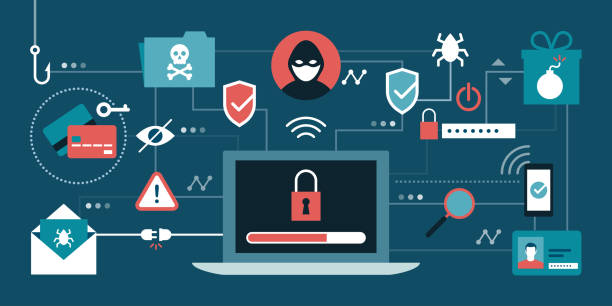
Computer viruses are a category of malicious software that can replicate, modify, or execute unwanted actions on devices and networks. Understanding the different types of computer viruses, their common behaviors, and typical infection vectors helps users and administrators prioritize defenses and respond effectively when incidents occur.
- Different types of computer viruses include file-infecting viruses, macro viruses, worms, trojans, ransomware, and polymorphic or metamorphic variants.
- Viruses spread through infected files, removable media, email attachments, software vulnerabilities, and social engineering.
- Detection relies on signature-based scanning, behavior analysis, sandboxing, and threat intelligence; recovery often involves isolation, backup restoration, and forensic analysis.
Types of computer viruses
Many classifications exist, but several categories commonly appear in incident reports and cybersecurity literature. The following descriptions focus on behavior and infection mechanisms rather than marketing labels.
File-infecting viruses
File-infecting viruses attach themselves to executable files or replace parts of a program so that the virus code runs when the application starts. These were widespread in earlier computing eras but still appear where legacy systems or unpatched applications exist.
Macro viruses
Macro viruses embed malicious macros into documents created with productivity suites (for example, word processors or spreadsheets). When a user opens a document and enables macros, the embedded code can execute, potentially spreading to other documents and systems.
Worms
Worms are self-replicating programs that spread across networks without needing to attach to a host file. They exploit network protocols, open ports, or software vulnerabilities and can propagate rapidly across connected systems, often forming botnets or triggering denial-of-service conditions.
Trojans
Trojans masquerade as legitimate software or files but perform hidden malicious actions. They do not self-replicate like worms or viruses but are used to create backdoors, steal data, or deploy additional payloads such as ransomware.
Ransomware
Ransomware encrypts files or entire systems and demands payment for recovery keys. It is frequently delivered via phishing emails, exploit kits, or through trojanized installers. Ransomware incidents have targeted organizations of many sizes and sectors.
Polymorphic and metamorphic viruses
These variants change their code or appearance to evade signature-based detection. Polymorphic viruses encrypt their payload with varying keys, while metamorphic variants rewrite their own code structure. Both complicate traditional antivirus approaches.
How viruses spread and common infection vectors
Email and social engineering
Phishing emails with malicious attachments or links remain a dominant delivery mechanism. Social engineering persuades users to open attachments, enable macros, or install untrusted applications.
Removable media and shared storage
USB drives, external hard drives, and shared network folders can carry infected files that execute when accessed on another machine. Many incident response guidelines still recommend disabling autorun features and scanning removable media before use.
Software vulnerabilities and exploits
Unpatched software and misconfigured services create opportunities for worms and exploit-driven malware to gain initial access and move laterally within networks.
Common behaviors and payloads
Data theft and exfiltration
Some malicious programs are designed to gather credentials, capture screenshots, or copy sensitive files to remote servers controlled by attackers.
Destruction, disruption, or sabotage
Certain malware aims to disrupt operations by deleting files, corrupting storage, or disabling system functions. Nation-state and hacktivist operations have included destructive components.
Resource abuse and botnet activity
Infected systems can be recruited into botnets to send spam, mine cryptocurrency, or participate in distributed attacks.
Detection, protection, and best practices
Layered defenses
Combining endpoint protection, network segmentation, email filtering, and regular patching reduces exposure. Endpoint detection and response (EDR) tools supplement traditional antivirus by monitoring behavioral indicators.
Backups and recovery planning
Regular, tested backups are essential to recover from ransomware and destructive attacks. Backups should be kept offline or in immutable storage to prevent compromise alongside production systems.
Incident response and threat intelligence
Preparation includes documented response playbooks, access to forensic tools, and integration with threat intelligence feeds to identify indicators of compromise and known malware families.
For official guidance on malware preparedness and incident response, consult resources from national cybersecurity agencies such as the Cybersecurity and Infrastructure Security Agency (CISA) and the United States Computer Emergency Readiness Team (US-CERT): CISA US-CERT guidance.
Responding to a suspected infection
Immediate steps
Isolate affected systems from networks, preserve volatile evidence if forensic analysis is needed, and notify IT or security teams according to organizational procedures. Avoid actions that could further spread the malware.
Recovery and lessons learned
Restore systems from verified backups, patch vulnerabilities, rotate credentials, and perform a post-incident review to update defenses and user training. Documentation supports compliance and continuous improvement.
Regulatory and reporting considerations
Depending on jurisdiction and sector, breaches involving data loss may trigger legal reporting obligations. Organizations often coordinate with regulators and law enforcement when severe incidents occur.
Frequently asked questions
What are common signs that a system is infected by computer viruses?
Signs may include unexplained slow performance, frequent crashes, unexpected network activity, unfamiliar files or processes, disabled security tools, or ransom notes. Investigation with appropriate tools and experts helps confirm the cause.
Can antivirus software stop all types of viruses?
No single tool guarantees complete protection. Signature-based antivirus is effective against known threats, while behavior-based detection and timely patching help detect novel or obfuscated malware. A layered security approach is recommended.
Is it safe to open email attachments if they come from known contacts?
Not always. Legitimate accounts can be compromised and used to distribute malware. Verify unexpected attachments via a separate channel and avoid enabling macros or executing embedded code unless the content is validated.
How often should backups be tested?
Backups should be tested regularly—at least quarterly or according to organizational risk tolerance—to ensure data integrity and restore procedures work under different recovery scenarios.
For technical standards and guidance on security controls, consider resources from organizations such as the National Institute of Standards and Technology (NIST) and sector-specific regulators for additional depth.