What are the Key Video Conference Hearing Etiquette in Court?
-

- September 19th, 2026
- 128 views
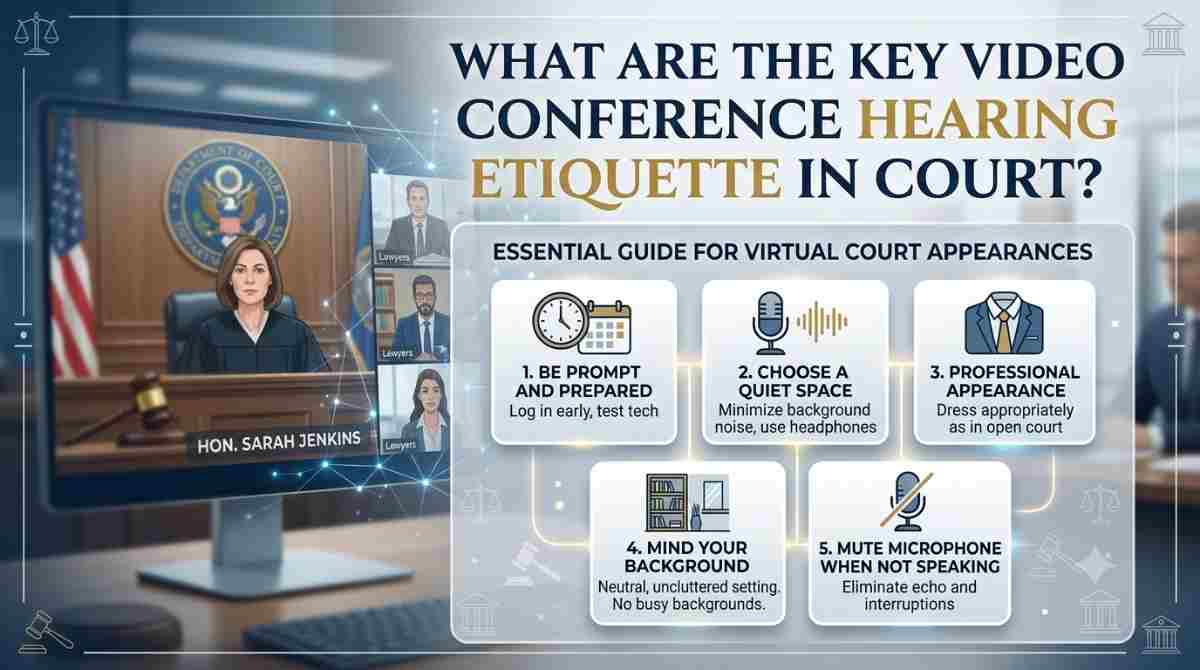
Table of Contents
- Introduction
- What Is Courtroom Video Conferencing?
- Pre-Hearing Etiquette: Getting Ready Before You Log In
- Etiquette During the Hearing for Judges, Attorneys, and Defendants
- Etiquette for Law Enforcement Officers Requesting Warrants by Video
- Technical Etiquette: Camera, Audio, and Connection Standards
- Document and E-Signature Etiquette in Virtual Hearings
- Common Video Conference Hearing Etiquette Mistakes to Avoid
- Quick Reference Table: Do’s and Don’ts of Courtroom Video Conferencing
- Confidentiality and Security Etiquette During Video Hearings
- Etiquette for Handling Technical Interruptions Without Delaying Justice
- Training and Onboarding Etiquette for Court Staff and Officers
- Etiquette for Scheduling and Coordinating Multi-Party Video Hearings
- How Palatine Technology Group Supports Proper Hearing Etiquette
- The Future of Courtroom Video Conferencing
- Ready to Modernize Your Court’s Video Hearings?
- Frequently Asked Questions
Key Takeaways
- Proper etiquette keeps virtual hearings professional, secure, and legally sound.
- Courtroom video conferencing works best with reliable browser based technology.
- Judges, attorneys, law enforcement, and defendants each have distinct etiquette duties.
- Camera framing, audio clarity, and connection stability all affect hearing outcomes.
- Palatine Technology Group’s PalVid Cloud and Virtual Court tools support etiquette by design.
Courtrooms have changed. What once required a judge, an attorney, a defendant, and a deputy to be physically present in the same room can now happen across four different locations at once.
This shift did not happen overnight. It happened because courtroom video conferencing has proven itself to be faster, safer, and more accessible than the old model of transporting inmates, driving officers to courthouses at 2 a.m., and waiting hours for a judge’s signature.
But speed and convenience only work when everyone in the virtual room follows the right etiquette. A frozen screen during a bond hearing, a muted attorney during a plea, or a poorly lit officer requesting a search warrant at midnight can all slow down justice instead of speeding it up.
This guide breaks down exactly what proper video conference hearing etiquette looks like for every party involved, and how the right technology partner makes that etiquette easy to maintain.
What Is Courtroom Video Conferencing?
Courtroom video conferencing is the use of secure, browser based video technology to connect judges, attorneys, law enforcement, and other required parties for hearings, arraignments, and warrant requests, without everyone needing to be in the same physical location.
It typically covers:
- First appearance and arraignment hearings
- Bond hearings
- Arrest and search warrant requests from officers in the field
- Attorney and client consultations during a hearing
- Probation warrant requests
Instead of relying on outdated hardware or single purpose video rooms, modern court video conferencing runs on standard devices. A judge can appear from chambers. An officer can appear from a patrol car. An attorney can appear from their office.
This flexibility is exactly why etiquette matters more, not less. When a hearing is not confined to one room, every participant is personally responsible for how they show up on screen.
Pre-Hearing Etiquette: Getting Ready Before You Log In
Etiquette does not start when the camera turns on. It starts well before the scheduled hearing time.
For Judges and Court Staff
- Confirm the hearing link and platform have been shared with every required party in advance.
- Test the connection from the chambers, office, or courtroom device that will be used.
- Have any documents that need electronic signature ready and accessible.
For Attorneys
- Log in a few minutes early to confirm audio and video are functioning.
- Review the case file so the hearing is not delayed by searching for documents on camera.
- Confirm with the client beforehand how private communication will work during the session.
For Law Enforcement Officers
- Position the device (patrol car MDT, tablet, or desktop) before initiating the call, not during it.
- Have the warrant application, probable cause statement, or supporting documents ready to present.
- Confirm the vehicle or location has a stable connection before requesting the judge join.
Good preparation is the single biggest factor separating a smooth courtroom video conferencing session from a delayed one.
Etiquette During the Hearing for Judges, Attorneys, and Defendants
Once the hearing begins, etiquette shifts from preparation to conduct. Every party plays a role in keeping the session professional and efficient.
General Etiquette That Applies to Everyone
Here’s a brief of the general ettiquete that applies to everyone:
- Mute your microphone when not speaking to avoid background noise.
- Look at the camera when addressing the court, not just the screen.
- Avoid multitasking. A visible phone, second monitor use, or distracted glance can be noted on the record.
- Dress and sit as if physically present in the courtroom.
- Speak clearly and pause between statements so the recording captures everything accurately.
For the Judge
Here’s what applies to the judge:
- Open the hearing by confirming all required parties are visible and audible.
- State clearly for the record that the hearing is being conducted through video conference.
- Address any technical issues immediately rather than proceeding through a poor connection.
For the Defendant and Attorney
- Sit in a quiet, private location if privileged communication may be needed during the hearing.
- Wait to be addressed before speaking, exactly as in a physical courtroom.
- Confirm understanding verbally when asked, since a nod may not translate clearly on screen.
This is where a platform built for courtroom video conferencing rather than a generic consumer app makes a visible difference in hearing quality.
Etiquette for Law Enforcement Officers Requesting Warrants by Video
Warrant requests carry their own etiquette expectations, since officers are often calling from a patrol vehicle, station, or mobile command unit rather than an office.
- Park in a well lit, stationary location before starting the call. A moving vehicle affects both video stability and audio clarity.
- State your name, badge number, and department clearly at the start of the call.
- Present probable cause information in the same organized manner expected in person.
- Keep the video call focused on the warrant request. Avoid unrelated conversation while the judge is reviewing documents.
- Confirm the judge has received and can view all submitted documentation before ending the call.
This kind of remote warrant request is exactly what Palatine Technology Group’s anywhereWARRANT platform was built to support, allowing officers to connect with a judge from the field instead of driving to the courthouse.
Technical Etiquette: Camera, Audio, and Connection Standards
Technical etiquette is often overlooked, but it directly affects whether a hearing proceeds smoothly or gets delayed.
Camera Positioning
- Position the camera at eye level, not looking up or down at the participant.
- Frame the shot from the chest up, centered in the screen.
- Ensure adequate lighting so facial expressions are visible, which matters for credibility assessments during hearings.
Audio Standards
- Use a quiet room whenever possible to avoid background interference.
- Speak at a normal courtroom volume, not too close to the microphone.
- Avoid speaking over other participants, since overlapping audio is harder to follow on video than in person.
Connection Standards
- Use a stable internet connection rather than relying on weak mobile signal for critical hearings.
- Close unnecessary applications that may slow down bandwidth during the call.
- Have a backup plan, such as a phone number, in case the video connection drops.
Because courtroom video conferencing through PalVid Cloud is built on WebRTC standards and runs directly in the browser, it removes many of the technical barriers that cause delays, without requiring officers or judges to install separate desktop software.
Document and E-Signature Etiquette in Virtual Hearings
Virtual hearings frequently involve documents that need to be reviewed, signed, and filed in real time. Etiquette here is about accuracy and clarity, not just conduct.
- Confirm every party can see the document being discussed before proceeding.
- Read key terms aloud when a document is being electronically signed, so the record reflects informed consent.
- Avoid rushing through electronic signature steps. Confirm the signature was captured successfully before moving to the next step.
- Keep a copy of every signed document accessible for the case file immediately after the hearing.
Palatine Technology Group’s Virtual Court solution is designed around this exact workflow, giving judges, prosecutors, defense attorneys, and inmates a shared collaborative environment where each party can electronically sign and print documents from their own location.
Common Video Conference Hearing Etiquette Mistakes to Avoid
Even experienced court professionals fall into avoidable habits during virtual hearings. Watch for these common mistakes.
- Joining a hearing late without notifying the court in advance
- Leaving a microphone unmuted while having a side conversation
- Using a location with poor lighting or a distracting background
- Failing to test the connection before an important hearing
- Speaking while another participant is already speaking
- Assuming a nod or gesture is enough of a response for the record
- Attempting to conduct a hearing from a moving vehicle
Avoiding these mistakes takes discipline, but it also takes reliable technology. A platform prone to freezing or dropped calls makes good etiquette much harder to maintain, no matter how prepared the participants are.
Thinking about What are the do’s and don’ts of virtual court hearings? To further make things clear, here’s a quick reference table:
| Situation | Do | Don’t |
| Before the hearing | Test audio, video, and connection early | Wait until the hearing starts to check equipment |
| During speaking | Look at the camera, speak clearly | Talk over other participants |
| Camera setup | Use eye level framing with good lighting | Sit in a dark or cluttered background |
| Documents | Confirm all parties can view and sign clearly | Rush through electronic signatures |
| Law enforcement calls | Park in a stable, well lit location | Attempt the call while driving |
| Technical issues | Report problems immediately | Continue through a poor connection |
Confidentiality and Security Etiquette During Video Hearings
Security is not just a technical requirement, it is an etiquette responsibility. Every participant in a virtual hearing plays a role in protecting sensitive case information.
Judges, attorneys, and law enforcement officers should treat a video hearing link with the same discretion as a physical courtroom access badge. Sharing links carelessly or joining from unsecured networks puts confidential case details at risk.
Best practices include:
- Never forward a hearing link to anyone outside the required parties
- Confirm the platform uses encrypted connections before sensitive information is discussed
- Avoid joining hearings from public WiFi networks whenever possible
- Log out completely once the hearing concludes rather than leaving a session idle
- Verify that recorded hearings are stored securely and only accessible to authorized personnel
For law enforcement specifically, warrant requests often involve sensitive investigative details. Officers should confirm they are connected to the correct judge on a verified, encrypted link before sharing probable cause information, rather than assuming any video platform is secure by default.
This is precisely why Palatine Technology Group built anywhereWARRANT around multiple layers of security and an encrypted, secured connection over the internet. When the underlying courtroom video conferencing platform is designed for judicial use rather than general business meetings, maintaining confidentiality etiquette becomes far easier for every party involved, since the security groundwork is already built into the system rather than left to individual users to manage on their own.
Etiquette for Handling Technical Interruptions Without Delaying Justice
Even with the best preparation, technical interruptions can happen. What separates a well run virtual hearing from a chaotic one is how participants respond when something goes wrong.
Proper etiquette during an interruption includes:
- Speaking up immediately rather than continuing to talk over a frozen or muted screen
- Staying on the call, if possible, rather than immediately disconnecting and rejoining
- Allowing the judge to formally pause the record before troubleshooting begins
- Avoiding side conversations or distractions while the issue is being resolved
- Confirming audio and video are fully restored before resuming testimony or statements
Judges and court staff should have a clear, calm process for handling these moments. Announcing a brief pause for the record, confirming all parties are still present, and resuming only once every connection is stable keeps the hearing procedurally sound.
Law enforcement officers requesting warrants from a patrol vehicle should be especially mindful here. A dropped connection during a time sensitive warrant request should be treated with urgency, but not panic. Reconnecting quickly from a stationary location and confirming the judge received all previously shared documentation prevents the need to restart the entire process.
Reliable, browser based technology significantly reduces how often these interruptions occur in the first place, which is part of why courts continue moving toward dependable, purpose built video systems rather than general consumer tools for judicial proceedings.
Training and Onboarding Etiquette for Court Staff and Officers
Etiquette is only consistent when everyone using a system has been properly trained on it. Courts and departments that skip formal onboarding often see the most avoidable mistakes during live hearings.
Effective training should cover:
- How to log in, test equipment, and troubleshoot common issues before a hearing begins
- Where to position a camera and how to set up lighting correctly during virtual court hearing?
- How electronic signature steps work within the platform being used
- What to do if a connection drops during a warrant request or hearing
- Department specific protocols for confidentiality and recording retention
New judges, attorneys, and officers should have a chance to practice with the system in a low stakes setting before relying on it for an active case. This reduces hesitation and error during real hearings, where every delay has a direct impact on case timelines.
Ongoing refreshers matter too. As features are added or workflows change, a short update session keeps everyone aligned on current best practices rather than relying on outdated habits.
Etiquette for Scheduling and Coordinating Multi-Party Video Hearings
Scheduling is often the first etiquette touchpoint in any virtual hearing, and getting it wrong creates delays before the hearing even starts.
Court staff should confirm every required party, including the judge, prosecutor, defense attorney, and jail or law enforcement location, has the correct hearing time, link, and any relevant case details well in advance. Sending this information at the last minute increases the chance of a missed or delayed connection.
Good scheduling etiquette includes:
- Confirming time zones when parties are joining from different locations
- Sending a single, clear link rather than multiple conflicting ones
- Building in a short buffer before the official start time for connection checks
- Notifying all parties immediately if a hearing needs to be rescheduled
- Keeping a consistent process so attorneys and officers know what to expect each time
For law enforcement, this matters most with warrant requests, where officers may need a judge on short notice outside normal hours. A dependable scheduling and connection process removes guesswork during time sensitive situations.
When coordination is handled consistently, every party arrives prepared, which keeps the hearing itself efficient and focused, rather than starting with confusion over logistics that could have been resolved beforehand.
How Palatine Technology Group Supports Proper Hearing Etiquette
Etiquette is easier to follow when the technology behind it works the way it should. For more than 25 years, Palatine Technology Group has built tools specifically for courts and law enforcement, not repurposed consumer software.
Here is how each product supports the etiquette standards covered above.
anywhereWARRANT
- Cloud based electronic warrant system that lets officers and judges collaborate remotely
- Built in First Appearance and Arraignment module with video conferencing
- GIS module and dynamic reporting dashboard for accurate case tracking
- Available in cloud or on premise hosting with multiple layers of security
- Remote access for probation officers to obtain probation warrants
Virtual Court (CDCS)
- Secure video conference connecting judge, jail, attorney, and other required parties
- Electronic signature capability for documents at every participating location
- Hearings can be electronically recorded and retained per required schedules
- Integrates with existing RMS, JMS, and Case Management systems
PalVid Cloud
- Secure, browser based courtroom video conferencing built on WebRTC standards
- Works on desktop, laptop, MDT, and tablet devices including iPad and Microsoft Surface
- Lets officers connect with a judge directly from a patrol car, station, or mobile command unit
- High quality HD audio and video as part of the anywhereWARRANT suite
By combining these tools, Palatine Technology Group removes many of the technical obstacles that lead to etiquette breakdowns, like dropped calls, unclear audio, or delays in document handling. You can review the full Video Conferencing solution here or see how the Products page ties everything together into one workflow.
The Future of Courtroom Video Conferencing
Remote hearings are no longer a temporary workaround. According to the National Center for State Courts, appearance rates for criminal warrant hearings in parts of North Dakota reached nearly 100 percent after adopting video conferencing, compared to about 80 percent before, a clear sign that video hearings can actually improve court participation when done correctly. Source: StateTech Magazine
As more jurisdictions formalize remote hearing procedures, the courts and departments that treat video etiquette as a standard, not an afterthought, will see the biggest gains in efficiency and consistency.
That means investing in:
- Purpose built court technology rather than general video call apps
- Ongoing training for judges, attorneys, and officers on virtual hearing conduct
- Secure, integrated systems that connect warrants, hearings, and documentation in one place
Courts that combine strong etiquette standards with dependable courtroom video conferencing technology are best positioned for what comes next in judicial modernization.
Ready to Modernize Your Court’s Video Hearings?
Palatine Technology Group has spent over 25 years helping courts and law enforcement agencies issue warrants faster, hold hearings remotely, and keep every session secure and professional. Whether you need a complete e-warrant system, a virtual court solution, or standalone courtroom video conferencing, PalVid Cloud and the anywhereWARRANT suite are built for exactly this purpose.
Contact Palatine Technology Group today to request a demo and see how much time, travel, and cost your department can eliminate.
Frequently Asked Questions
1. How long does a typical virtual arraignment hearing take compared to an in-person one?
Most virtual arraignments take a similar amount of time to in-person hearings once participants are logged in, though total turnaround is often faster since there is no travel or transport time beforehand.
2. Can multiple locations join the same court video hearing at once?
Yes, a properly designed virtual court setup can connect a judge, jail, prosecutor, and defense attorney from separate locations simultaneously in one session.
3. What should an officer do if the video connection drops during a warrant request?
The officer should reconnect from a stationary, well lit location as quickly as possible and confirm with the judge that no submitted information was lost before continuing.
4. Are virtual hearings recorded the same way as in-person hearings?
Virtual hearings can be electronically recorded and retained based on a court’s required retention schedule, similar to how in-person proceedings are documented.
5. Do defendants have the same rights during a virtual hearing as an in-person one?
Yes, defendants retain the same procedural rights during a virtual hearing, including the right to legal representation and the opportunity to respond to the court.
6. What devices can be used for a courtroom video hearing?
Depending on the platform, hearings can typically be joined from desktops, laptops, tablets, or mobile data terminals, giving officers, attorneys, and judges flexibility in where they connect from.