NoSho | Appointment Booking Software for Service Businesses
-
- Published Updated
- 4,300 views
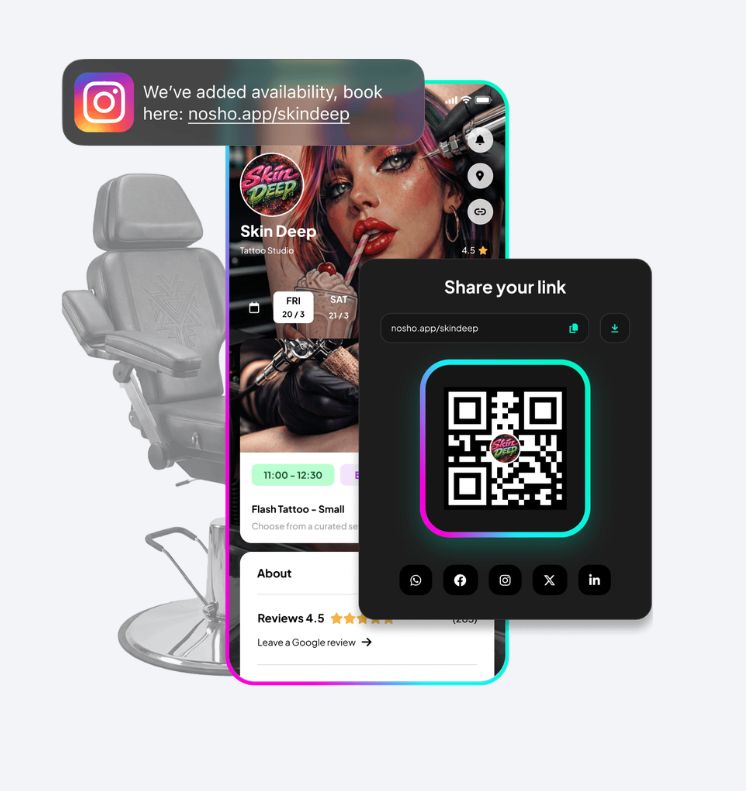
Every missed appointment costs a service business real money — the lost slot, the wasted staff hour, the client who quietly books somewhere else instead. NoSho is appointment booking software built specifically for service businesses that can't afford empty chairs: salons, clinics, studios, home-service teams, and consultants who live and die by their calendar. The name says it all — NoSho exists to make the no-show close to impossible, so every open slot on your calendar turns into revenue instead of a gap.
Why Service Businesses Need Dedicated Appointment Booking Software
Generic scheduling tools were built for meetings, not for businesses that run on billable time slots. A hair salon, a physiotherapy clinic, or a mobile detailing crew doesn't just need a calendar — it needs deposits, staff assignments, service durations, buffer times, and a booking page that converts a browsing visitor into a paying client without a single phone call.
That's the gap NoSho was built to close. Instead of stitching together a calendar app, a payment processor, and a text-reminder tool, service businesses get one connected system designed around the way appointments actually work: recurring clients, variable service lengths, multiple staff or rooms, and the constant threat of a forgotten booking.
What Makes NoSho Different
Plenty of tools call themselves appointment booking software, but NoSho is built around a single, specific problem: no-shows. Most platforms treat reminders as an afterthought. NoSho treats no-show prevention as the core product — automated confirmations, smart reminder timing, waitlist backfill, and optional deposits work together so a cancelled or forgotten slot rarely stays empty.
The result is software that pays for itself. A single recovered appointment often covers the monthly cost of the platform, and most businesses see far more than one saved booking a month once reminders and deposits are switched on.
Key Features of NoSho's Appointment Booking Software
Online Booking & Calendar Sync
Clients book directly from a branded page, your website, or social media — no back-and-forth calls required. NoSho syncs in real time with Google Calendar and Outlook, so double-bookings and manual entry errors disappear.
Automated Reminders to Reduce No-Shows
This is the feature the name is built around. Automated SMS and email reminders go out at intervals proven to reduce missed appointments, with optional two-way confirmation so clients can reschedule instead of simply not showing up.
- Customizable reminder timing (24 hours, 2 hours, or your own schedule)
- Two-way SMS confirmation and easy rescheduling links
- Automatic waitlist notifications when a slot opens up
Payments & Deposits
For businesses that lose real money on last-minute cancellations, NoSho supports upfront deposits and card-on-file policies at booking. Clients pay or save a card before the slot is confirmed, which on its own cuts no-shows dramatically for many service businesses.
Staff & Resource Management
Assign services to specific staff members, rooms, or equipment, and let clients book directly with their preferred provider. Staff calendars, availability rules, and time-off requests all live in one dashboard instead of a shared spreadsheet.
Reporting & Insights
NoSho tracks booking volume, cancellation rates, no-show rates, and revenue by staff member or service, so owners can see exactly where lost appointments are happening and fix it — rather than guessing.
Who Uses NoSho
The platform is built for any business where a missed appointment means lost income, including:
- Salons, spas, and barbershops
- Medical, dental, and wellness clinics
- Fitness studios and personal trainers
- Home-service providers: cleaning, repair, and mobile detailing teams
- Consultants, coaches, and tutors who bill by the session
How to Get Started with NoSho
Setting up appointment booking software shouldn't take weeks. Most businesses are live on NoSho within a day:
- Create a free account and add your services, staff, and availability
- Connect your calendar and payment processor
- Turn on automated reminders and (optionally) deposit requirements
- Share your booking link on your website, Instagram bio, or Google listing
From there, NoSho runs quietly in the background — confirming bookings, sending reminders, and filling cancellations from the waitlist — while you focus on the clients actually in the chair.
Conclusion
Choosing the right appointment booking software comes down to one question: does it actually protect your calendar? NoSho is built for service businesses that need more than a digital calendar — they need a system that actively fights the no-shows eating into their revenue. If missed appointments are costing you money every week, it's worth seeing the difference firsthand.
Start your free NoSho trial today and see how many appointments you save in the first 30 days.
Frequently Asked Questions
Q: What is NoSho?
A: NoSho is appointment booking software designed for service businesses — salons, clinics, studios, and home-service providers — that combines online booking, automated reminders, deposits, and staff scheduling in one platform focused on reducing no-shows.
Q: How does NoSho reduce no-shows?
A: NoSho combines timed SMS and email reminders, two-way confirmation, optional deposits or card-on-file at booking, and automatic waitlist backfill so cancelled slots get rebooked instead of sitting empty.
Q: Is NoSho suitable for a small, single-location business?
A: Yes. NoSho scales from a single solo provider to multi-location teams with several staff members, so small businesses can start with the essentials and add features like deposits or multi-staff scheduling as they grow.
Q: Does NoSho integrate with my existing calendar?
A: Yes. NoSho syncs in real time with Google Calendar and Outlook, so appointments booked through NoSho automatically block your existing calendar and vice versa.
Q: Can clients book appointments without calling my business?
A: Yes. Clients can book directly through a branded booking page, your website, or a link shared on social media, at any hour, without needing to call or wait for a response.
Q: Does NoSho charge clients for missed appointments?
A: You control the policy. NoSho supports optional deposits or saved-card policies at booking, and you decide whether to charge a no-show fee based on your own cancellation rules.