Clean 3D Print Bed: Proven Methods to Improve Adhesion and Surface Finish
-

- Published Updated
- 1,709 views
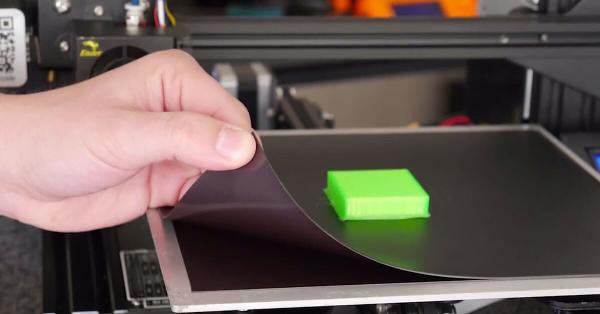
Keeping a printer's build surface free of residue is a simple way to reduce failed prints and improve first-layer adhesion. This guide explains how to clean 3D print bed surfaces safely and effectively, covering common materials, tools, step-by-step methods, and aftercare tips.
- Regular cleaning removes oils, adhesives, and filament residue to improve adhesion and surface quality.
- Use isopropyl alcohol for most surfaces, mild soap and water for removable plates, and plastic scrapers to avoid scratching.
- Follow the printer or surface manufacturer's maintenance instructions and allow plates to reach room temperature before re-leveling.
How to Clean 3D Print Bed: Step-by-Step Methods
Before beginning, power down the printer and allow the bed to cool to a safe handling temperature. The specific cleaning approach depends on the build surface: glass, PEI, magnetic spring steel, painter's tape, or specialty coated surfaces. Identify the surface type to choose the appropriate cleaning method and avoid damaging the finish.
General tools and supplies
- Lint-free cloth or microfiber towel
- Plastic scraper or spatula (non-metal)
- Isopropyl alcohol (70%–91%)
- Mild dish soap and warm water (for removable plates)
- Soft brush for flaky residue
- Paper towels or compressed air for dust
Glass beds
Remove large flakes with a plastic scraper. For oils and fingerprints, spray or apply isopropyl alcohol to a lint-free cloth and wipe until the surface is clear. For stuck-on adhesive, soak a corner of the plate with warm soapy water (if removable) and let it sit to soften residues before gentle scraping. Avoid harsh abrasives that can cause micro-scratches and affect print adhesion.
PEI and coated spring steel sheets
Use isopropyl alcohol for everyday cleaning; wipe the surface in overlapping passes until residue is removed. Avoid acetone on some PEI coatings—check the manufacturer’s guidance. If the sheet is removable, warm soapy water and a soft cloth can remove heavier buildup. Replace the sheet if the coating is worn or permanently damaged.
Painters' tape and textured surfaces
Painter’s tape (blue tape) and textured adhesives are often easier to replace than to fully clean. If residue accumulates on a textured PEI or BuildTak-style surface, consult the manufacturer: light wiping with isopropyl alcohol may help, but aggressive scraping can remove texture. When in doubt, replace the tape or adhesive sheet.
Why regular cleaning matters for print quality
Residue from oils, adhesives, and filament can change surface tension and thermal transfer, causing poor first-layer adhesion or warping. Regular maintenance reduces the need for extra adhesion aids (glue sticks, hairspray) and extends the usable life of build plates. Standardizing a cleaning routine improves reproducibility and reduces troubleshooting time.
When to clean
- After visible residue or color change on the plate
- When prints start to warp, detach, or show poor first-layer quality
- Periodically as part of preventive maintenance, depending on print frequency
Materials and safety considerations
Isopropyl alcohol is effective for removing oils and common adhesives but should be used in a well-ventilated area and kept away from heat or open flame. Avoid mixing chemicals. For concerns about appropriate solvents, consult the build surface manufacturer. For broader standards and research on additive manufacturing processes, see guidance from relevant institutions such as the National Institute of Standards and Technology (NIST additive manufacturing).
Avoiding damage
- Do not use metal scrapers that can gouge glass or coated surfaces.
- Avoid strong solvents (e.g., concentrated acetone) on surfaces not rated for them.
- Replace worn adhesive surfaces rather than attempting aggressive restoration.
Aftercare and re-leveling
After cleaning, ensure the bed is dry and at ambient temperature before attempting another print. Some build surfaces require re-leveling after removal and reinstallation; re-run any bed-leveling or mesh-bed compensation routines defined by the printer to restore reliable first-layer results.
Storage and handling tips
- Handle plates by the edges to avoid leaving fingerprints.
- Store removable sheets flat in a clean, dry place when not in use.
- Document the cleaning schedule and methods that work best for the specific surface type.
Troubleshooting common cleaning problems
Persistent residue
If residues remain after alcohol and soapy water, allow a longer soak (for removable plates) or consult the plate manufacturer's restoration guidance. In some cases, gentle mechanical removal with a plastic scraper followed by alcohol cleaning will suffice.
Surface scratches or damage
Minor scratches may affect adhesion. If a surface is scratched or delaminated, replacement is often the most reliable solution. Do not attempt to sand or recoat surfaces unless using a method recommended by the original manufacturer.
Adhesion still poor after cleaning
Check nozzle height, bed leveling, and extrusion settings. Cleaning addresses surface contamination but not mechanical or calibration issues that also affect first-layer adhesion.
Summary checklist
- Identify the build surface before cleaning.
- Use isopropyl alcohol for general cleaning; soap and water for removable plates.
- Use non-metal scrapers and soft cloths to avoid damage.
- Re-level after reinstalling or replacing plates.
- Follow manufacturer guidance and safety recommendations.
Maintenance schedule (suggested)
- Light wipe with alcohol: after every few print jobs.
- Deep clean or soak removable plates: weekly to monthly, depending on usage.
- Replace consumable adhesive sheets: when worn or after repeated failures.
FAQ
What is the best way to clean 3D print bed?
For most surfaces, start with a plastic scraper to remove flakes, then wipe with isopropyl alcohol using a lint-free cloth. For removable plates, warm soapy water can remove heavier residues. Always follow the plate manufacturer's recommendations.
How often should a print bed be cleaned?
Frequency depends on usage. Light cleaning after several prints and a deeper clean weekly or monthly (for high-volume printing) is a practical starting point. Adjust based on observed adhesion and residue buildup.
Can acetone be used to clean a print bed?
Acetone can dissolve certain adhesives and may be appropriate for glass, but it can damage some coatings (for example, some PEI variants). Check the build surface manufacturer's guidance before using acetone and work in a ventilated area.
Will cleaning remove a textured or adhesive surface?
Cleaning should not remove a properly applied textured sheet or adhesive tape, but aggressive scraping or strong solvents can damage or lift those surfaces. Replace adhesive surfaces when they become worn.
How do I know if cleaning fixed my adhesion issues?
After cleaning, run a small first-layer test print to confirm improved adhesion. If problems persist, check bed leveling, nozzle height, and extrusion settings in addition to the build surface condition.