5 Habits That Make Any Massage Chair Control System Easier to Use
-

- Published Updated
- 74 views
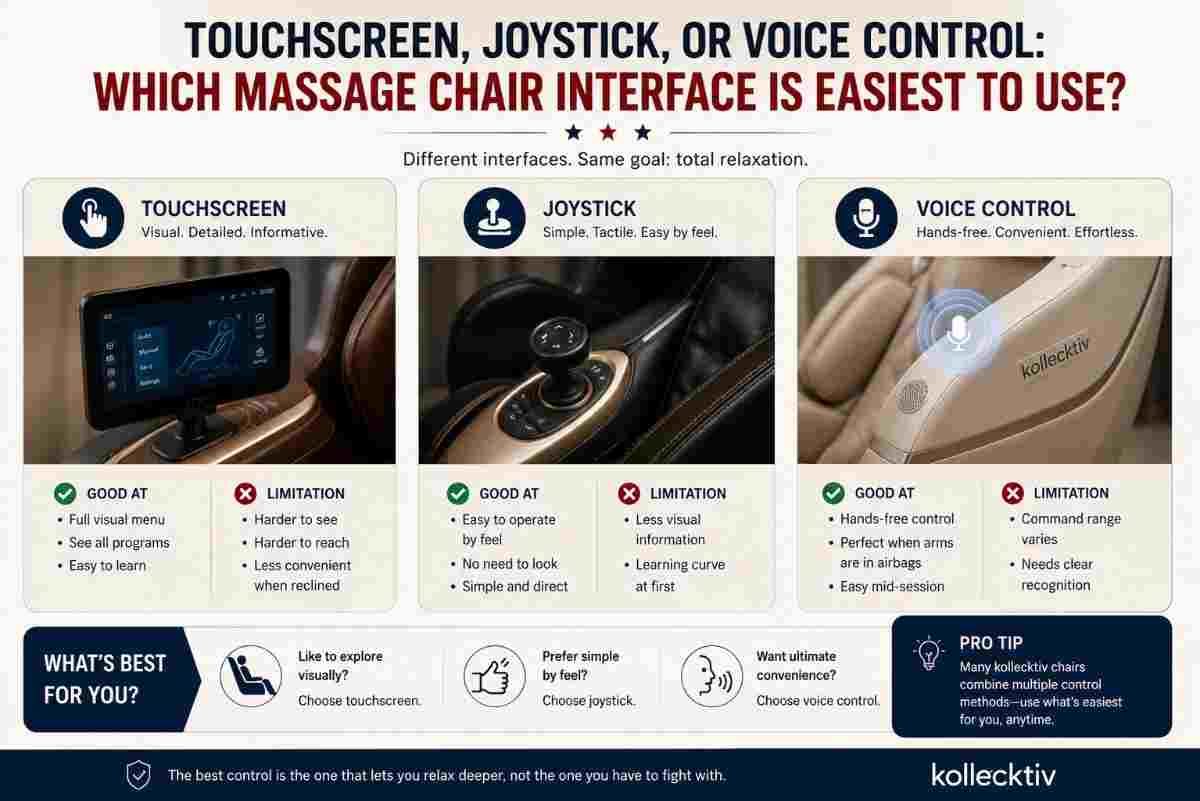
Quick answer: there’s no universally “best” control method, but each one fits a different situation. A touchscreen gives you the most visual menu options but is the hardest to use once you’re fully reclined and can’t easily see the screen. A joystick is simpler to operate by feel, without needing to look at anything. Voice control is the most convenient when your arms are already resting under the armrests mid-massage. The right choice usually comes down to how reclined you’ll typically be and whether reaching or viewing a screen is comfortable for you.
Touchscreen, joystick, or voice — whichever control method your massage chair uses, a handful of simple habits make a bigger difference in day-to-day ease of use than the control method itself. Rather than comparing the three interface types head to head, this piece focuses on what actually makes any of them easier to live with once the chair is part of your regular routine.
Habit #1: Set Up Your Favorite Program Before You Recline, Not After
Whatever control system you're using, navigating menus is always easiest while sitting upright and able to see clearly, and hardest once you're leaned back in zero gravity with your view of a screen partially obstructed. Selecting your program, intensity, and target area before reclining — rather than trying to adjust mid-recline — sidesteps the exact moment every control method struggles with most.
Why this works regardless of control type: This habit neutralizes a touchscreen's hardest moment (reading and tapping while reclined), reduces how much a joystick needs to be used blind, and cuts down on how many voice commands you need to issue once you're settled in.
Habit #2: Learn Three or Four Core Commands Instead of the Whole Menu
Most massage chairs offer a genuinely long list of programs, intensity levels, and targeting options — more than most people realistically use in a typical week. Trying to memorize the entire system upfront, regardless of control method, usually just creates frustration. Learning a small handful of go-to settings well tends to matter far more than knowing everything the chair can technically do.
Why this works regardless of control type: A touchscreen becomes easier once you know exactly where your three or four favorites live in the menu. A joystick becomes more intuitive once you've built muscle memory for a handful of directional inputs. Voice control becomes more reliable once you're using the same handful of tested phrases rather than experimenting with new wording each time.
Habit #3: Test New Settings While Sitting Upright First
Before relying on a new program or setting during an actual relaxation session, running it once while upright and alert lets you confirm it does what you expect without the added friction of being reclined and less able to course-correct if something's off.
Why this works regardless of control type: This is less about the control method itself and more about avoiding the compounding frustration of an unfamiliar setting combined with limited mobility and visibility at the same time. A control system is far easier to use when you're not simultaneously learning it and trying to relax.
Habit #4: Keep a Simple Note of What Works for You
Whether it's a sticky note, a phone note, or just a mental shortlist, keeping track of your preferred program combinations — "full body, medium intensity, 15 minutes" or a specific voice phrase that reliably works — removes the need to re-navigate or re-learn the system every single session.
Why this works regardless of control type: This habit essentially creates your own personal shortcut layer on top of whatever control system the chair uses, which matters more for touchscreens and joysticks with deeper menus, though it helps with voice control too if certain phrasings work more reliably than others.
Habit #5: Give Voice Control a Real Trial Period Before Judging It
If your chair includes voice control, it's worth genuinely using it for a full week before deciding whether it's useful for you, rather than trying it once, getting an unrecognized command, and writing it off. Voice recognition systems often improve in practical usefulness once you've learned which specific phrasings the system responds to best.
Why this works regardless of control type: This applies specifically to voice control, but the broader principle — giving any control method a genuine adjustment period before judging it — holds true across touchscreens and joysticks too. The first session with any new interface is rarely representative of how smooth it'll feel by the second week.
Putting These Habits Together
None of these habits require choosing a specific control method over another — they're useful regardless of whether your chair relies primarily on a touchscreen, a joystick, or voice control. If you're comparing chairs and want to know what each model actually offers, models like the Kollecktiv G18 combine a touchscreen with AI voice control, giving you flexibility to apply these habits across more than one interface in the same chair. The Kollecktiv 208 similarly offers multiple ways to interact with its settings, which means these habits apply just as directly regardless of which specific model you're using.
Why Habits Matter More Than the Interface Debate
It's easy to treat the choice between touchscreen, joystick, and voice control as the entire question, but in practice, how you actually use whichever system you have tends to matter more than which one you picked. A touchscreen used thoughtfully, with favorites set up in advance and a short list of tested settings, can end up feeling just as smooth in daily use as a joystick or voice system used the same way.
If You're Still Comparing Models
For a direct comparison of touchscreen, joystick, and voice control as interface types, it's worth reading through Kollecktiv's existing breakdown of each method's strengths and tradeoffs. Beyond control method specifically, browsing the 4D Massage Chair lineup or the Full Body Massage Chair range gives a fuller picture of what each model offers, and the broader Massage Chair Collection covers the full range of options across price tiers. Checking current pricing on the massage chair sale page is worth doing before finalizing a decision either way.
FAQ
Does the control method I choose really matter if I build good habits around it? Habits matter more than most people expect — setting up favorites in advance, learning a small core set of commands, and giving a new system a real trial period all meaningfully improve daily ease of use regardless of which control method the chair uses.
Is it worth learning every program and setting a massage chair offers? Not necessarily. Most users rely on a handful of favorite combinations rather than using the full range of available programs, so focusing on learning those well tends to matter more than memorizing everything available.
How long should I try voice control before deciding it doesn't work for me? A full week of genuine use is a more reliable test than a single session, since recognition often improves in practical usefulness once you've learned which specific phrasings the system responds to best.
Should I test new chair settings while reclined or sitting upright? Testing a new setting while sitting upright first lets you confirm it does what you expect without the added difficulty of being reclined and less able to course-correct if something's off.
Do these habits apply to every massage chair regardless of brand or model? Yes, these habits are about how you interact with any control system rather than being specific to one particular interface type or chair model.
Final Thoughts
Whichever control method your massage chair uses, a few simple habits — setting up favorites before reclining, learning a small core set of commands, testing new settings while upright, keeping a quick personal note of what works, and giving voice control a genuine trial period — make a bigger difference in daily ease of use than which specific interface you ended up with. The best control system is ultimately the one you've built a few good habits around.