Online LTO Portal: Complete Guide to Vehicle and License Services
-

- March 25th, 2026
- 7,770 views
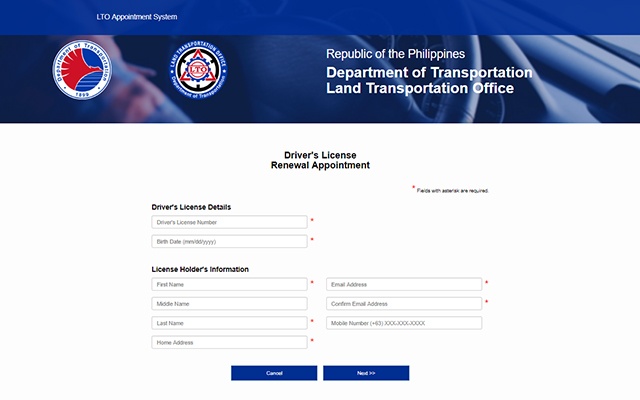
The digital transformation of government services has made many processes easier for citizens. In the Philippines, the Land Transportation Office (LTO) introduced an online platform that allows drivers and vehicle owners to manage their transactions without spending hours in long queues. The Online LTO Portal is designed to provide quick and convenient access to important services such as driver's license renewal, vehicle registration verification, and appointment scheduling.
Instead of visiting an LTO branch for every small transaction, motorists can now perform many tasks online. This system helps reduce waiting times, improve transparency, and simplify vehicle-related processes.
This guide explains everything you need to know about the portal, including its features, benefits, registration process, and the most commonly used services.
What is the Online LTO Portal?
The Online LTO Portal is a web-based platform that allows users to access services provided by the Land Transportation Office through the internet. The system is part of the Land Transportation Management System (LTMS), which aims to modernize how transportation services are handled in the Philippines.
Through the portal, users can create an account and manage various driving and vehicle-related records in one place. It acts as a digital hub where drivers can track their licenses, check violations, renew registrations, and schedule appointments with LTO offices.
The portal also helps reduce manual paperwork because most information is stored digitally. Once you create an account, your records remain accessible whenever you log in.
Key Features of the Online LTO Portal
The platform offers multiple features that make transportation services more convenient. These tools help drivers manage their documents and avoid unnecessary trips to government offices.
Driver's License Services
One of the most widely used features is driver's license management. Through the portal, drivers can:
- Apply for a new driver's license
- Renew an existing license
- Check license validity
- Update personal information
- Review driving records
These services help ensure that drivers keep their documents updated without going through complicated procedures.
Vehicle Registration Management
Vehicle owners can also handle registration-related tasks online. The portal allows users to:
- Check vehicle registration status
- Verify plate number details
- Renew vehicle registration
- Monitor vehicle records
This feature is especially useful for individuals who own multiple vehicles and want to track their registration schedules.
Online Appointment Scheduling
Instead of walking into an LTO branch and waiting for hours, users can schedule an appointment online. This allows them to choose a convenient date and time for their visit.
Benefits of appointment scheduling include:
- Shorter waiting times
- Organized queues at LTO offices
- Faster transaction processing
Violation and Penalty Monitoring
Drivers can view traffic violations linked to their licenses through the portal. This helps them stay informed about any penalties that need to be settled.
The system improves transparency because motorists can immediately see the details of violations recorded in the database.
Benefits of Using the Online LTO Portal
Using the online portal offers several advantages compared to traditional manual processes.
Convenience
The biggest benefit is convenience. Instead of visiting multiple offices, users can access services from their homes using a computer or smartphone.
Time Saving
Long queues at government offices are common. The portal allows users to complete many steps online, reducing the time spent waiting.
Digital Record Keeping
All personal records, licenses, and vehicle information are stored digitally in one account. This makes it easier to track important documents and avoid losing paperwork.
Improved Transparency
The online system allows users to verify information directly. They can check registration status, license validity, and violations without relying on third-party sources.
Better Service Efficiency
By shifting many transactions online, LTO offices can focus on more complex services. This helps improve the overall efficiency of the transportation system.
How to Register for the Online LTO Portal
Creating an account is simple and usually takes only a few minutes. Follow these steps to get started.
Step 1: Visit the Portal Website
Open your web browser and access the Online LTO Portal homepage.
Step 2: Create an Account
Click on the registration option and enter the required information such as:
- Full name
- Email address
- Mobile number
- Personal identification details
Make sure the information you provide matches your official documents.
Step 3: Verify Your Account
After submitting your details, you will receive a verification message through email or SMS. Follow the instructions to confirm your account.
Step 4: Log In to Your Dashboard
Once verification is complete, you can log in and access your personal dashboard. This is where you can view your driving records and perform various transactions.
Services Available on the Portal
The platform offers a variety of services that help drivers manage transportation requirements more efficiently.
Driver License Application
New drivers can apply for their licenses through the portal. The system provides step-by-step instructions and allows users to upload required documents.
License Renewal
Drivers whose licenses are about to expire can initiate the renewal process online. In many cases, only the final step requires visiting an LTO branch.
Vehicle Registration Renewal
Vehicle owners can check registration deadlines and renew their vehicles through the system. This helps avoid penalties caused by late renewals.
Online Payments
Some services on the portal allow users to make digital payments. This reduces the need to handle cash during transactions.
Record Verification
Drivers can review their personal records, ensuring that all information stored in the system is accurate.
Tips for Using the Portal Efficiently
To make the most of the online system, users should follow a few helpful practices.
Keep Your Information Updated
Make sure your contact details and personal information are accurate. This helps prevent problems during verification.
Save Your Login Details
Since your account contains important records, keep your login credentials secure and avoid sharing them with others.
Check Notifications Regularly
The portal may send updates about license renewals, appointment reminders, or document requirements.
Prepare Documents in Advance
When applying for services, having digital copies of your documents ready will make the process faster.
Common Problems and Solutions
Even though the system is designed to be user-friendly, some users may encounter minor issues.
Login Errors
Sometimes login problems occur due to incorrect passwords or unverified accounts. Resetting the password usually resolves the issue.
Slow Website Performance
Heavy traffic on the portal may cause slow loading times. Trying again during off-peak hours often helps.
Missing Records
If some records are not visible in your account, you may need to update your profile or contact LTO support for assistance.
Frequently Asked Questions
What is the Online LTO Portal used for?
The Online LTO Portal is used to manage driver’s licenses, vehicle registrations, appointments, and traffic violations through an online platform.
Is the portal free to use?
Creating an account is free. However, certain services such as license renewal or vehicle registration may require payment.
Can I renew my driver’s license completely online?
Some steps can be completed online, but depending on the situation, you may still need to visit an LTO branch for final verification.
Is the portal available on mobile devices?
Yes. The portal can be accessed using smartphones, tablets, and computers through a web browser.
How long does account registration take?
Most users can complete the registration process in less than 10 minutes.
What should I do if I forget my password?
Use the password recovery option on the login page to reset your password.
Final Words
The Online LTO Portal represents an important step toward modernizing transportation services in the Philippines. By providing digital access to driver and vehicle records, the system helps reduce waiting times and improve service efficiency.
For motorists, the portal offers a convenient way to manage important documents, schedule appointments, and monitor violations without visiting multiple government offices. As more services become available online, the platform will continue to make transportation processes easier and more accessible for everyone.
Whether you need to renew your license, verify vehicle registration, or check your driving record, the Online LTO Portal provides a simple and efficient solution that saves both time and effort.