Why Is My Printer Leaving Streaks? 7 Common Causes Explained
-

- August 26th, 2026
- 1,648 views
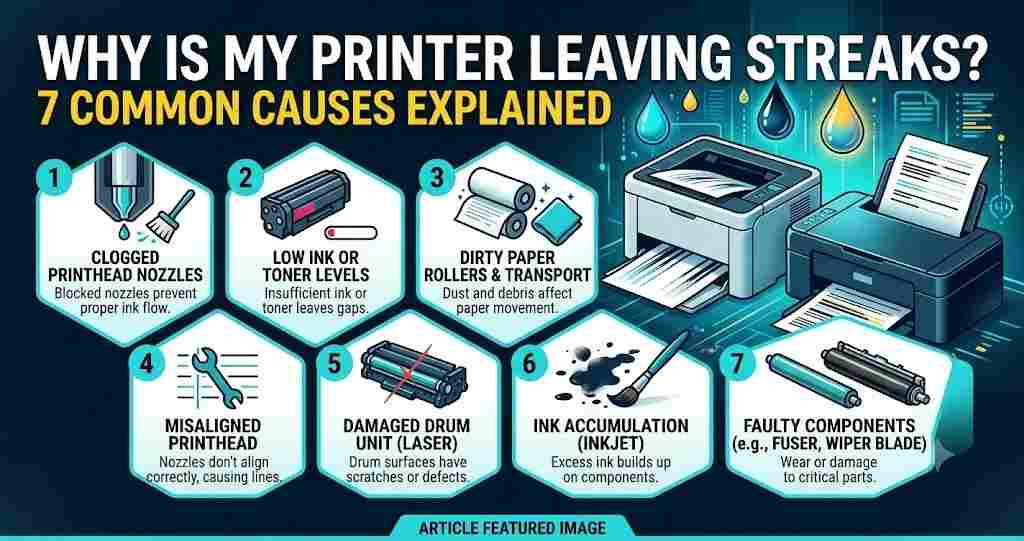
Streaks on every page are one of the most common printing issues, and usually it's easy to figure out what's causing the streaks once you know what to look for. Let's take a look at the seven most frequent causes of printer streaking and what they mean to you when trying to repair streaks.
1. Clogged Print Head
Clogged print heads are the most common reason for streaking. Dried ink can become trapped in the fine nozzles that squirt ink onto the paper and lead to thin white lines or printouts with missing parts.
- Why it happens: This is particularly likely to happen when the printer has not been used for an extended period of time, causing the ink to harden in the nozzles.
- How to fix it: Often, the problem is solved by cleaning the printer using the built-in function in the printer's software.
2. Low or Uneven Ink/Toner Levels
Sometimes, the warning may not appear until streaks begin to appear on the print, when ink or toner is getting low.
- Why it happens: There may be uneven distribution within the cartridge, which can result in patchy fade that may not show up until after you have had a cartridge low alert, so don't assume that patchy fade is a cartridge low.
- How to fix it: Manually check the ink level, and gently shake toner cartridges to redistribute the ink before replacement.
3. Damaged/ Faulty Cartridge
Sometimes, however, the problem is with the cartridge, and no amount of cleaning can fix printer white streaks caused by a small crack, air bubble, or manufacturing defect.
How to fix it: If streaking continues after cycles of cleaning, change to a fresh cartridge to eliminate the possibility of streaking.
4. Dirty or scratched drum (Laser printer)
If the printing lines are streaky, it may be caused by the drum unit and not the toner itself for laser printers.
- Why it happens: A dirty, scratched, or worn-out drum can produce repeating vertical streaks or lines down the page. This is a common problem in older machines, as drums are subject to deterioration with use.
- How to fix it: Check the drum for visible damage or debris; if it cannot be cleaned, replace the drum.
5. Debris on the Print Head/ Rollers
Tiny dust, paper fibres, or bits of dried ink on the printhead or rollers can obstruct the application of ink onto the page.
- Why it happens: This is more likely to manifest in a pattern of random and intermittent streaks than a regular pattern.
- How to fix it: Cleaning the print head and rollers by hand can make a world of difference.
6. Paper quality or paper type mismatch.
Believe it or not, the paper you select is important.
-
Why it happens: The use of paper that is too thin, too glossy, or incompatible with your printer's settings may lead to spills or streaks of ink.
- How to fix it: Ensure that your paper type is set to the same paper type on your printer.
8. Processed and unprocessed materials, such as paper
Sometimes, printer streaking is not hardware-related; it's software-related.
- Why it happens: Misaligned or poor-quality print settings may be due to an outdated printer driver.
- How to fix it: It's often overlooked, though it's simple: Keep your drivers up to date, and look at your print quality settings.
If you are unsure, when is it time to call in the professionals or to replace your printer?
While many printer streaking problems are solved by the above DIY fixes, there are instances when it goes beyond a clogged nozzle or low ink cartridge.
Signs the Issue Is Bigger Than a Quick Fix
If you have already run the machine multiple times, changed the cartridge, updated the drivers, changed paper types, and still the printer is streaking, it is probably a mechanical issue, and you cannot clean or reset the machine away. Look out for these signs:
- Persistent streaks after a cleaning cycle within a few days.
- Changes in physical noise, such as noise or vibration when printing, more than usual
- Any damage that can be seen to the drum or rollers, for example, if the drum is scratched or the rollers are worn.
- Streaks that worsen over weeks, but not months.
Make the best choice between repair and replace.
If you've eliminated the obvious causes, you might take into consideration the cost of repair versus the printer's age and value. As a general rule:
- Repair if the printer is under two years old, still under warranty, or the fix (like a drum replacement) costs significantly less than a new unit, you are looking for Printer Streaking repairing options you can visit DeviceFixes.
- Replace if the printer is older, repair costs approach half the price of a new model, or you're dealing with recurring streaking that keeps coming back despite fixes.
Determine when to call in the technician.
A professional repair technician will be able to diagnose the problem more accurately if you are not comfortable opening up your printer or removing the drum or fuser assembly. It is particularly important to do so for office laser printers, where parts can be costly, and mishandling can damage them more.
Final Thoughts
Printer streaks can be caused by a wide variety of factors, including low ink or perhaps a worn-down drum. Fortunately, most causes can be alleviated at home without the assistance of professionals. If you've already tried cleaning cycles, new cartridges, and updating the drivers, and still have streaks, you may need to take a closer look at hardware wear, but one of the following seven reasons could be the answer for you.