Remote Employee Monitoring Software for Better Team Productivity
-

- Published Updated
- 57 views
Introduction
Modern businesses are increasingly adopting remote and hybrid work models. Although these arrangements offer flexibility, managing employees across different locations can create challenges related to attendance, working hours, productivity, and task coordination. Businesses need reliable tools to understand work patterns and improve operational efficiency without depending entirely on manual reporting.
Employee monitoring software helps organizations collect and review work-related information, including computer activity, application usage, attendance, and time records. These insights can help managers understand how teams work and identify opportunities to improve daily processes.
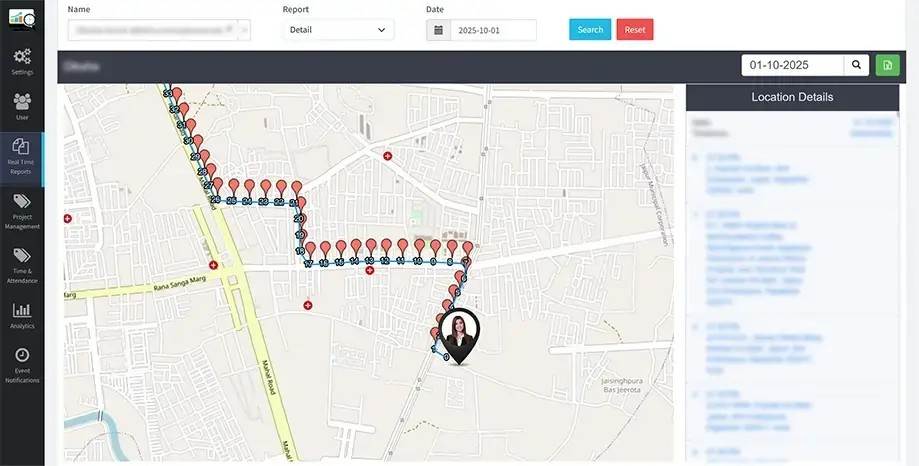
DeskTrack offers workforce monitoring and time-tracking capabilities designed to help businesses gain better visibility into work activities. With suitable monitoring policies and clear communication, organizations can use these tools to support accountability, improve planning, and manage distributed teams more effectively.
What Is Employee Monitoring Software?
Employee monitoring software is a digital solution that helps businesses review selected work-related activities on company computers and other supported devices. Depending on the features enabled, it may provide information about working hours, application usage, website activity, attendance, screenshots, and productivity reports.
The primary purpose is to help organizations understand work patterns and improve workforce management. Rather than relying only on assumptions or manually prepared reports, managers can use recorded information to make informed operational decisions.
For example, a business may discover that employees spend excessive time switching between applications or that a particular process creates unnecessary delays. These insights can help management review workflows and identify practical improvements.
Why Do Businesses Need Remote Employee Monitoring Software?
Managing a distributed workforce requires effective communication, clear expectations, and accurate work records. Managers cannot always observe daily activities directly, making it important to have appropriate systems for reviewing work-related information.
Remote employee monitoring software can help businesses maintain visibility into working hours and digital activity while allowing employees to work from different locations.
Some important benefits include:
Better time management: Understand how recorded working hours are distributed across different tasks and activities.
Improved workflow visibility: Identify recurring delays and potential process inefficiencies.
Attendance management: Review recorded attendance and working-hour information.
Informed decision-making: Use activity reports to support workload planning and team discussions.
These benefits are most useful when managers interpret information in context and consider the responsibilities and working arrangements of each employee.
Key Features to Consider
When selecting an employee monitoring solution, businesses should evaluate whether its features align with their operational requirements. The right combination of tools can reduce manual work and provide useful insights without creating unnecessary complexity.
1. Automated Time Tracking
Time tracking helps businesses understand when work begins, how long activities take, and how recorded hours are distributed. Automated tracking can reduce the effort required to maintain manual timesheets and help teams improve time-recording accuracy.
2. Application and Website Monitoring
Application and website tracking provides information about the digital tools used during working hours. Managers can use this information to understand software usage patterns and identify whether employees have the resources required to complete their responsibilities.
3. Attendance and Activity Reports
Attendance reports help organizations review working hours and attendance records. Activity reports can provide additional context about computer usage and periods of inactivity, depending on the monitoring configuration.
4. Screenshots and Productivity Insights
Some solutions provide optional screenshots and productivity summaries. These features may help authorized managers review selected work activity when there is a legitimate business need. Organizations should define clear access permissions and explain monitoring practices to employees.
How DeskTrack Supports Workforce Management
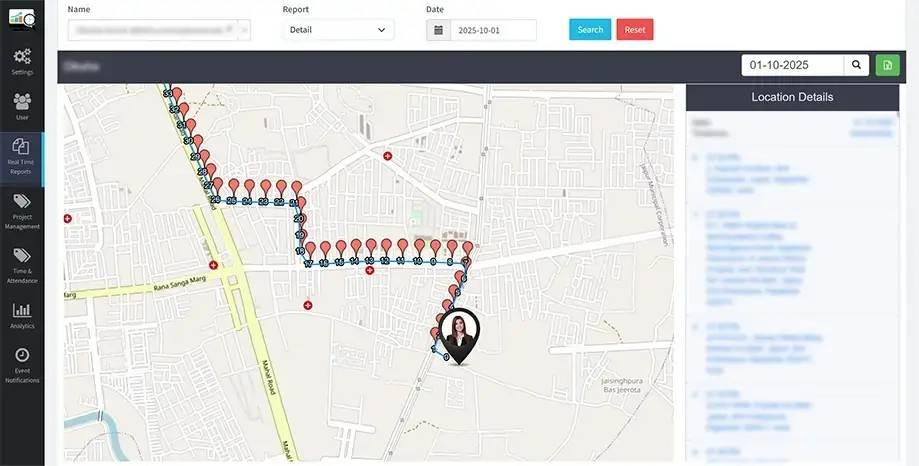
DeskTrack provides workforce monitoring and time-tracking capabilities that help organizations review work-related activity in a centralized platform. Businesses can use available features to understand working hours, application usage, attendance, and productivity patterns.
With remote employee monitoring software, managers can gain visibility into distributed teams without depending entirely on repeated status requests or manually compiled reports.
DeskTrack can support workforce management through features such as:
Monitoring computer activity and application usage.
Reviewing working hours and attendance information.
Understanding active and idle computer time.
Accessing reports to evaluate work patterns and identify workflow improvements.
The value of these capabilities depends on how they are configured and used. Managers should consider meetings, training, research, breaks, and other legitimate responsibilities before drawing conclusions from activity data.
Best Practices for Responsible Employee Monitoring
Monitoring technology should support business objectives while respecting employee privacy. A clear and responsible approach helps organizations establish trust and avoid misunderstandings about how information is collected and used.
Businesses should communicate monitoring policies before implementation and explain the purpose of each enabled feature.
Important practices include:
Inform employees about the types of information collected and the reasons for collecting it.
Limit access to monitoring reports to authorized personnel.
Establish appropriate data retention, security, and access policies.
Review productivity trends over time rather than judging employees from a single metric.
Follow applicable privacy, employment, and data protection requirements.
Employee monitoring software should be used to support fair management decisions, improve processes, and identify areas where employees may need additional resources or guidance.
Choosing the Right Solution for Your Business
Before choosing a monitoring platform, organizations should identify their most important requirements. A small remote team may prioritize time tracking and attendance, while a larger organization may require detailed reports, configurable monitoring features, and access controls.
Consider the following factors:
Ease of use: The platform should be straightforward for managers and employees to understand.
Relevant features: Select tools that address actual workforce management challenges instead of enabling unnecessary monitoring.
Reporting capabilities: Look for clear reports that help managers interpret working hours and activity patterns.
Privacy and security: Review data handling practices, user permissions, and available configuration options.
Scalability: Consider whether the solution can support the organization's future team size and operational needs.
Evaluating these factors helps businesses choose a solution that fits their workflows and long-term goals.
Frequently Asked Questions (FAQs)
1. What is employee monitoring software used for?
Employee monitoring software helps businesses review work-related information such as working hours, attendance, application usage, and computer activity. Organizations can use these insights to improve workflow management and operational planning.
2. How does remote employee monitoring software help remote teams?
Remote employee monitoring software provides visibility into selected work activities when employees work outside the office. Depending on the features enabled, managers can review time records, application usage, and activity reports to understand work patterns.
3. Can employee monitoring software track working hours?
Yes. Solutions with time-tracking capabilities can record working hours and provide reports that help businesses understand how time is distributed. The exact functionality depends on the selected platform and its configuration.
4. Is employee monitoring suitable for hybrid workplaces?
Yes. Businesses with office-based, remote, and hybrid teams can use monitoring and time-tracking tools to maintain consistent work records. Clear policies help ensure that monitoring remains appropriate across different work arrangements.
5. What should businesses consider before implementing monitoring software?
Businesses should evaluate features, reporting, ease of use, data security, privacy requirements, and employee communication. Monitoring policies should be transparent and comply with applicable laws.
6. How can DeskTrack help businesses?
DeskTrack offers workforce monitoring and time-tracking capabilities that help businesses review work hours, application usage, attendance, and productivity-related information. These insights can support better workforce planning and workflow management.
Conclusion
Managing modern teams requires a balance between flexibility, accountability, and operational visibility. The right monitoring solution can help organizations understand work patterns, improve time management, and identify opportunities to streamline daily processes.
Remote employee monitoring software can be particularly useful for organizations managing distributed teams, provided that monitoring practices are transparent and information is interpreted fairly.
DeskTrack helps businesses bring monitoring and time-tracking capabilities together to support more organized workforce management. By choosing relevant features, communicating policies clearly, and using reports responsibly, organizations can improve operational efficiency while maintaining employee trust.
Learn More: DeskTrack