Boost Restaurant Sales with a Web App for Restaurant Ordering
-

- Published Updated
- 1,635 views
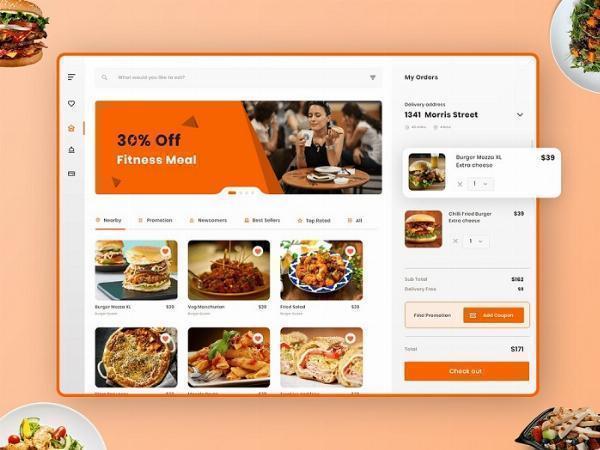
Adopting a web app for restaurant ordering can increase sales, reduce wait times, and improve order accuracy by connecting customers, staff, and delivery partners through a single online system. This guide explains what to consider when planning, building, and launching a restaurant ordering web app so operators can make informed, long-term decisions.
A web app for restaurant ordering centralizes online orders, supports contactless and mobile ordering, integrates with point-of-sale (POS) systems and delivery services, and provides analytics for menu optimization. Focus on user experience, secure payments, and operational integration. Consult industry guidance from official organizations for compliance and safety best practices.
Why a web app for restaurant ordering can upsurge revenue and efficiency
Customers increasingly prefer digital ordering channels such as mobile web apps, native apps, QR-code menus, and delivery platforms. A dedicated web app for restaurant ordering offers direct access to customers without relying solely on third-party marketplaces, enabling higher margins, loyalty programs, and branded experiences while supporting takeout, curbside pickup, and delivery operations.
Key features to prioritize
Clear menu and customizable items
Menus should load quickly and display clear item descriptions, photos, dietary labels, modifiers, and real-time availability. Allowing customers to customize items (extras, substitutions, portion sizes) reduces staff errors and increases average order size.
Seamless checkout and multiple payment options
Offer secure card payments, digital wallets, and contactless options. A smooth checkout flow with saved preferences and guest checkout options reduces cart abandonment. Payment processing should comply with applicable security standards.
Order management and kitchen integration
Integrate the web app with kitchen display systems (KDS) or the restaurant POS so orders are routed directly to staff. Real-time order statuses, estimated preparation times, and print or screen notifications help maintain throughput during peak hours.
Design and user experience
Mobile-first, responsive interface
A mobile-first design ensures the app works well on phones and tablets without requiring an app store install. Progressive Web App (PWA) techniques enable offline caching, push-like notifications, and home-screen installation behavior for repeat customers.
Accessibility and speed
Follow accessibility guidelines to make the app usable for a wide audience. Optimize images and scripts to reduce load times, which improves conversion rates and search visibility.
Integration and operational considerations
POS and inventory synchronization
Bi-directional integration with the POS and inventory systems prevents overselling and keeps reporting consistent across channels. Synchronize pricing, modifiers, and tax calculations to avoid reconciliation issues.
Delivery and third-party partners
Support multiple fulfillment models: in-house delivery, third-party couriers, and pickup. Provide routing information and estimated delivery times to customers and drivers. APIs and webhooks help automate handoffs to delivery partners.
Compliance, privacy, and security
Payment security and data protection
Handle cardholder data in accordance with payment industry standards and local data protection laws. Consider tokenization and hosted payment pages to reduce compliance scope. For general operational guidance, consult authoritative industry bodies such as the National Restaurant Association.
Local regulations and health guidance
Follow local health department rules for food safety, pickup handling, and delivery packaging. Maintain accurate allergen information and labeling to reduce risk and improve customer trust.
Measuring success and iterating
Key performance indicators
Track metrics such as online order volume, average order value, conversion rate, customer acquisition cost, repeat purchase rate, and fulfillment time. Use analytics to test menu placement, promotions, and checkout flows.
Customer feedback and loyalty
Collect post-order feedback and incentivize repeat business with loyalty rewards, saved favorites, and personalized offers. A simple loyalty integration fosters long-term relationships and increases lifetime value.
Implementation roadmap
Plan, pilot, scale
Begin with a minimum viable product (MVP) focused on core ordering and payments. Pilot the web app at one location or during off-peak hours to refine workflows. Scale by adding integrations (POS, delivery partners), multi-location management, and advanced marketing features once stability is proven.
Costs and staffing
Estimate costs for development or subscription services, payment processing, maintenance, and staff training. Identify who will manage menu updates, order exceptions, and technical support to ensure consistent operations.
Common pitfalls and how to avoid them
Poor menu structure
Overly complex menus and hidden fees increase abandonment. Simplify pathways to popular items and make fees transparent during checkout.
Neglecting operations
Technology alone does not solve staffing or kitchen capacity issues. Align menu design, prep stations, and staffing with expected digital order volume to maintain service quality.
Underestimating support needs
Provide clear customer support channels and internal escalation procedures for order errors, refunds, and technical problems.
Next steps for restaurant operators
Evaluate customer demand, choose core features, and select an approach—build, buy, or partner—that aligns with operational capacity and budget. Prioritize secure payments, POS integration, and a fast mobile experience. Pilot, measure, and iterate using real data to refine offerings.
FAQ
What is a web app for restaurant ordering and why choose it?
A web app for restaurant ordering is a browser-based application optimized for mobile devices that allows customers to place orders directly with a restaurant. It eliminates the need for app store downloads, supports quick updates, and can offer features similar to native apps such as offline caching and home-screen installation.
How can a web app integrate with an existing POS system?
Integration typically uses APIs or middleware to synchronize orders, menu items, and inventory. Work with POS vendors or integration providers to map data fields, tests flows, and ensure reliability during peak service times.
What security and compliance steps are necessary for online orders?
Implement secure payment processing, use encryption for data in transit, limit storage of sensitive data, and follow local data protection laws. Maintain access controls and audit logs for operational transparency.
How long does it take to launch a functional restaurant ordering web app?
Launch timelines vary. A simple MVP that supports menu browsing and payments can take weeks to a few months, while fully integrated, multi-location solutions with delivery routing and loyalty features can take several months of development and testing.