One Scanner, Multiple Barcode Types: Understanding Windows-Compatible 1D and 2D Linear Imagers
-

- Published Updated
- 90 views
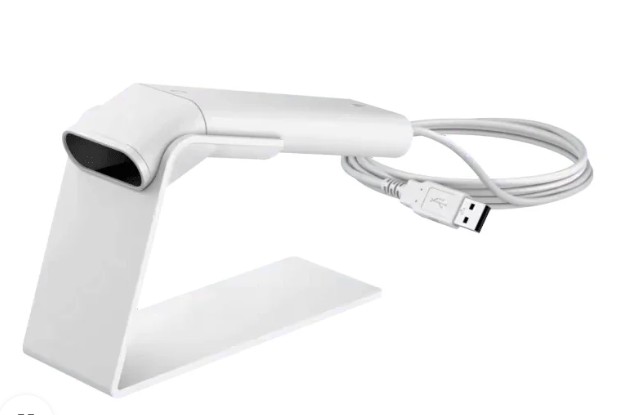
Barcode scanning has become an essential part of modern business operations. From retail counters and warehouses to offices, healthcare facilities, and logistics centres, businesses use barcode scanners to capture information quickly and reduce manual data entry. However, choosing the right scanner requires more than looking at its scanning speed or design. Compatibility with existing computer systems and the ability to read different barcode formats are equally important.
A Windows-compatible barcode scanner with 1D and 2D scanning capabilities can help businesses simplify daily tasks, improve data accuracy, and support a wide range of applications. When combined with 2D linear imaging technology, the right scanning solution can make routine transactions and data collection more efficient.
What Is a Windows-Compatible Barcode Scanner?
A Windows-compatible barcode scanner is designed to work with supported computers and software running the Windows operating system. It allows users to scan barcodes and transfer the captured information into applications such as inventory management systems, billing software, spreadsheets, and business databases.
Many scanners connect through USB, while some models offer additional connectivity options. Depending on the device and application, scanned information may appear automatically in a text field, point-of-sale system, or other compatible software.
This makes integration relatively straightforward for businesses that already use Windows-based computers. Employees can scan product codes, inventory labels, identification tags, and other barcodes without manually typing long sequences of numbers or characters.
Before purchasing a scanner, businesses should check the manufacturer's specifications for supported Windows versions, connection types, drivers, and software requirements.
Understanding 1D and 2D Barcode Compatibility
Barcodes come in different formats, and not every scanner can read all of them. Understanding the difference between one-dimensional and two-dimensional barcodes helps businesses select equipment that suits their operational needs.
What Is a 1D Barcode?
A 1D barcode, also known as a linear barcode, consists of parallel lines and spaces arranged in a specific pattern. It is commonly used to represent product identification numbers and other basic information.
Examples include UPC, EAN, and Code 128 barcodes. These formats are widely used in retail stores, product packaging, shipping labels, and inventory management.
A scanner that supports 1D barcodes can help employees identify products, process purchases, and record stock movements efficiently.
What Is a 2D Barcode?
A 2D barcode stores information in a pattern that extends in two dimensions. Unlike traditional linear barcodes, it can represent more information within a compact area.
Common examples include QR codes and Data Matrix codes. These formats are used for product tracking, digital payments, equipment identification, document management, and other applications.
A scanner with 2D compatibility gives businesses greater flexibility when they need to read both conventional product labels and newer barcode formats.
How Does 2D Linear Imager Technology Work?
A linear imager is generally designed to capture one-dimensional barcodes using imaging technology. However, a scanner described specifically as a 2D imager can capture and interpret two-dimensional barcode patterns as well as supported 1D codes.
The exact capabilities depend on the scanner's specifications, so it is important to confirm whether a particular model supports both formats.
Imaging-based scanners capture an image of the barcode and use decoding technology to interpret the encoded information. Depending on the model, they may also read barcodes displayed on compatible digital screens, making them useful for applications involving mobile devices and electronic tickets.
For businesses handling multiple barcode types, an appropriate imaging scanner can reduce the need to maintain separate devices for different scanning tasks.
Where Can 1D and 2D Barcode Scanners Be Used?
The versatility of barcode scanning makes these devices suitable for a wide range of business environments.
Retail stores: Scan product barcodes during billing, sales transactions, and stock verification.
Warehouses: Identify packages, record incoming goods, and support order-picking activities.
Manufacturing: Track components, work-in-progress items, and finished products throughout production
Healthcare: Scan supported patient identification labels, specimen codes, and medical inventory labels.
Offices: Manage equipment records, documents, and fixed assets using compatible barcode systems.
Logistics: Support package identification, shipment processing, and inventory movement.
The best scanner depends on the type of barcode, working environment, scanning frequency, and software used by the organisation.
Conclusion
Barcode scanning helps businesses simplify data entry, improve product identification, and maintain more organised records. A Windows-compatible scanner that supports both 1D and 2D barcodes can offer flexibility across retail, inventory management, logistics, manufacturing, and other professional applications.
Understanding the difference between linear barcodes and two-dimensional codes is an important step in choosing the right device. Businesses should also consider operating system compatibility, connectivity, scanning performance, and software integration before making a decision.