Complete Guide to Wipe Data and Factory Reset for Phones, PCs, and Tablets
-

- Published Updated
- 1,717 views
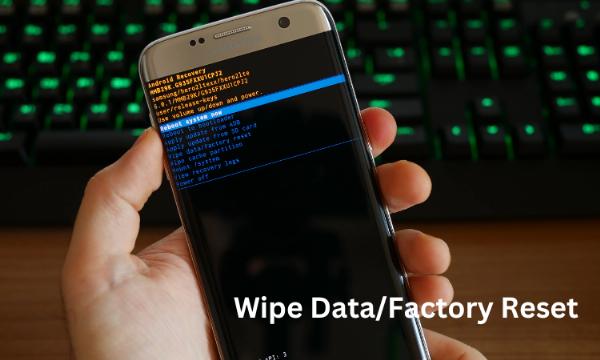
A factory reset is a common method to wipe data from a device and restore it to original settings. This guide explains what a factory reset does, when to use a wipe data operation, how to prepare and back up information, and steps to reduce the chance of data recovery on smartphones, tablets, and computers.
- A factory reset removes user data and settings but may not securely erase all remnants of files.
- Always back up important data before performing a wipe data/factory reset.
- Use device-specific secure erase tools or encryption to reduce recovery risk.
- Follow disposal, resale, or transfer steps to protect personal information.
What is a factory reset (wipe data)?
A factory reset, sometimes called a data wipe or master reset, returns a device to its original software state by removing user accounts, apps, and settings. The process varies by platform—smartphones, tablets, and computers have different procedures—but the intent is the same: remove personal configuration and data so the device behaves like it did when new.
When to use a factory reset
Common reasons to perform a factory reset include preparing a device for sale or transfer, troubleshooting persistent software problems, removing malware or unauthorized accounts, and clearing data before recycling or disposal. A factory reset is not always necessary for routine maintenance; softer troubleshooting steps (restarting, updating software, uninstalling apps) are often sufficient.
When a reset is not enough
A simple factory reset may not permanently erase sensitive files from a storage medium. For situations that demand stronger data destruction—legal compliance, highly sensitive personal information, or corporate data—additional secure erasure methods are recommended.
Preparing for a wipe: backup and account steps
Before performing a wipe data or factory reset, take these steps:
- Back up important files, photos, and contacts to a separate device or cloud service.
- Sign out of accounts and remove device associations (e.g., disable activation locks or deauthorize the device) to avoid reactivation issues for the new owner.
- Record any software keys or license information required to reinstall software.
- Encrypt the device before wiping if supported; this makes residual data harder to recover.
How to wipe data on common devices
Smartphones and tablets (Android, iOS)
Most mobile operating systems have a built-in factory reset option in system settings. After backing up data and removing accounts, use the system settings to perform a factory reset. On some devices, a recovery menu or hardware key combination can initiate a reset when the device will not boot.
Windows PC
Windows provides a "Reset this PC" feature that can reinstall the OS and remove files. Options may include a basic removal or a full drive cleaning. For stronger erasure, use dedicated disk-wiping utilities and consider full-disk encryption beforehand.
macOS
On macOS, reinstalling the operating system after erasing the startup disk via Disk Utility resets the machine. FileVault full-disk encryption adds an extra layer of protection and can render data inaccessible if credentials are removed before wiping.
Security and data recovery: how permanent is a factory reset?
A standard factory reset aims to make data inaccessible during normal use, but it may not permanently remove all traces on the storage medium. Residual data can sometimes be recovered with specialized tools. For guidance on secure sanitization, refer to the NIST guidelines on media sanitization: NIST Special Publication 800-88 Rev. 1.
Methods to improve permanence
- Full-disk encryption: Encrypting storage makes leftover data unreadable without the key.
- Secure erase utilities: Use trusted tools that overwrite storage with patterns or random data.
- Physical destruction: For storage media that will not be reused, physical destruction ensures data cannot be reconstructed.
Legal and privacy considerations
Data protection rules and employer policies may require specific handling of data before disposal or transfer. Regulations such as the EU General Data Protection Regulation (GDPR) and consumer guidance from agencies like the U.S. Federal Trade Commission emphasize protecting personal data during device lifecycle changes. Organizations often follow formal data sanitization procedures to meet compliance requirements.
After the reset: verify and restore
After performing a factory reset, verify that personal content and accounts are removed and test the device in a fresh state. When restoring data to a device that remains in use, selectively restore necessary items from backups and re-enable security controls such as passcodes and encryption.
Best practices checklist
- Back up data before wiping.
- Remove or deactivate linked accounts and activation locks.
- Encrypt storage where possible prior to reset.
- Use secure erase tools for stronger guarantees or follow physical destruction for end-of-life media.
- Document steps if device handling is part of organizational compliance.
Resources and official guidance
Official guidance on data sanitization and device disposal can help determine the appropriate level of erasure. Public agencies and standards organizations publish recommendations for different threat models and reuse scenarios.
Frequently asked questions
What is a factory reset and what does it do?
A factory reset removes user data, apps, and personalized settings and reinstalls the original system software where applicable. It prepares a device for reuse or troubleshooting but may not securely erase all underlying data without additional measures.
Will a factory reset permanently erase my data?
Not always. A standard factory reset generally makes data inaccessible through normal use, but remnants can sometimes be recovered with advanced tools. To reduce this risk, use full-disk encryption, secure-erase utilities, or physical destruction when appropriate.
How should personal accounts be handled before wiping a device?
Sign out and remove accounts, disable activation or anti-theft locks, and deauthorize the device from services. This prevents activation issues for the next user and protects linked accounts.
Can data be recovered after a wipe data or factory reset?
In some cases, specialized recovery tools or forensic methods can recover residual files. The probability depends on the device, storage type, and the erasure technique used. Stronger methods such as multiple overwrites, encryption, or physical destruction lower recovery chances significantly.