View Corrupt PST File Without Outlook
-

- Published Updated
- 55 views
Trying to view corrupt PST file without Outlook can be difficult when the file does not open normally or shows an error. PST files store Outlook mailbox data such as emails, attachments, contacts, calendars, tasks, and notes. When a PST file becomes damaged, Outlook may fail to load its contents.
The good news is that you do not always need Microsoft Outlook to check the data inside a PST file. A dedicated PST viewer can open and preview the available mailbox items without requiring Outlook. This can be useful when Outlook is not installed, the PST belongs to an old computer, or you only want to check the contents of the file.
To view corrupt PST file without Outlook, use a PST viewer that supports damaged or corrupted PST files. Add the PST file to the software, scan it, and browse the available mailbox folders. You can then preview emails, attachments, contacts, calendars, and other supported items without opening Microsoft Outlook.
If the PST file is severely damaged, some data may not be available for preview. In that situation, you may need to repair the PST file before accessing more of its contents.
Why Does a PST File Become Corrupt?
A PST file can become damaged for several reasons. Understanding the cause can also help you avoid similar problems in the future.
Common reasons include:
- A PST file becomes too large.
- Outlook closes unexpectedly while the PST is being accessed.
- The computer shuts down suddenly.
- The storage drive has errors.
- The PST file is stored on an unreliable or damaged drive.
- Malware affects the file or system.
- The file is moved or copied incorrectly.
- Outlook or the system crashes while working with the PST.
When corruption occurs, Outlook may display an error instead of opening the mailbox. In some cases, only certain folders or emails may be affected.
How to View Corrupt PST File Without Outlook
Method 1: Use a PST Viewer
The simplest way to check a damaged PST without Outlook is to use a PST viewer. This type of software is designed to read PST files and display their contents.
The general process is:
Step 1: Install a PST Viewer
Download and install a SysTools PST viewer on your Windows computer. Choose a tool that supports PST files and can handle corrupted or damaged files.
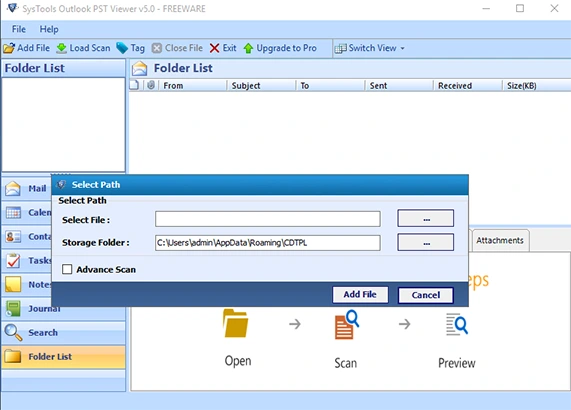
Step 2: Add the PST File
Open the software and select the option to add or open a PST file. Browse to the location where your PST file is saved.
Step 3: Scan the PST File
Select the file and start the scanning process. The software checks the PST and loads the mailbox structure and available data.
Step 4: Browse the Mailbox
After the scan is complete, you can browse folders such as Inbox, Sent Items, Drafts, Deleted Items, Contacts, Calendar, Tasks, and Notes.
Step 5: Preview the Data
Click an email or another mailbox item to view its contents. If the attachment data is available, you may also be able to preview the attached files.
This method is useful when you only need to inspect the PST file and do not want to install Microsoft Outlook.
Method 2: Repair the PST File
Another option is to repair the damaged PST file before trying to open it.
Microsoft Outlook includes a utility called Inbox Repair Tool, commonly known as ScanPST. It can check a PST file for certain problems and attempt to repair them.
The general process is:
- Locate the ScanPST utility.
- Open the tool.
- Select the damaged PST file.
- Start the scan.
- Follow the repair instructions.
- Try accessing the PST file again.
However, ScanPST may not recover every item from a badly damaged PST file. The result depends on the level and type of corruption.
If your main goal is simply to check what data is available, using a PST viewer first can help you determine whether the mailbox contents are accessible.
View Corrupt PST File Without Outlook Using SysTools PST Viewer
SysTools PST Viewer is another option for users who want to view corrupt PST file without Outlook. It allows users to add a PST file and preview its available mailbox data without installing Microsoft Outlook.
After adding the PST file, you can browse its folder structure and check supported mailbox items. This can be helpful when you have an old PST file from another computer or when Outlook is not available on the current system.
The viewer can help you check items such as:
- Emails
- Email attachments
- Contacts
- Calendar entries
- Tasks
- Notes
- Deleted items
- Mailbox folders
The exact data available for preview depends on the condition of the PST file and SysTools also have repairing PST file options.
Can I View a Corrupt PST File Without Outlook?
Yes, a PST file can be viewed without Microsoft Outlook by using a compatible PST viewer. This is especially useful if Outlook is not installed on your computer or you do not want to install Outlook just to inspect an old PST file.
However, there is an important point to remember: PST corruption can vary from file to file. A viewer may be able to display some mailbox items from a partially damaged file, while a severely damaged PST may require repair or recovery before its data can be accessed.
Can I View PST Attachments Without Outlook?
Yes, if the PST viewer can read the email and attachment data, you may be able to preview attachments without Outlook. After opening an email, check whether an attachment is listed with the message.
If the attachment information is also damaged, the viewer may not be able to display or access it.
What If the PST File Is Not Opening?
If the PST file is not opening, first make a copy of the original file and work with the copy. This helps protect the original PST if you need to try different repair or recovery methods.
You can then try a PST viewer to check whether the mailbox data is readable. If the file cannot be properly scanned or previewed, consider using a PST repair or recovery solution.
Avoid repeatedly modifying the original PST file because further changes may make troubleshooting more difficult.
Frequently Asked Questions
Can I open a PST file without Outlook?
Yes. You can use a PST viewer to open and preview PST mailbox data without Microsoft Outlook.
Can I view a damaged PST file?
Yes, depending on the level of damage. A PST viewer that supports corrupt files may be able to display available mailbox items.
Can I view PST emails without Outlook?
Yes. A compatible PST viewer can allow you to preview emails stored inside a PST file without Outlook.
Can I view PST attachments without Outlook?
If the attachment data is readable, a PST viewer may allow you to preview or access attachments stored with emails.
Do I need Outlook to repair a PST file?
Not always. Some PST repair tools can repair PST files independently of Outlook. The available features depend on the tool you use.
Conclusion
When you need to view corrupt PST file without Outlook, you do not necessarily have to install Microsoft Outlook. A PST viewer can help you scan the file and preview available emails, attachments, contacts, calendars, and other mailbox data.
If the PST has minor or partial corruption, you may be able to view much of its content directly. For a severely damaged PST, repair or recovery may be necessary. Before trying any repair method, keep a backup copy of the original PST file so that your original data remains protected.