MBOX to PST Conversion Myths: What Mac and Windows Users Should Really Know
-

- Published Updated
- 52 views
Introduction
MBOX is a common file format for mailboxes that is supported by email clients such as Thunderbird, Apple Mail, Eudora, etc. But when users switch to Microsoft Outlook, they usually need to convert MBOX files to PST format. There are many misconceptions along the way that can make email migration more difficult.
Myths about file extensions, worries about attachments, and concerns about data loss can encourage users to utilize inadequate ways to convert files. Let's separate reality from myth and know what Mac and Windows users should truly know about MBOX to PST conversion.
Myth 1: Changing .mbox to .pst Converts the File
One of the most common mistakes is thinking you can just rename an MBOX file to a .pst file extension so that it works with Outlook.
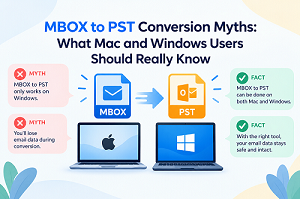
Reality: The MBOX and PST mailbox formats are entirely different. Renaming the extension does not change the internal structure and makes the email data inaccessible to Outlook. The mailbox data must be processed and exported into a correctly formatted PST file through a proper MBOX to PST conversion.
Myth 2: MBOX Files Can Be Directly Imported into Outlook
Certain users believe that Microsoft Outlook can immediately open or import any MBOX file.
Reality: Outlook mostly works with PST and OST files, not MBOX. So, users often require an intermediate conversion process to migrate an MBOX email archive to Outlook.
This is a must whether you are migrating emails from Thunderbird or Apple Mail to Outlook.
Myth 3: MBOX to PST Conversion Always Causes Data Loss
If you are working with a valuable email collection, it’s common to worry about losing emails, folders, attachments, or even metadata.
Reality: Data preservation depends heavily on the conversion method and software used. A good MBOX conversion should try to preserve important mailbox components such as email content, attachments, folder structure, and pertinent message information.
We recommend that users try the conversion on a copy of their MBOX data before commencing a full transfer.
Myth 4: Mac Users Cannot Convert MBOX to PST
Since MBOX is widely linked with Apple Mail and other Mac-based email apps, some users assume PST conversion must be done on Windows.
Reality: Mac users can use the specialized MBOX to PST converter for Mac software to process mailbox files and generate PST files that are compatible with Outlook. This can be handy if the original MBOX data is saved on a Mac, but the final mailbox needs to be accessed via Microsoft Outlook.
A Mac-compatible converter means you don’t need a separate Windows PC for the initial conversion.
Myth 5: Every MBOX Converter Produces the Same PST File
All conversion utilities can appear to do the same thing.
Reality: Different tools have very different supported MBOX sources, folder handling, attachment preservation, batch conversion, filtering options, and output quality.
When selecting an MBOX to PST converter, users need to look for more than the ability to create a PST file. Other essential factors are compatibility, data integrity, ease of use, and large mailbox files.
Myth 6: Manual MBOX to PST Conversion Is Always the Best Option
Manual approaches can be appealing, as they do not always require dedicated conversion software.
Reality: Manual methods can require several steps, temporary email-client setups, mailbox exports, and importing the resulting data into Outlook. When working with multiple MBOX files, large archives, or lots of folders, the process can get tricky.
For a tiny mailbox, a manual technique could be manageable. However, if you have a large email collection, it could be beneficial to use a specialist MBOX email migration application, which can be more convenient and efficient.
Myth 7: Attachments Cannot Be Preserved During MBOX Conversion
Some users worry that converting email archives will just keep the text of messages and strip out attachments.
Reality: How attachments are handled varies according to the conversion software and its features. A properly developed MBOX to PST solution can assist you in keeping email attachments along with the messages they belong to.
Before converting essential business or personal mailboxes, users should always check for attachment preservation.
Myth 8: Large MBOX Files Cannot Be Converted Successfully
Another misconception is that MBOX conversion is only compatible with small mailbox files.
Reality: You can migrate large MBOX archives, but speed will depend on your system, mailbox size, files’ state, and software you are using. Users should ensure they have sufficient capacity to accommodate the source data and the generated PST file.
If the archive is particularly large, translating data in small pieces can also make the conversion process easier to keep an eye on.
Myth 9: MBOX to PST Conversion Deletes the Original MBOX Data
Some users are reluctant to start the conversion process since they feel their original mailbox will be changed or erased.
Reality: Conversion usually creates a new output file rather than forcing users to delete the old MBOX archive. However, it is always good practice to keep a copy of source MBOX files as a backup before starting email transfer.
If the generated PST needs to be verified, keeping the original archive is another recovery option.
Myth 10: A Professional Converter Is Useful Only for Windows
Most users assume that professional email conversion software is primarily for Windows users.
Reality: There are dedicated options for mailbox migration for Mac users. Mailvita MBOX to PST Converter for Mac is for those users who want to convert MBOX files to PST format in a Mac-based workflow.
This software is especially useful when you want to convert an Apple Mail or other MBOX-based email archive to Microsoft Outlook compatibility.
What Should You Check Before Converting MBOX to PST?
Here are some things to consider as you start migrating email:
Source Compatibility: Ensure that the software you use is compatible with your MBOX file or email client.
PST Compatibility: Make sure the resulting PST can be opened in the Outlook environment you want.
Attachments: Ensure attachments and their relationships are preserved.
Folder Structure: Check that mailbox folders and subfolders are kept.
Processing Large Files: How does the tool handle large MBOX archives?
Data Safety: Make a backup of original MBOX files.
Batch Conversion: If you have more than one mailbox file, look for batch processing.
Previewing or Filtering: These capabilities can aid in finding the essential emails before conversion.
Final Verdict
MBOX to PST conversion needn’t be confusing. Changing a file extension to .pst does not make it a PST. Outlook does not automatically treat MBOX as PST. Mac users are not bound to Windows-based migration methods.
The right method for conversion will depend on the size of the mailbox, the desired output, the attachment and folder requirements, and the platform you are using. Understanding common myths and checking the capabilities of an MBOX to PST converter can provide Mac and Windows users with more confidence and fewer surprises from incompatibility during email conversion.
Frequently Asked Questions
Q1. Are attachments retained in MBOX for PST conversion?
Ans. Whether attachments are preserved depends on the conversion software and its capabilities. Before starting the conversion, users should check whether the selected solution supports email attachments.
Q2. Can I convert large MBOX files to PST?
Ans. Yes. Conversion of large MBOX archives is possible, but the time taken depends on the mailbox size, system resources, file condition, and software used.
Q3. Should I back up my MBOX data prior to conversion?
Ans. Yes. It is advised that you keep a copy of the original MBOX files as a
backup. It provides you with a second copy of the source data in case you want
to check or repeat the conversion.
Visit here: https://www.mailvita.com/mbox-to-pst-converter-for-mac/