Huge VCF File Taking Too Long to Access? Best Solution to Fix the Problem
-

- Published Updated
- 7,517 views
Waiting several minutes just to open a contact file can become frustrating very quickly. A huge VCF file often causes slow loading, freezing during import, missing contacts, and even app crashes on phones or computers.
This issue is common when thousands of contacts are stored together inside one vCard file. Importing or synchronizing a huge contact list usually poses a challenge to devices or email programs in managing it efficiently.
Even when such contacts are in different formats, such as those obtained from Outlook, Android, iPhone, Gmail, or any other platform, huge VCF files may pose major problems when they are managed inefficiently.
Fortunately, however, this problem has an efficient solution without any loss of contacts.
Why Huge VCF Files Take Too Long to Load
In the VCF file, there are contact details such as:
- Names
- Mobile numbers
- Email addresses
- Company details
- Contact images
Notes and descriptions
The loading speed gets slowed down when many contacts have been compressed into a single file because the computer requires more processing power to handle the load.
The following reasons typically lead to such a slowdown.
Large Contact Databases Increase Processing Time
Huge VCF files require more:
- RAM usage
- CPU processing
- Storage access
During contact import or synchronization, the device processes every contact entry individually. The bigger the file size, the longer the loading process becomes.
This may result in:
- Slow imports
- Device lag
- Contact app freezing
- Partial contact loading
- Import interruptions
Older phones and low-storage systems usually experience these problems more frequently.
Contact Synchronization Becomes Slower
Many users sync VCF contacts with:
- Gmail
- Outlook
- Android devices
- iPhone
- Thunderbird
When the contact database becomes too large, synchronization speed drops significantly. In some situations, contacts may stop syncing completely.
Duplicate and Unwanted Contacts Create Extra Load
Huge VCF files often contain:
- Duplicate contacts
- Outdated entries
- Incomplete contact information
- Repeated phone numbers
These unnecessary entries increase file size and slow down the loading process even further.
Large Contact Files Are Harder to Manage
Finding a single contact inside thousands of records can become difficult.
Managing one oversized contact file creates problems like:
- Slow contact search
- Complicated sharing
- Backup confusion
- Contact organization issues
Smaller and properly divided contact files are easier to access and maintain.
Common Signs of an Oversized VCF File
Several warning signs indicate that the contact file has become too large.
Frequent Symptoms
- The VCF file is opening slowly
- Phone hanging during contact import
- Contacts app crashing
- Delayed synchronization
- Missing contact details
- Duplicate entries are appearing repeatedly
These issues usually become worse as the number of contacts increases.
Best Solution for Slow Loading VCF Files
One of the most effective ways to fix this problem is by splitting the huge VCF file into separate contact files.
Smaller contact files are easier for devices and applications to process. This improves loading speed and reduces the chances of import failures.
Benefits of Splitting Oversized VCF Files
- Faster contact imports
- Better device performance
- Improved contact organization
- Easier sharing
- Reduced corruption risk
- Stable synchronization
Best Technique for Splitting Massive VCF Files
Manual editing is too dangerous and complicated to perform, especially when there are thousands of contacts inside. Even a small formatting mistake can damage contact information.
For safer contact management,
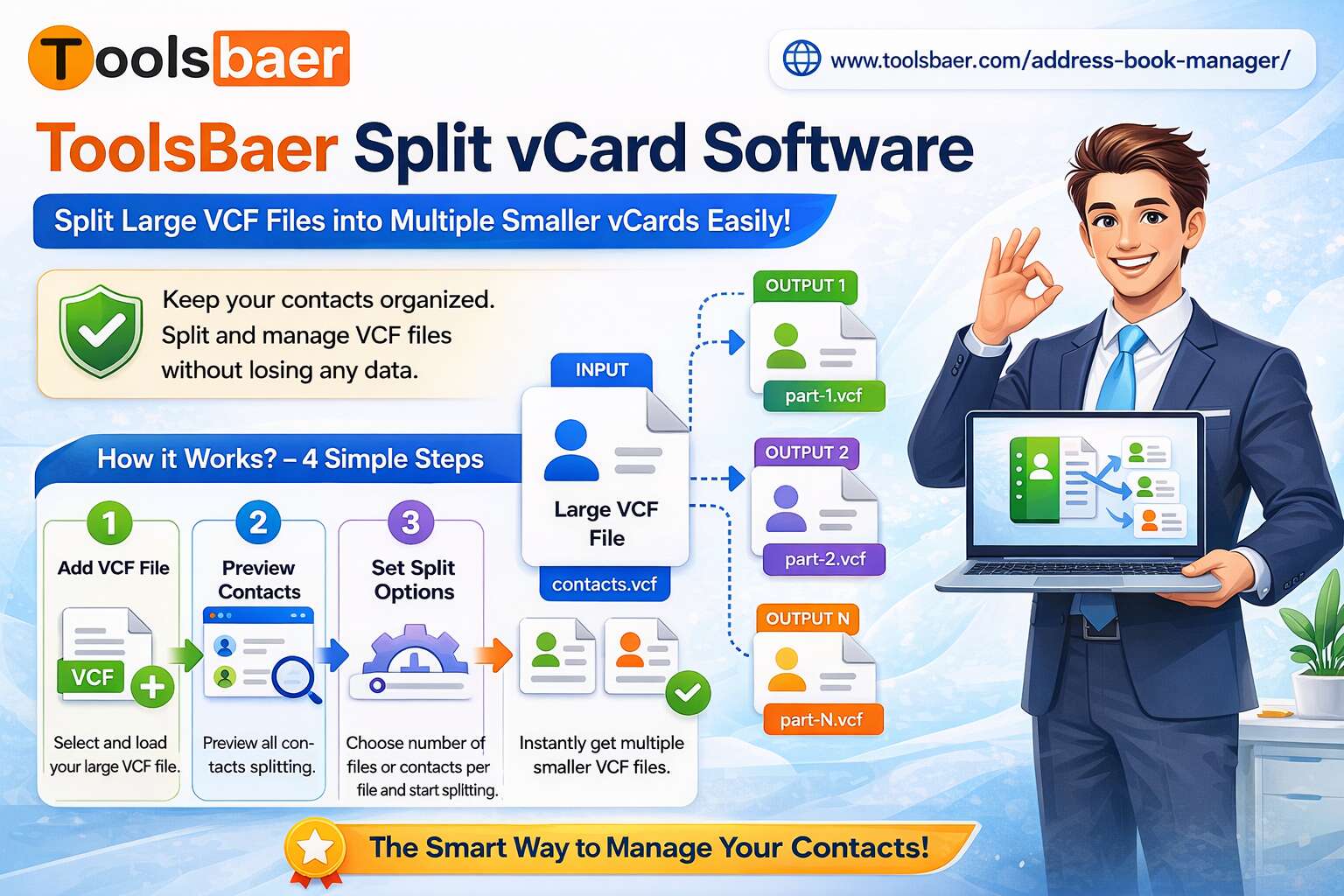
ToolsBaer Split vCard Software
helps divide large VCF files into separate contact files smoothly and securely.
The software is designed to handle oversized contact databases while preserving complete contact information.
Important Features of the Solution
Create Separate Contact Files Easily
The software breaks one large VCF file into multiple individual contact files for easier management.
Preserve Complete Contact Details
All contact properties remain unchanged, including:
- Names
- Phone numbers
- Email addresses
- Images
- Notes
- Descriptions
No data loss occurs during the splitting process.
Supports Multiple vCard Versions
The application supports:
- vCard 2.1
- vCard 3.0
- vCard 4.0
This improves compatibility across different devices and platforms.
Save Contacts in Multiple Formats
Separated contacts can be exported into:
- VCF format
- MSG format
This feature is useful for Outlook-related tasks and email migration projects.
Preview Contacts Before Exporting
The preview option helps verify contact details before saving the final files.
No Restrictions on File Size
Large contact databases containing unlimited entries can be processed without major limitations.
Steps to Fix Huge VCF Loading Problems
Using
ToolsBaer Split vCard Software
is simple.
Step 1
Install and open the software.
Step 2
Add the oversized VCF file.
Step 3
Choose the output destination folder.
Step 4
Select the export format:
- VCF
- MSG
Step 5
Start the splitting process.
The software quickly creates smaller contact files that load much faster across devices and email applications.
Why Smaller VCF Files Perform Better
Smaller contact files reduce system load and improve overall contact handling performance.
This Helps With:
- Faster imports
- Better synchronization
- Easier contact search
- Improved backup management
- Reduced application crashes
Managing smaller files also makes contact sharing more convenient.
Most Asked Questions
Why is a huge VCF file loading slowly?
Large contact databases require more system resources, which increases processing and synchronization time.
Can splitting a VCF file improve performance?
Yes. Smaller contact files load faster and reduce device lag during importing and syncing.
Is splitting VCF files safe?
Reliable VCF splitter tools preserve all contact information safely during the process.
Which platforms support split VCF files?
Split contact files work with:
- Android
- iPhone
- Outlook
- Gmail
- Thunderbird
- iCloud
and many other platforms.
Final Thoughts
Huge VCF files often become slow because devices and applications struggle to process oversized contact databases efficiently. This may cause problems like lagging, hanging, duplicate contacts, and synchronization failure.
Splitting big contact files into small parts is one of the best ways to make contact handling easier and more efficient.
For users searching for a secure and practical solution,
ToolsBaer Split vCard Software
provides an easy way to divide huge VCF files without affecting contact information.