Streamlining Your Inbox: A Comprehensive Review of the Mailvare Free Outlook PST Extractor
-

- Published Updated
- 7,086 views
Introduction
A bloated Outlook inbox can quickly become a frustrating management exercise. If you’ve been using Microsoft's email client for years, then your main data file – the PST (Personal Storage Table) or OST (Offline Storage Table) – has likely grown into a digital behemoth. As these files continue to grow in size, not only do they start to take up important space on the hard drive, but also start to impact system performance, lead to application lag, and in extreme cases, increase the chances of file corruption that may lead to permanent data loss.
Many users are in a dilemma when they want to extract some items, such as an old contact list, some important calendar appointments, or some important attachments without migrating their entire email. Moving these items manually into Outlook is a tedious process, and if the file is already corrupted, or you no longer have Outlook installed on your current machine, you are essentially locked out of your own data.
Let’s meet Mailvare Free Outlook PST Extractor. This utility is designed to be a surgical tool for your data. You can skip a live Outlook environment and get exactly what you need. In this review we will take a deep dive into the tool’s functionality, how easy it is to use, and whether it deserves a permanent place in your digital maintenance toolbox.
What Exactly Does This Tool Do?
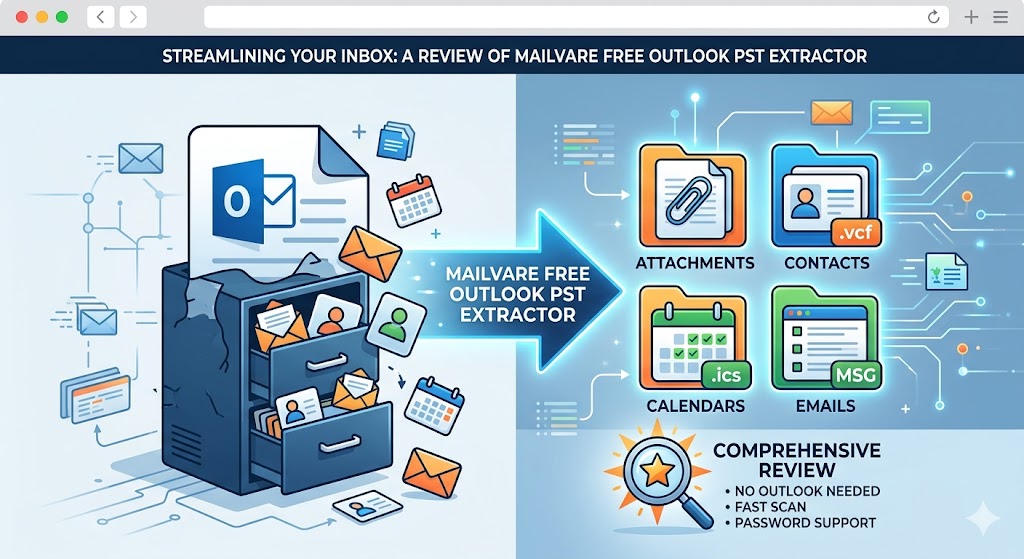
What this software is really is a data extraction utility. It's not trying to be an all-in-one email client or a complex database manager; it's entirely focused on the "extract and export" workflow. It doesn't force you to convert the entire multi-gigabyte PST file to a new format (which can take hours), but instead allows you to break apart the file and save only the parts you want in formats that are widely supported by other applications.
The software targets the following four major data types:
• Attachments: One of the quickest ways to reduce the size of a PST file is to delete the large PDF, image or document attachments that are buried in old emails. It can extract these attachments and save them to a local folder while maintaining the structure of the original emails.
• Your Contacts: Are you getting a new phone or email provider? Moving contacts can be the biggest hurdle. This utility converts your Outlook address book to standard .vcf (vCard) files compatible with Android, iPhone and web-based email services.
• Calendars: Manual export of calendar data is notoriously difficult. With this tool you can save your schedule in the industry-standard .ics format. That makes it easy to import years’ worth of appointments into Google Calendar, Apple Calendar or any other scheduling app.
• Your E-mail Addresses: For those users who are doing data mining or cleaning up distribution lists, the tool can scan folders and extract all unique e-mail addresses (From, To, CC and BCC) into a clean, text-based list.
Key Features and Technical Capabilities
1. No dependency on Microsoft Outlook
Perhaps the most important advantage of this utility is its standalone nature. Most migration tools require a 'source environment' to be up and running. Usually, you are stuck if your Outlook is not opening due to a file corruption or you are using a new computer where you have not installed the full Office suite yet. This tool works outside the Microsoft ecosystem, so you can open, scan and extract data of a standalone PST or OST file on a clean Windows machine, no extra overhead.
2. Powerful handling of Big and Protected files
The major reason for PST corruption is the large file size. Most users have 10-year archives, and files can be larger than 20 GB or 30 GB. Mailvare utility is developed to handle such huge volumes without crashing or hanging at the scanning phase. It supports password-protected files too. If you have encrypted your archives, you just need to enter the password when prompted, and the tool will read the contents as if it was an unencrypted files.
3. Batch Processing and Folder Integrity
You don't want to spend all afternoon working on one file at a time. This utility performs batch processing by folders. You can point the software at a whole directory full of archives and it will process them one by one. It is smart enough to keep your original folder structure during the extraction process. It's a massive "quality of life" feature – if your emails are organized into specific subfolders based on projects or years, the output stays logically arranged, rather than a messy, flat list of files.
About User Experience: How convenient this is
This Utility’s interface design is based on a “wizard-based” philosophy.
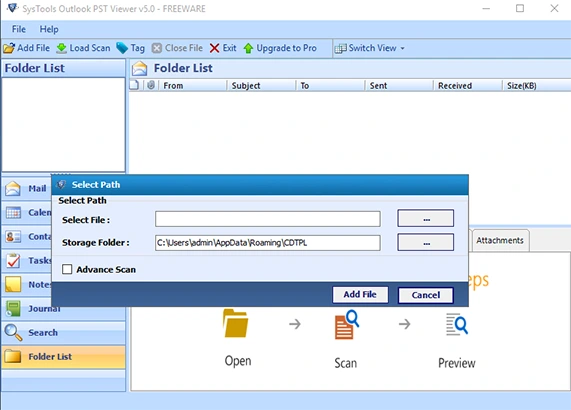
The first time you run the application you are asked to select your source file. When you choose a file, the software rapidly indexes the file contents. Unlike some competitors that keep you in the dark until the final export, this utility gives you a live preview of the folder's contents on your screen.
This preview window is a kind of “safety net”. You can also check the entries in the calendar or contact lists before you do the final save. That can save you a lot of time, especially if you have a number of versions of an archive and you're not sure which one has your latest data.
Lightweight Performance: It won't hog your computer's memory or slow down your other apps, meaning you can leave it running in the background while you work.
Intuitively Designed UI: The layout cuts out the clutter, making it easy for anyone to open the tool, find what they need, and get the job done in just a few clicks.
Scan Speed: Very well optimized for large multi-GB files.
Data Fidelity: Preserves folder structure and original metadata.
The Bottom Line: Is it Worthwhile?
Whether you want to free up some space on your disk, bridge the gap between Outlook and other platforms or simply save the most important data from an inaccessible archive, this tool is a great resource.
The big selling point here is a combination of power and accessibility. It offers professional-grade extraction capabilities without the “professional-grade” learning curve. It’s great for one-off data recovery jobs as well as ongoing digital housekeeping, as it handles batch processing and is completely standalone.
In a world of overly complicated migration software that comes with expensive licenses, a free and reliable utility that does what it says on the tin is a big win. It’s a lightweight, effective and efficient addition to your toolkit and will save you the manual headache of exporting data piece by piece. If you are an IT admin cleaning up old archives or a home user moving to a new email platform, this utility makes it so much easier.