Top 7 PST Split Tools for Managing Large Outlook Data Files in 2026
-

- September 12th, 2026
- 4,855 views
Large Outlook PST files often create performance issues, slow email access, and increase the risk of file corruption. As mailbox data continues to grow, managing oversized PST files has become a major concern for individuals, businesses, and IT administrators. This is where a reliable PST Split solution becomes essential.
PST Split tools help users to split huge Outlook data files into small manageable PST files and do not affect email integrity. If you wish to increase the performance of Outlook, reduce the danger of file corruption or want to manage the mailbox data more efficiently, then choosing the best PST Split software can save you a lot of time and work.
In this post, we discuss the Top 7 PST Split Tools for Managing Large Outlook Data Files 2026. We look at their benefits, advantages, disadvantages, cost and ease of use, to help you pick the ideal solution for your needs.
What is PST Split?
A PST Split is the process of splitting a large Outlook PST (Personal Storage Table) file into various smaller PST files. Microsoft Outlook saves your mailbox data (email messages, contacts, calendars, notes, tasks, etc.) in PST files.
As PST files get larger, users can experience:
- Lack of Outlook speed performance
- Longer loading time
- Increased risk of PST damage
- Backup and migration challenges
- Challenges in storage management
To overcome these challenges, PST Split software splits huge PST files into smaller files based on size, date, folder or other criteria while keeping data integrity.
Why Do Users Need PST Split Tools?
Working with large PST files manually can be complicated and dangerous. The PST Split tools make the procedure easy and have a lot of benefits.
Key Reasons to Use PST Split Tools:
- Enhance Outlook Performance
- Reduce the possibility of PST corruption
- Simplify managing backups.
- Manage mailbox data effectively
- Simplified email migration
- Use archive files efficiently
- Save space
- Keep your inbox healthy
For businesses that deal with thousands of emails on a regular basis, a professional PST Split solution is a necessary aspect of Outlook data management.
Top 7 PST Split Tools for 2026
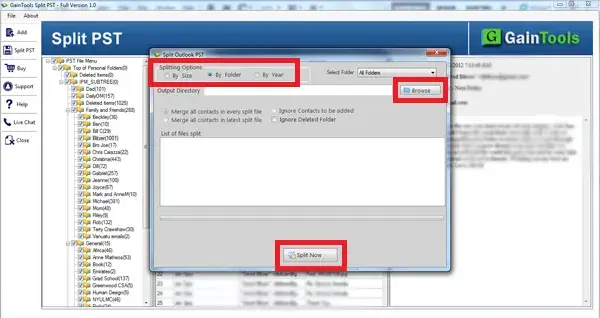
1. GainTools PST Splitter
Overview
GainTools PST Splitter is a user-friendly utility designed to divide large Outlook PST files into smaller and more manageable segments. The software supports splitting PST files based on size, folder, date, and year. The software runs on all Windows OS versions, like 11, 10, 8.1, 8, and 7, without needing any applications.
Key Features
- Split PST by Size, Date, Year and Folder
- Keeps original directory structure
- Supports ANSI and Unicode PST files
- Preserves data integrity
- Compatible with all major versions of Outlook
Pros
- User-friendly interface
- Fast processing speed
- A variety of split choices
- Consistent output quality
Cons
- Advanced enterprise features limited
- Limitations of the trial version
Best for home users, professionals and small businesses.
2. SysTools PST Split Tool
Overview
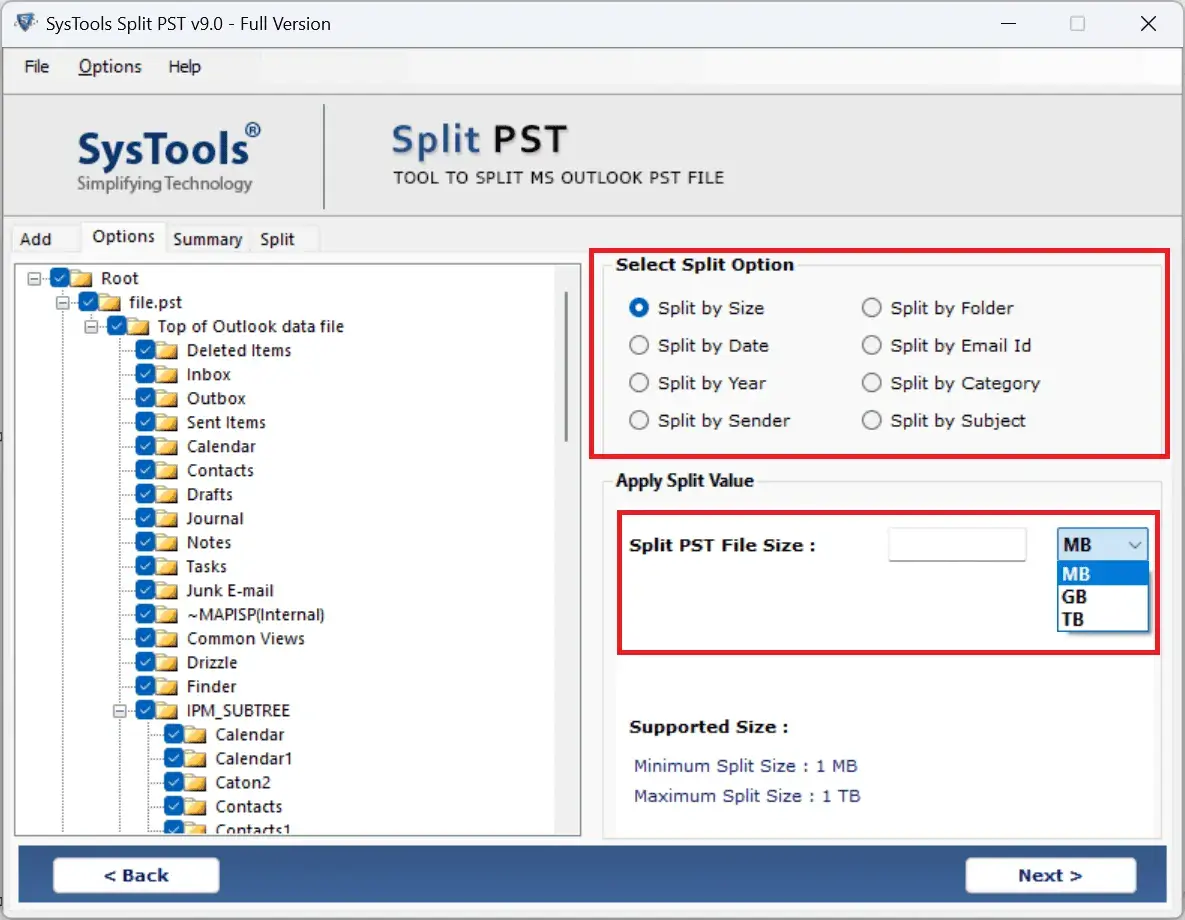
SysTools PST Separate Tool is a professional tool that allows users to separate large PST files safely while maintaining the mailbox structure and metadata.
Main Features
- By Size, By Date, By Folder and Email ID.
- Support massive PST files
- Filter options, advanced
- Email characteristics are important
- Multiple treatment reports
Pros
- Features for the enterprise
- Different split criterion
- Good performance
Cons
- Higher prices
- Interface can be technical for novices
Best for Enterprise users and IT admins.
3. Stellar Splitter for Outlook
Overview
Stellar provides an effective PST Split solution that improves Outlook performance and efficiently manages huge mailbox files.
Main Features
- Split PST file by size, date and email ID
- Supports encrypted PST files
- Folder structure maintained
- Easy-to-use wizard
Pros
- Trusted brand reputation
- Easy to navigate
- secure splitting process
Cons
- Premium pricing
- Trial mode only
Best For Business experts and companies.

4. Softaken Split PST Tool
Overview
Softaken Split PST Tool provides an efficient way to divide oversized Outlook files while ensuring complete data safety.
Main Features
- Split PST by Size & Date
- Compatible with any Outlook version
- Maintains mailbox structure
- Lightweight application
Pros
- Affordable costs
- Suitable for beginners
- Pros Easy install
Cons
- Less sophisticated features
- Limited customization
Best for: single users and small businesses.

5. Kernel PST Splitter
Overview
Kernel PST Splitter is an excellent Outlook management tool that allows users to separate large PST files without impacting the mailbox content.
Key Features
- Split PST by Date, Size, Folder, Sender
- Supports Large PST datasets.
- Keeps metadata
- User-friendly interface
Advantages
- Stable performance
- Multiple division modes
- Great customer support
Disadvantages
- Price of premium license
- Some advanced features come in higher plans
Best For: Medium and large companies.

6. DataVare PST Split Expert
Overview
DataVare PST Split Expert is a software that splits PST files safely. This software makes PST management easy by splitting huge PST files into smaller PST files.
Main Features
- Split PST by Size, Date and Folder
- Supports Unicode PST files
- Fast processing engine
- Keeps original data
Pros
- Affordable
- Lightweight application
- Easy to use
Cons
- Limited enterprise functionality
- Easy user interface
Best for small companies and personal use.

7. SysInfo PST Split Tool
Overview
SysInfo PST Split Tool is a professional tool for users to manage huge Outlook data files effectively by splitting them into smaller PST files without losing any data.
Main Features
- Split by size, date, folder, year
- Support for massive PST file
- Email Formatting is preserved
- The next-generation scan engine
Pros
- Good compatibility
- Split Options Available!
- Reliable findings
Cons
- Beginner Learning Curve
- Full functionality requires the premium version.
Best for IT experts and power users.

Feature-Based Comparison Table
| Feature | GainTools | SysTools | Stellar | Softaken | Kernel | DataVare | SysInfo |
|---|---|---|---|---|---|---|---|
| Supported Formats | PST | PST | PST | PST | PST | PST | PST |
| Batch Processing | Yes | Yes | Yes | Yes | Yes | Yes | Yes |
| Data Integrity | High | High | High | High | High | High | High |
| Outlook Compatibility | All Versions | All Versions | All Versions | All Versions | All Versions | All Versions | All Versions |
| Ease of Use | Excellent | Good | Excellent | Excellent | Good | Excellent | Good |
| Free Trial | Yes | Yes | Yes | Yes | Yes | Yes | Yes |
| Pricing | Affordable | Premium | Premium | Budget-Friendly | Premium | Affordable | Mid-Range |
How to Choose the Right Tool
1. Analyze Features
Find the tools to provide you:
- Split by size
- Split by date
- Split by Folder
- Batch processing
- Support for large PST
More freedom means more alternatives for splitting.
2. Ease of Use
Simple and easy interface reduces training and helps users finish the tasks as well.
3. Think about scalability
If you are managing huge mailbox environments, consider solutions that can handle very large PST files efficiently.
4. Ensure Customer Support
Good user assistance might save you precious time when you face technological problems. Look for vendors offering:
- Email support
- Live chat
- Knowledgebase
- Support tech
5. Check for Security and Data Integrity
Best PST Split Tools keep:
- Folder structure as is
- Email formatting
- Attachments
- Metadata
- Contacts & Calendars
Always select a tool that ensures zero data loss.
Conclusion
Correct PST Split software is important to maintain Outlook performance and handle massive mailbox content effectively. A trustworthy PST Split Solution decreases the danger of corruption, enhances accessibility and makes email administration easier.
GainTools, SysTools, Stellar, Softaken, Kernel, DataVare and SysInfo are the top choices for reliable PST splitting in 2026. The perfect one depends on your budget, technical requirements, scalability needs and the set of features you like.
Frequently Asked Questions (FAQs)
1. What is a PST Split tool?
PST Split tool is a software that splits huge Outlook PST files into smaller files for improved performance, easier maintenance and less corruption concerns.
2. Why should I use a PST Split solution?
PST Split solution aids in enhancing Outlook speed, reduces the chances of file corruption, makes backups easier, and organizes mailbox data better.
3. Is PST Split safe for Outlook data?
Yes. Professional PST Split tools provide full data integrity and keep all the emails, attachments, contacts, calendars, and metadata safe.
4. Can PST Split software split huge PST files?
Most PST Split tools today are designed to efficiently handle very large PST files without losing any data.
5. Which PST Split Tool is Best for Business?
Businesses prefer systems like SysTools, Stellar, Kernel, SysInfo, etc., because they offer extensive features, scalability, and enterprise-level support.