
Dynamics 365 in 2026: ISV vs Customization vs Native — The Complete Decision Guide
-

- Published Updated
- 397 views
Most implementations fail not because of the software, but because of how the decision was made. Here’s the framework that actually works.

In this article
1.The Hidden Reality of Dynamics 365 Projects2. The 3-Layer Dynamics 365 Model
3. ISV vs Customization vs Native: The Real Decision Breakdown
4. Top 10 Things You Must Get Right in Your D365 Implementation (2026)
5. Real-World Implementation Scenarios
6. The 5 Costliest Implementation Mistakes (With Real Numbers)
7. The 2026 Winning Strategy
8. Frequently Asked Questions
There’s a pattern that repeats across industries. A company invests in Dynamics 365. Teams are trained. Reports are live. Leadership calls it a success. And then, six months later, someone notices that the finance team still reconciles in Excel, the operations team tracks contracts via email threads, and critical approvals still happen outside the system entirely.
The software isn’t broken. The implementation approach was.
The Real Problem
According to Info-Tech Research Group, more than half of ERP projects run over budget, and two-thirds of companies realize less than half of the benefits they anticipated. The failure point is almost never technical — it’s strategic.
In 2026, the question has shifted. Business leaders no longer ask “What can Dynamics 365 do?” They’re asking, “Why isn’t it delivering the ROI we expected?” The answer, in most cases, traces back to a single decision made early in the project: the wrong choice between native capabilities, ISV solutions, and custom development.
This guide is built to help you make that decision correctly — with a clear framework, real data, and the patterns we’ve observed across dozens of implementations in real estate, construction, manufacturing, and enterprise services.
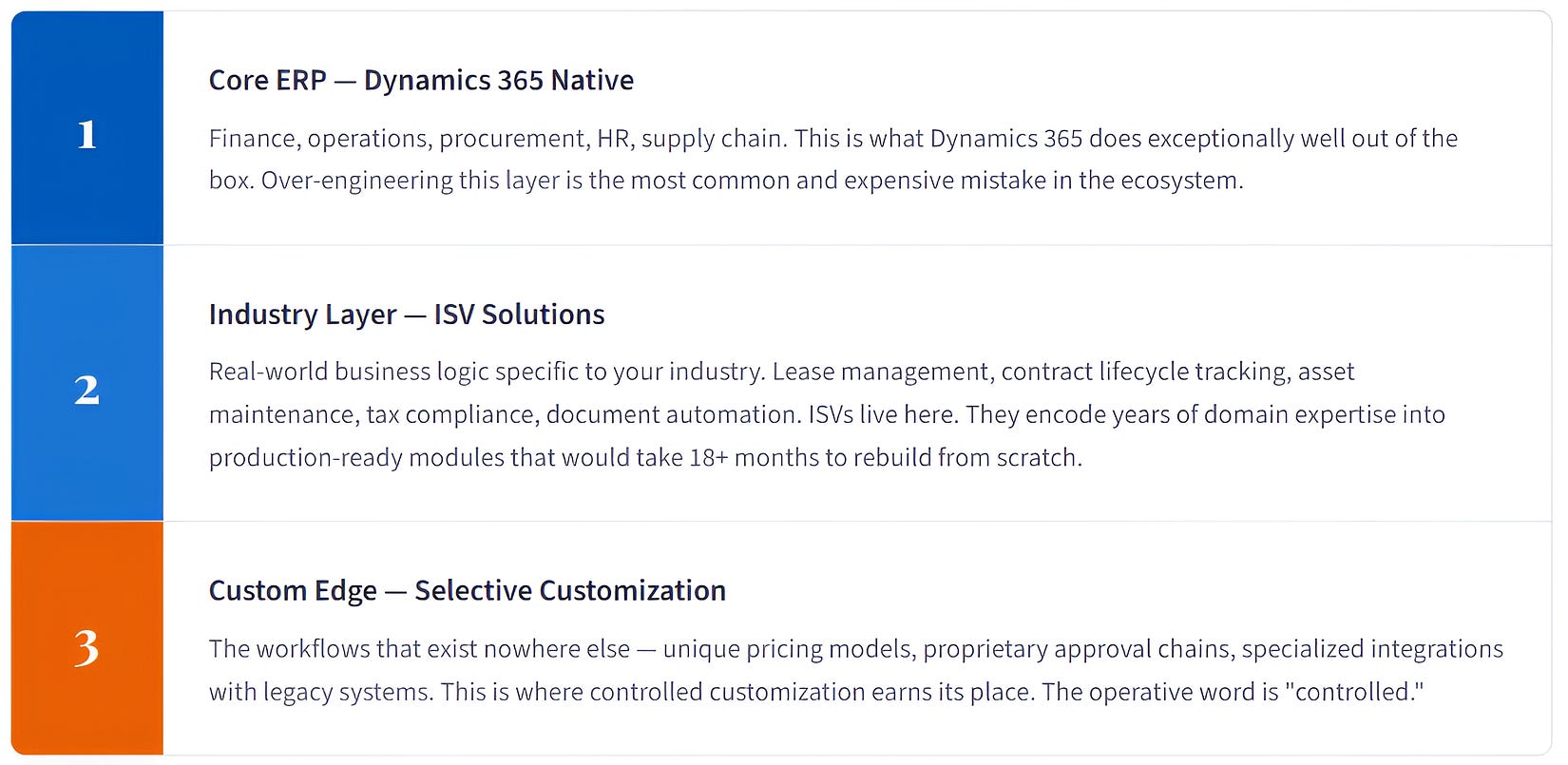
The 3-Layer Dynamics 365 Model
Most companies approach Dynamics 365 as a monolithic tool — one system that either fits or doesn’t. The reality is more nuanced. Successful implementations in 2026 operate across three distinct layers, each with a different purpose and a different decision logic.
The Core Insight
Most project failures happen when companies try to solve Layer 2 problems using Layer 3 tools. They build from scratch what an ISV already solved. This produces delays, budget overruns, and critically, systems that break every time Microsoft releases a Wave update.
ISV vs Customization vs Native: The Real Decision Breakdown
Here is how to think through the decision in practice — not in theory.
When native Dynamics 365 is sufficient
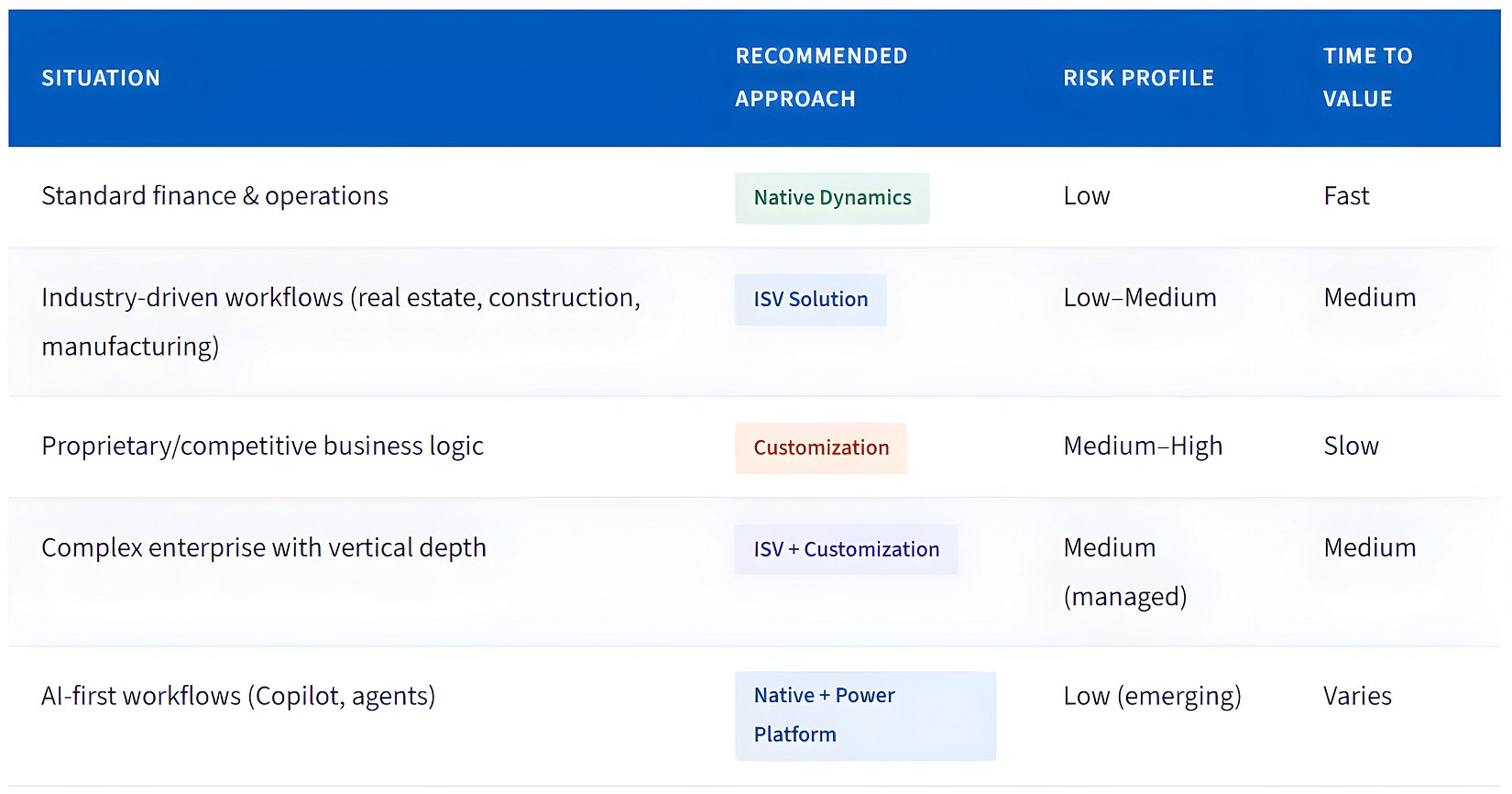
If your business runs standard financial operations, basic supply chain, and general HR workflows with low industry-specific complexity, native Dynamics 365 will serve you well. The platform has matured significantly. Over-configuring it is now a more common mistake than under-configuring it. SMEs with clean, simple processes often extract the most ROI from vanilla implementations — because they aren’t fighting against their own customizations during every upgrade cycle.
When ISVs deliver disproportionate value
The inflection point arrives when your industry’s core workflows don’t map cleanly to standard ERP logic. Real estate companies managing multi-entity lease portfolios, construction firms handling multi-stage contract billing, property managers tracking tenant lifecycle — these aren’t edge cases you can configure away. They represent the core of how the business operates.
ISVs solve this problem because they’ve already built the domain model.
A good ISV solution brings not just features, but tested implementation patterns, compliance handling, and upgrade paths that align with Microsoft’s release waves. The risk profile is fundamentally lower than starting from scratch with custom code.
Key data point: ISV solutions published on Microsoft AppSource are validated through Microsoft’s certification process and must maintain compatibility with Dynamics 365 release updates — a significant governance advantage over bespoke customizations that can break during bi-annual Wave releases.
When customization is genuinely required
Custom development earns its place at Layer 3 — for truly unique business logic that no ISV solution covers, for proprietary pricing algorithms, for complex integrations with industry-specific legacy systems, or for workflows that represent genuine competitive differentiation. The critical discipline here is the “Configuration-First, Low-Code Second” principle. Build custom features as independent Power Platform apps rather than modifying core ERP source code. This keeps the system modular and protects it against upgrade disruption.
The Decision Matrix
Top 10 Things You Must Get Right in Your D365 Implementation (2026)
This isn’t a checklist of obvious advice. These are the ten decisions and disciplines that most directly determine whether your implementation delivers measurable ROI — based on patterns across real projects and validated by current industry research.
01. Choose your architecture before your license
Most projects fail before they start — because the team selected a Dynamics 365 module before mapping the business architecture. Layer 1 (native), Layer 2 (ISV), and Layer 3 (custom) decisions must be made at the architecture stage, not discovered during implementation. Document your current processes, identify where ISV coverage exists, and define the custom edge before any development begins.
02. Treat data migration as a project-within-a-project
Data migration is consistently underestimated. Gartner reports that around 85% of large-scale data projects fall short of expectations. Dirty data — duplicates, mismatched fields, legacy formats — doesn’t just cause technical problems; in 2026’s AI-enabled Dynamics environment, it actively degrades Copilot accuracy and business intelligence output. Begin data cleansing at project kickoff, not during UAT.
03. Evaluate ISVs on AppSource before building anything custom
Microsoft AppSource now hosts thousands of certified ISV solutions across every major industry vertical. Before commissioning custom development for any industry-specific requirement, conduct a structured ISV evaluation. The time cost of proper evaluation is measured in days. The time cost of custom development gone wrong is measured in months, and the maintenance cost never stops accumulating.
04. Apply the “Configuration-First” principle to every customization request
Microsoft releases two major Wave updates per year. Hard-coded customizations that modify core D365 source code are the single largest source of upgrade failures. Every customization request should be tested first against configuration options, then Power Platform low-code solutions, and only escalate to code-level development when both paths are genuinely exhausted. Build custom features as independent apps, not modifications of the core system.
05. Implement AI grounding from day one
The 2026 implementation landscape is fundamentally different from 2022. Microsoft Copilot is now embedded across Dynamics 365 Finance, Sales, Supply Chain, and Customer Service. For Copilot to produce accurate, business-specific output, your data must be clean, your knowledge bases must be structured, and your Dataverse schema must be intentional. AI grounding is no longer a post-launch enhancement — it’s a core implementation requirement.
06. Assign a senior sponsor with actual authority
Executive sponsorship is cited in nearly every post-mortem of failed implementations as a critical missing element. The sponsor role is not ceremonial. It requires real decision-making authority to resolve scope disputes, drive cross-departmental cooperation, and protect the project from the organizational inertia that kills momentum. Visible, consistent executive involvement directly reduces timeline slippage and change-resistance during go-live.
07. Design training before development completes, not after
One of the most preventable failure points in Dynamics 365 projects is deferred training. Role-specific training that begins during implementation — not two weeks before go-live — produces dramatically higher user adoption rates. Identify super users in each department early. These internal champions handle day-to-day questions and reduce the IT support burden that otherwise overwhelms the team post-launch.
08. Use Event-Driven Integration, not batch sync
Modern enterprise tech stacks average 20+ applications. Without a proper integration architecture, Dynamics 365 becomes one more silo. Event-driven integration using Azure Logic Apps and Service Bus ensures that when a transaction occurs in D365, dependent systems — accounting, shipping, CRM — are updated in real time with zero manual re-entry. Batch sync creates data lag that erodes system trust and drives workarounds.
09. Phase the rollout — the “Big Bang” approach consistently underperforms
A phased implementation approach typically saves 25–30% on long-term maintenance costs compared to a simultaneous full-system rollout. Beyond cost, phasing reduces organizational risk: each phase allows real-world testing, user feedback integration, and scope refinement before the next wave. In complex enterprise environments, a Big Bang go-live amplifies every underlying data quality or configuration issue simultaneously.
10. Build ROI measurement into the system from go-live
Many implementations are declared successful at go-live but never measured again. Power BI dashboards in Dynamics help track key metrics like cost reduction, invoice cycles, and operational efficiency.
If you’re facing ROI challenges post-implementation, this guide on rescuing a failed Dynamics 365 ERP implementation shows how the right ISV approach can realign your system with measurable outcomes.
If you can’t measure it, you can’t defend the investment.
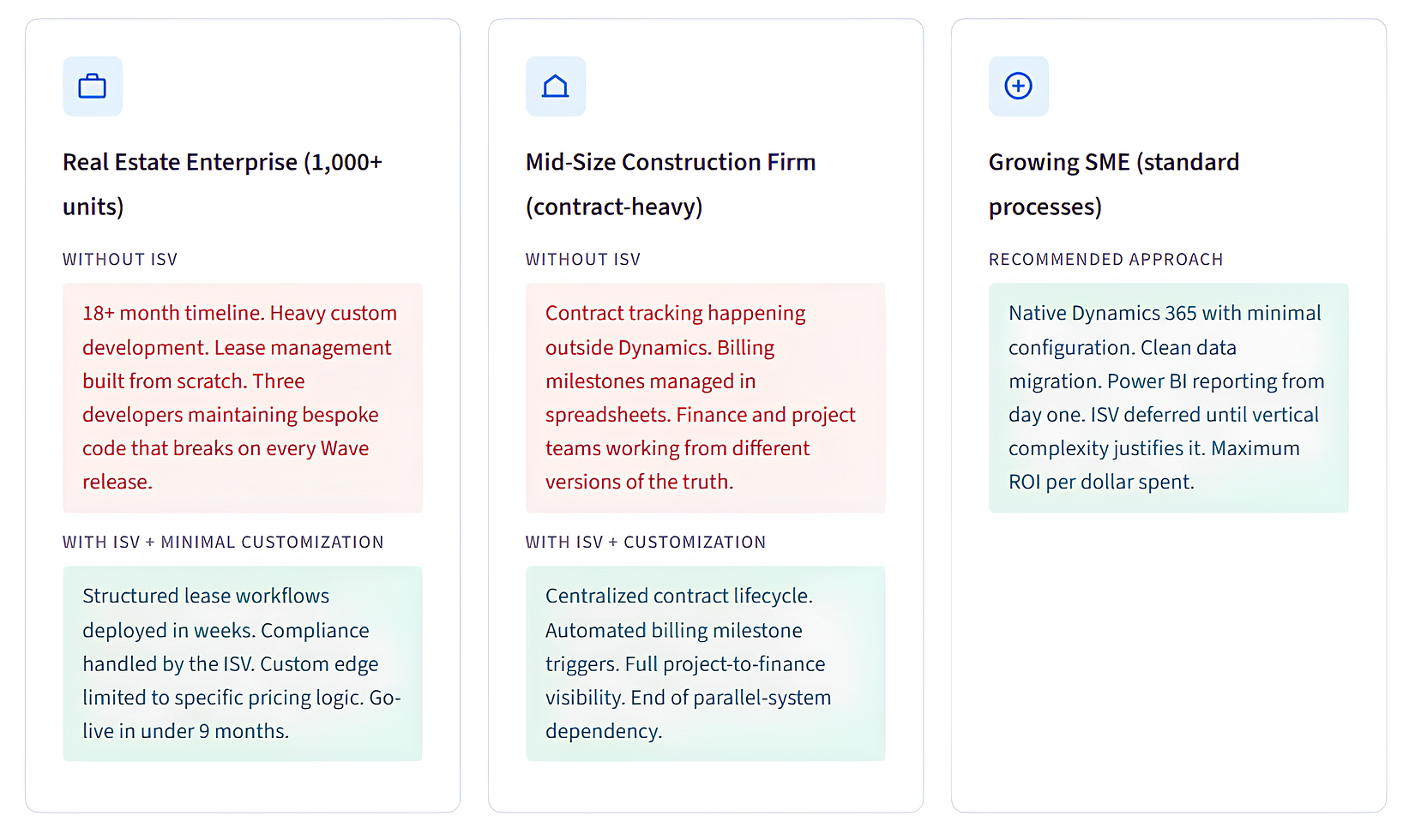
Real-World Implementation Scenarios
Patterns drawn from implementation experience across three of the most Dynamics-active industries in the market:
The 5 Costliest Implementation Mistakes (With Real Numbers)
These are not theoretical risks. They appear in real project post-mortems. Understanding them is the first step to avoiding the bill.
Real Cost Reference
A documented example from industry research: skipped data cleaning on a 20GB ERP migration cost $30K in cleanup. Over-customized workflows added $50K in extra development. Neglected training generated $15K in ongoing support costs. No pilot phase required $20K in rework. Weak governance caused $25K in delays. Total overrun: approximately $140,000 — on a project that should have cost far less.
Mistake 1: Over-customizing in the early phases
The instinct to replicate existing business processes inside a new system is understandable — but it’s the single most expensive habit in ERP implementations. Over-customization in the early phases creates a brittle system that requires constant maintenance, breaks during upgrades, and accumulates technical debt at a pace that eventually makes the system harder to use than the legacy platform it replaced.
Mistake 2: Ignoring the ISV ecosystem
Many project teams remain unaware of the depth of Microsoft’s AppSource ecosystem. Thousands of certified ISV solutions exist across manufacturing, retail, real estate, field service, professional services, and more. Bypassing this ecosystem and building industry functionality from scratch is equivalent to writing a payroll module when dozens of certified payroll ISVs already exist. The wasted investment is compounded by the ongoing maintenance obligation.
Mistake 3: No architectural planning before tool selection
Selecting a Dynamics 365 module — or an ISV solution — before the business architecture has been mapped is a project risk that manifests later as scope creep, integration failures, and expensive rework. The 3-layer model described in this article exists precisely to force architectural clarity before any vendor or product is selected.
Mistake 4: Tool-first thinking instead of process-first
Companies that define their ideal future-state processes before selecting technology consistently outperform those that configure software to match current broken processes. Business process reengineering is not a luxury activity — it is the foundation on which every other implementation decision rests. Implementing Dynamics 365 to replicate an inefficient manual workflow is one of the purest ways to guarantee a failed project.
Mistake 5: Underestimating the implementation partner's decision
The quality of the implementation partner is, in aggregate, the strongest predictor of project outcome. A partner who understands your industry, advocates for ISV solutions where they apply, resists unnecessary customization, and brings a structured change management approach will consistently outperform a technically proficient but process-naive team. Vet your partner’s industry portfolio, not just their technical certifications.
The 2026 Winning Strategy
The organizations extracting the best ROI from Dynamics 365 in 2026 are not using the most customization. They’re not the ones with the most ISVs. They’re the ones who made the right decision at each layer — and resisted the pressure to over-engineer solutions that didn’t need it.
The Pattern That Consistently Wins
Core ERP → Dynamics 365 native, fully leveraged.
Industry workflows → ISV solutions, certified and maintained. Competitive edge → controlled customization, built as independent apps on Power Platform. All three layers are connected through clean data and a real-time integration architecture.
In the 2026 environment specifically, two additional factors reshape the equation. First, Microsoft Copilot is now embedded across Dynamics 365 — and its value is entirely dependent on the quality of your underlying data architecture. Implementations built on clean data, structured Dataverse schemas, and well-governed ISV integrations will extract exponentially more value from AI capabilities than those built on customized, fragmented data structures.
Second, Microsoft’s bi-annual Wave releases continue to evolve the platform at a pace. Implementations that prioritize configuration over code, and ISV solutions over bespoke development, stay current without significant rework. Implementations that took shortcuts in the early phases face increasing technical debt with each update cycle.
The smartest strategy isn’t about choosing one approach. It’s about understanding which approach belongs at which layer — and having the discipline to apply that framework consistently, even under the pressure of go-live deadlines and stakeholder feature requests.
Frequently Asked Questions
Does every Dynamics 365 implementation need ISV solutions?
No. ISVs are most valuable for organizations in industries with complex, domain-specific workflows — real estate, construction, manufacturing, retail, and field service. For SMEs with standard finance and operations needs, native Dynamics 365 often delivers strong ROI without any ISV overhead. The decision should be driven by industry complexity and workflow specificity, not vendor preference.
Is customization better than an ISV solution?
Not in most cases where an ISV solution already covers the requirement. ISV solutions are faster to deploy, carry lower implementation risk, maintain upgrade compatibility with Microsoft’s release waves, and are backed by vendors with deep domain expertise. Custom development makes sense only when the business requirement is genuinely unique, and no ISV solution exists. Using customization to solve problems that ISVs already solve is one of the most common and expensive mistakes in the ecosystem.
Can you use both ISV solutions and customization in the same implementation?
Yes — and most successful enterprise implementations do. The discipline is architectural: ISVs handle the industry layer, custom development handles the genuine edge cases, and both are built to operate as independent, upgrade-safe modules rather than modifications to core Dynamics code. The critical principle is to use customization only after the ISV ecosystem has been evaluated and found insufficient for the specific requirement.
How does Microsoft Copilot change the implementation approach in 2026?
Significantly. Copilot is now embedded across D365 Finance, Supply Chain, Sales, and Customer Service. For it to produce accurate, business-specific results, your Dataverse data must be clean and structured, and your knowledge bases must be properly configured — a concept called “AI grounding.” Implementations that begin with AI grounding as a first-class requirement will extract far more value from Copilot than those that treat it as a post-launch add-on.
What is the most important factor in choosing a Dynamics 365 implementation partner?
Industry expertise and architectural discipline. The right partner should demonstrate experience in your vertical, advocate for ISV solutions before recommending custom development, apply a configuration-first approach to every technical decision, and have a structured change management methodology. Technical certifications matter — but a partner’s posture toward over-customization and their track record of on-time, within-budget deliveries are stronger predictors of your project’s success.
Ready to plan your Dynamics 365 implementation the right way?
specializes in Dynamics 365 F&O, industry-specific ISV solutions, and migration from legacy ERP systems — with a proven approach that reduces implementation time, controls risk, and builds for long-term scale.
Talk to a D365 Expert → https://dnetsoft.com/
