HubSpot Pricing Explained: How to Choose the Right Plan Without Overspending
-
- Published Updated
- 2,052 views
Choosing a CRM is not only about comparing features. Businesses also need to understand what they will actually pay as their contacts, users, marketing campaigns, sales processes, and customer service requirements grow. This is why understanding HubSpot Pricing before selecting a plan can help businesses avoid unnecessary software costs and choose a setup that supports long-term growth.
HubSpot offers multiple products and subscription levels rather than one fixed package. A small company may begin with free or Starter tools, while a growing organization may need Professional or Enterprise functionality for automation, reporting, permissions, integrations, and larger teams.
The right choice depends less on finding the cheapest plan and more on matching HubSpot’s capabilities with the processes your business genuinely needs.
What Is HubSpot Pricing?
HubSpot Pricing is based on the products, subscription tier, number of users or seats, marketing contact volume, additional features, and implementation requirements selected by a business.
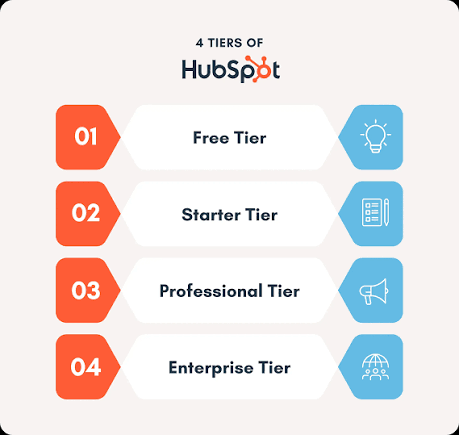
HubSpot provides Free, Starter, Professional, and Enterprise options across different parts of its customer platform. Because each business can use a different combination of Marketing, Sales, Service, Content, Data, and other tools, the final subscription cost can vary considerably.
As of September 2026, HubSpot’s official pricing pages show free options as well as paid Starter, Professional, and Enterprise plans. Businesses should always verify the latest official pricing before purchasing because subscription rates, promotional pricing, included seats, credits, and onboarding charges can change.
How Does HubSpot Pricing Work?
HubSpot pricing becomes easier to understand when you separate the software into the functions your company actually needs.
A business focused mainly on lead generation may invest primarily in Marketing Hub. A customer support team may need Service Hub. Companies that want marketing, sales, customer service, content, and data management under one system can instead evaluate the broader Customer Platform.
The cost may also increase when your company adds more users, marketing contacts, advanced automation, AI usage, enterprise controls, or integrations.
This means two companies using HubSpot can have very different monthly costs even when both describe themselves as HubSpot customers.
HubSpot Marketing Hub Pricing
HubSpot Marketing Hub Pricing is particularly important for businesses running email marketing, lead generation campaigns, forms, landing pages, automation, advertising, and marketing reporting.
The Free level can help businesses test basic functionality before committing to a paid subscription. Starter is designed for businesses that need more professional marketing tools without advanced automation requirements.
Professional is more suitable when marketing teams require scalable automation, campaign management, reporting, and more sophisticated customer journeys. Enterprise targets larger organizations that need greater flexibility, governance, controls, and scale.
HubSpot currently lists Marketing Hub Professional from around $800 per month with annual billing, while Enterprise starts from around $3,600 per month. Professional and Enterprise plans can also include mandatory onboarding fees.
However, businesses should not judge HubSpot Marketing Hub Pricing using the starting subscription price alone. Marketing contacts are another important consideration.
HubSpot distinguishes between marketing contacts and non-marketing contacts. Contacts that you actively target through marketing activity can affect the paid contact tier, while non-marketing contacts can be stored without being treated in the same way for marketing pricing purposes.
For companies with large databases, properly managing contact status can therefore become an important part of controlling HubSpot costs.
HubSpot Service Hub Pricing
Customer support teams should evaluate HubSpot Service Hub Pricing separately because Service Hub is structured around customer service requirements and user seats.
Service Hub can provide tools for managing customer conversations, support tickets, help desk processes, customer success workflows, and service reporting.
The Free and Starter levels can work for smaller support operations. Professional is designed for businesses that need more comprehensive help desk and customer success capabilities, while Enterprise provides advanced routing, controls, and enterprise-level functionality.
As of September 2026, HubSpot lists Service Hub Professional from approximately $90 per seat per month with annual billing, while Enterprise starts from around $150 per seat per month. Professional and Enterprise can also carry separate onboarding costs.
When evaluating HubSpot Service Hub Pricing, companies should therefore estimate how many employees genuinely need paid access instead of simply multiplying the price by the total number of employees.
What Additional HubSpot Costs Should Businesses Consider?
The subscription price shown on a pricing page is not always the complete cost of adopting a CRM platform.
Implementation, CRM configuration, contact migration, workflow creation, integrations, user training, reporting architecture, data cleanup, custom development, and ongoing optimization may all contribute to the overall investment.
For example, a company moving from spreadsheets or a basic CRM may require relatively straightforward implementation. A business migrating thousands of records from multiple systems while connecting ERP, sales, marketing, customer support, and analytics platforms will usually require a more detailed implementation strategy.
HubSpot also uses credits for certain AI-powered agents and functionality. Paid subscriptions include different credit allocations, while businesses with heavier usage may require additional credits.
The more useful question is therefore not simply, “How much does HubSpot cost?” but “What will it cost to make HubSpot work correctly for our business?”
Which HubSpot Plan Is Right for Your Business?
The best HubSpot plan is the one that solves your current operational problems while providing a practical path for future growth.
A small business focused on organizing contacts and basic lead management may not need Professional-level automation immediately. A growing B2B company managing multiple campaigns, lead stages, sales pipelines, reporting dashboards, and customer journeys may quickly benefit from more advanced capabilities.
Large organizations should also consider permissions, governance, reporting complexity, integrations, automation limits, and team structure before making a decision.
Paying for advanced functionality that employees never use creates unnecessary software expenditure. At the same time, choosing a plan that is too limited can result in manual work, disconnected systems, poor reporting, and another migration later.
Can You Reduce Your HubSpot Costs?
Yes. Cost optimization usually begins with defining exactly what your teams require before purchasing licenses or upgrading plans.
Businesses should evaluate the number of active users, marketing contacts, automation requirements, integrations, reporting needs, and customer service workflows before making a subscription decision.
A well-planned HubSpot architecture can often be more valuable than simply selecting the highest available package.
Why HubSpot Implementation Matters as Much as Pricing
CRM software only creates value when people, processes, data, and automation are configured correctly.
Poor implementation can leave businesses paying for advanced functionality while employees continue managing important activities in spreadsheets, email threads, or disconnected tools.
Technix Infotech helps businesses plan and implement HubSpot environments around real marketing, sales, customer service, integration, and RevOps requirements. Its HubSpot services include implementation, CRM migration, integrations, and broader revenue operations support.
Instead of treating the CRM as another software subscription, businesses can build a connected system where customer information flows across teams and supports measurable business processes.
Frequently Asked Questions About HubSpot Pricing
How much does HubSpot cost?
HubSpot offers free tools as well as paid Starter, Professional, and Enterprise subscriptions. The total cost depends on the Hub, plan level, users, contacts, onboarding, AI usage, integrations, and additional requirements.
Is HubSpot free for small businesses?
HubSpot provides free CRM and related tools that can be useful for businesses starting with basic customer management. Growing businesses can upgrade when they require additional automation, reporting, support, or operational capabilities.
Is HubSpot Marketing Hub priced by contacts?
Marketing Hub pricing can be affected by the number of marketing contacts as well as the selected subscription level. Businesses with large databases should carefully manage which contacts need to remain active marketing contacts.
Is HubSpot Service Hub priced per user?
Paid Service Hub plans can use seat-based pricing. The final cost therefore depends partly on the number of team members requiring paid Service Hub functionality.
Final Thoughts
Understanding HubSpot Pricing requires more than looking at a monthly starting price. Companies should consider their users, contact database, marketing automation, support requirements, integrations, onboarding, data migration, and future growth.
Comparing HubSpot Marketing Hub Pricing and HubSpot Service Hub Pricing according to actual business needs can help prevent both overspending and under-investing.
Before purchasing or upgrading HubSpot, businesses should map their current processes, identify essential functionality, and calculate the complete cost of ownership. With the right plan and implementation strategy, HubSpot can become much more than a CRM — it can serve as the connected operational foundation for marketing, sales, service, and customer growth.
Choosing a CRM is not only about comparing features. Businesses also need to understand what they will actually pay as their contacts, users, marketing campaigns, sales processes, and customer service requirements grow. This is why understanding HubSpot Pricing before selecting a plan can help businesses avoid unnecessary software costs and choose a setup that supports long-term growth.
HubSpot offers multiple products and subscription levels rather than one fixed package. A small company may begin with free or Starter tools, while a growing organization may need Professional or Enterprise functionality for automation, reporting, permissions, integrations, and larger teams.
The right choice depends less on finding the cheapest plan and more on matching HubSpot’s capabilities with the processes your business genuinely needs.
What Is HubSpot Pricing?
HubSpot Pricing is based on the products, subscription tier, number of users or seats, marketing contact volume, additional features, and implementation requirements selected by a business.
HubSpot provides Free, Starter, Professional, and Enterprise options across different parts of its customer platform. Because each business can use a different combination of Marketing, Sales, Service, Content, Data, and other tools, the final subscription cost can vary considerably.
As of September 2026, HubSpot’s official pricing pages show free options as well as paid Starter, Professional, and Enterprise plans. Businesses should always verify the latest official pricing before purchasing because subscription rates, promotional pricing, included seats, credits, and onboarding charges can change.
How Does HubSpot Pricing Work?
HubSpot pricing becomes easier to understand when you separate the software into the functions your company actually needs.
A business focused mainly on lead generation may invest primarily in Marketing Hub. A customer support team may need Service Hub. Companies that want marketing, sales, customer service, content, and data management under one system can instead evaluate the broader Customer Platform.
The cost may also increase when your company adds more users, marketing contacts, advanced automation, AI usage, enterprise controls, or integrations.
This means two companies using HubSpot can have very different monthly costs even when both describe themselves as HubSpot customers.
HubSpot Marketing Hub Pricing
HubSpot Marketing Hub Pricing is particularly important for businesses running email marketing, lead generation campaigns, forms, landing pages, automation, advertising, and marketing reporting.
The Free level can help businesses test basic functionality before committing to a paid subscription. Starter is designed for businesses that need more professional marketing tools without advanced automation requirements.
Professional is more suitable when marketing teams require scalable automation, campaign management, reporting, and more sophisticated customer journeys. Enterprise targets larger organizations that need greater flexibility, governance, controls, and scale.
HubSpot currently lists Marketing Hub Professional from around $800 per month with annual billing, while Enterprise starts from around $3,600 per month. Professional and Enterprise plans can also include mandatory onboarding fees.
However, businesses should not judge HubSpot Marketing Hub Pricing using the starting subscription price alone. Marketing contacts are another important consideration.
HubSpot distinguishes between marketing contacts and non-marketing contacts. Contacts that you actively target through marketing activity can affect the paid contact tier, while non-marketing contacts can be stored without being treated in the same way for marketing pricing purposes.
For companies with large databases, properly managing contact status can therefore become an important part of controlling HubSpot costs.
HubSpot Service Hub Pricing
Customer support teams should evaluate HubSpot Service Hub Pricing separately because Service Hub is structured around customer service requirements and user seats.
Service Hub can provide tools for managing customer conversations, support tickets, help desk processes, customer success workflows, and service reporting.
The Free and Starter levels can work for smaller support operations. Professional is designed for businesses that need more comprehensive help desk and customer success capabilities, while Enterprise provides advanced routing, controls, and enterprise-level functionality.
As of September 2026, HubSpot lists Service Hub Professional from approximately $90 per seat per month with annual billing, while Enterprise starts from around $150 per seat per month. Professional and Enterprise can also carry separate onboarding costs.
When evaluating HubSpot Service Hub Pricing, companies should therefore estimate how many employees genuinely need paid access instead of simply multiplying the price by the total number of employees.
What Additional HubSpot Costs Should Businesses Consider?
The subscription price shown on a pricing page is not always the complete cost of adopting a CRM platform.
Implementation, CRM configuration, contact migration, workflow creation, integrations, user training, reporting architecture, data cleanup, custom development, and ongoing optimization may all contribute to the overall investment.
For example, a company moving from spreadsheets or a basic CRM may require relatively straightforward implementation. A business migrating thousands of records from multiple systems while connecting ERP, sales, marketing, customer support, and analytics platforms will usually require a more detailed implementation strategy.
HubSpot also uses credits for certain AI-powered agents and functionality. Paid subscriptions include different credit allocations, while businesses with heavier usage may require additional credits.
The more useful question is therefore not simply, “How much does HubSpot cost?” but “What will it cost to make HubSpot work correctly for our business?”
Which HubSpot Plan Is Right for Your Business?
The best HubSpot plan is the one that solves your current operational problems while providing a practical path for future growth.
A small business focused on organizing contacts and basic lead management may not need Professional-level automation immediately. A growing B2B company managing multiple campaigns, lead stages, sales pipelines, reporting dashboards, and customer journeys may quickly benefit from more advanced capabilities.
Large organizations should also consider permissions, governance, reporting complexity, integrations, automation limits, and team structure before making a decision.
Paying for advanced functionality that employees never use creates unnecessary software expenditure. At the same time, choosing a plan that is too limited can result in manual work, disconnected systems, poor reporting, and another migration later.
Can You Reduce Your HubSpot Costs?
Yes. Cost optimization usually begins with defining exactly what your teams require before purchasing licenses or upgrading plans.
Businesses should evaluate the number of active users, marketing contacts, automation requirements, integrations, reporting needs, and customer service workflows before making a subscription decision.
A well-planned HubSpot architecture can often be more valuable than simply selecting the highest available package.
Why HubSpot Implementation Matters as Much as Pricing
CRM software only creates value when people, processes, data, and automation are configured correctly.
Poor implementation can leave businesses paying for advanced functionality while employees continue managing important activities in spreadsheets, email threads, or disconnected tools.