How to Design a Scalable Jira Project Management Architecture
-

- Published Updated
- 1,741 views
Introduction
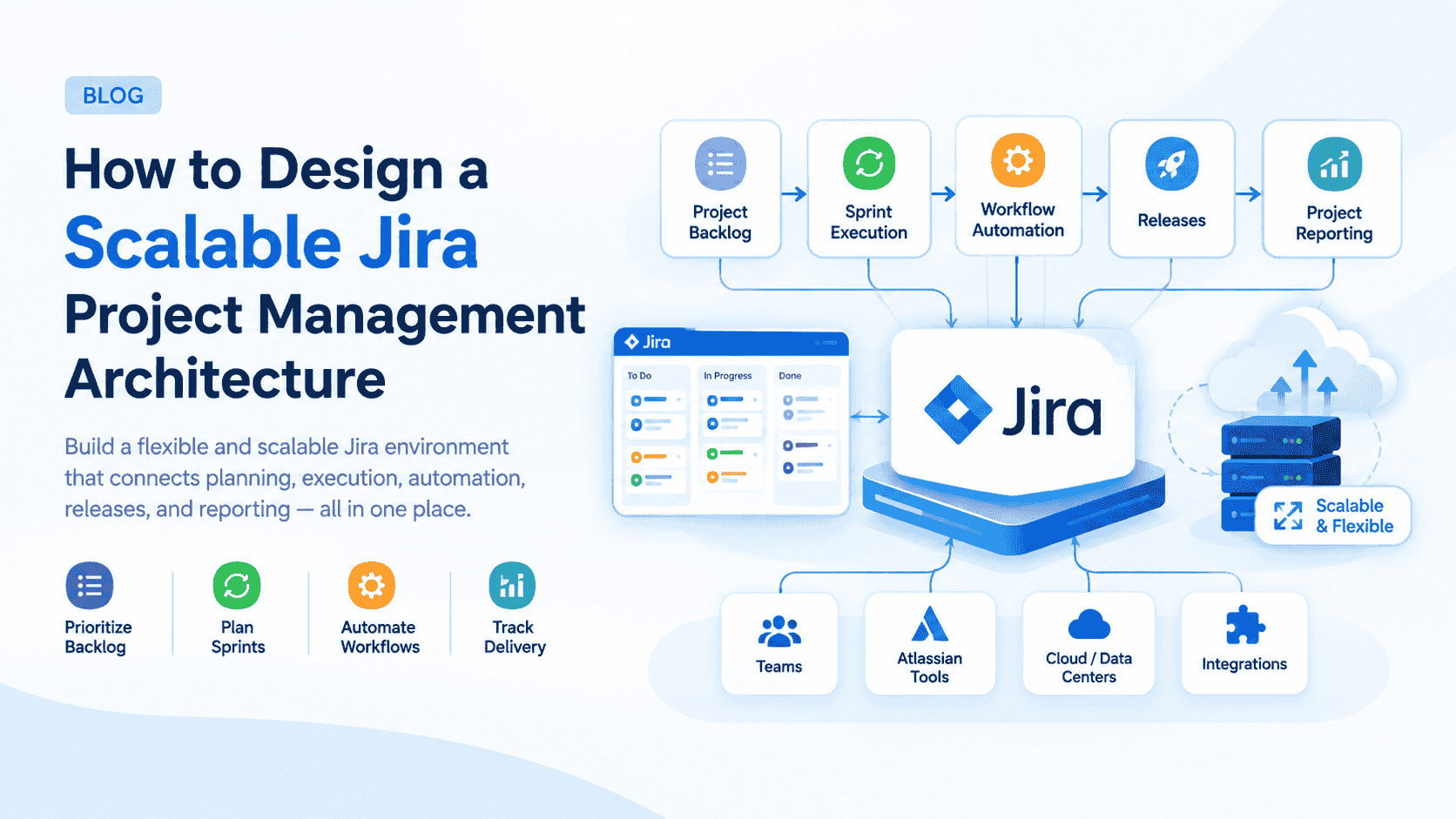
As organizations grow, project management becomes more complex. Teams need consistent workflows, better visibility, controlled access, reliable reporting, and automation without creating unnecessary administrative overhead. A scalable Jira environment helps connect planning, execution, collaboration, and delivery within a structured framework.
With Jira Software Project Management, organizations can establish an architecture that supports Agile planning, backlog management, sprint execution, workflow automation, release coordination, and performance monitoring. However, simply creating Jira projects is not enough. The architecture needs to be designed around business processes, team structures, governance requirements, and future growth.
A well-designed Jira architecture allows teams to standardize processes while maintaining the flexibility required by individual projects. Therefore, organizations can improve operational consistency without limiting Agile teams.
1. Start With Business and Project Requirements
Before configuring Jira, organizations should understand how projects are currently planned, executed, monitored, and delivered. This assessment provides the foundation for deciding which Jira configurations, workflows, issue types, permissions, and reporting structures are actually required.
Instead of starting with Jira settings, begin with business requirements and translate them into technical configurations.
Map existing processes: Document how work moves from project initiation through completion. This helps identify unnecessary steps and existing bottlenecks.
Identify project types: Determine whether teams manage software development, product development, IT initiatives, or other project categories. Different project types may require different configurations.
Define team structures: Understand which teams, departments, and stakeholders participate in project delivery. This supports appropriate project and permission design.
Establish business objectives: Connect Jira implementation decisions with measurable objectives such as faster delivery, improved visibility, or reduced manual work.
Identify scalability requirements: Consider future teams, projects, users, and workflows before establishing the initial architecture.
Document technical requirements: Capture integration, reporting, automation, security, and data requirements early in the design process.
2. Design a Scalable Jira Project Structure
A scalable Jira architecture requires a logical project structure. Creating separate projects for every small team or initiative can eventually make administration and reporting difficult. Therefore, project boundaries should be established based on meaningful differences in processes, permissions, ownership, or reporting.
The objective is to create enough separation for governance while avoiding unnecessary fragmentation.
Define project boundaries: Create projects when teams have genuinely different workflows, permissions, or delivery requirements.
Standardize project configurations: Reuse appropriate configurations where possible to reduce administrative complexity.
Separate operational needs: Keep projects logically organized when different teams require substantially different processes.
Plan project ownership: Establish clear ownership for project configuration, administration, and ongoing maintenance.
Create naming standards: Consistent project names and keys make administration, reporting, and navigation easier.
Review project growth: Periodically assess whether existing projects still match organizational structures and business requirements.
3. Build Consistent Issue Type and Workflow Architecture
Workflows define how work progresses through Jira. A scalable architecture should balance standardization with flexibility, ensuring teams follow consistent processes while retaining the ability to support legitimate project-specific requirements.
Issue types should also represent meaningful work categories rather than every possible variation of a task.
Define core issue types: Establish standard types such as epics, stories, tasks, bugs, and subtasks based on organizational requirements.
Map lifecycle stages: Design statuses that accurately represent the movement of work from creation to completion.
Minimize unnecessary statuses: Excessive workflow stages can make processes difficult to understand and maintain.
Define transition rules: Establish clear conditions for moving issues between statuses and prevent invalid transitions.
Standardize workflows: Reuse common workflows across similar projects to simplify administration and reporting.
Document workflow ownership: Assign responsibility for approving and maintaining workflow changes.
A good workflow should reflect the actual delivery process rather than simply reproducing every internal organizational step.
4. Architect Backlogs, Boards, and Sprint Planning
Backlog management is central to Agile project delivery. Jira should provide teams with a structured way to capture requirements, prioritize work, organize epics, and prepare items for sprint execution.
Once the backlog structure is established, boards can provide teams with a visual representation of their work and progress.
Structure requirements: Use epics, stories, tasks, bugs, and subtasks to organize work according to project complexity.
Prioritize strategically: Rank backlog items according to business value, urgency, dependencies, and delivery objectives.
Configure Agile boards: Design Scrum or Kanban boards around how teams actually manage work.
Establish sprint practices: Define consistent approaches for sprint planning, execution, review, and retrospective activities.
Manage dependencies: Link related work items so teams can identify potential delivery constraints.
Maintain backlog quality: Regularly remove obsolete items, clarify requirements, and refine upcoming work.
A well-structured backlog reduces ambiguity and gives teams a reliable starting point for planning future delivery cycles.
5. Introduce Jira Automation and Integration
As project environments scale, manual administration becomes increasingly difficult. Jira automation can reduce repetitive activities such as issue assignment, status updates, notifications, and workflow actions.
Integrations can also connect Jira with development, collaboration, documentation, and service management platforms, creating a more connected delivery ecosystem.
Automate repetitive tasks: Use rules to handle predictable project management activities and reduce manual administration.
Automate assignments: Route issues to appropriate users or teams based on defined conditions.
Trigger notifications: Notify stakeholders when important workflow, priority, or project events occur.
Automate status updates: Move issues through predefined stages when specific conditions are satisfied.
Connect development tools: Integrate Jira with development platforms to connect project work with implementation activities.
Connect collaboration systems: Use integrations to improve communication and ensure project information remains accessible across teams.
Automation should be introduced strategically. Poorly designed rules can create unexpected updates, notification overload, or difficult-to-debug workflows.
6. Establish Governance, Permissions, and Security
Scalability requires governance. As the number of users, projects, and administrators increases, organizations need consistent rules for permissions, configuration changes, project ownership, and data access.
A governance model provides the framework for keeping Jira manageable while allowing teams to work independently where appropriate.
Define permission models: Establish who can view, create, edit, transition, administer, and manage project information.
Apply role-based access: Assign permissions according to responsibilities instead of providing excessive administrative access.
Control configuration changes: Establish an approval process for major workflow, permission, and scheme modifications.
Create governance standards: Document naming conventions, issue structures, workflow practices, and configuration principles.
Monitor administration: Regularly review users, permissions, projects, and configuration changes.
Plan lifecycle management: Define processes for creating, modifying, archiving, and retiring Jira projects.
Effective governance should support delivery rather than create unnecessary bureaucracy. The goal is controlled flexibility.
7. Build Reporting and Dashboard Architecture
A scalable Jira environment should transform project information into actionable insights. Dashboards and reports can provide visibility into sprint progress, workload, project health, delivery performance, and potential bottlenecks.
However, reporting should be designed around decisions rather than simply displaying large amounts of data.
Define project KPIs: Select metrics that reflect meaningful delivery and business outcomes.
Monitor sprint performance: Track progress and identify issues that could affect sprint commitments.
Track workload: Review team workload and identify potential capacity constraints.
Monitor delivery trends: Analyze project performance over time instead of relying on individual snapshots.
Create stakeholder dashboards: Provide executives, project managers, and delivery teams with relevant views.
Use data for decisions: Convert reporting insights into actions such as reprioritization, resource adjustment, or process improvement.
A strong dashboard architecture ensures that different stakeholders see the information they need without overwhelming them with irrelevant metrics.
8. Optimize the Architecture for Long-Term Growth
Jira architecture should not be treated as a one-time implementation. As teams, projects, processes, and business requirements change, the environment must evolve accordingly.
Continuous optimization helps organizations maintain performance, usability, governance, and scalability over time.
Review configurations: Periodically examine workflows, schemes, permissions, and project structures for unnecessary complexity.
Analyze automation: Identify outdated or overlapping automation rules and optimize them as processes change.
Measure adoption: Monitor how teams use Jira and identify areas where additional training or process improvements may be required.
Improve workflows: Use delivery data and team feedback to remove unnecessary process steps.
Review integrations: Ensure connected applications continue to support current business and technical requirements.
Create optimization cycles: Establish recurring architecture reviews instead of waiting until Jira becomes difficult to manage.
Continuous optimization is especially important for growing organizations because configurations that work for a small number of teams may become inefficient at enterprise scale.
Conclusion
Designing a scalable Jira architecture requires more than configuring projects, workflows, and dashboards. Organizations need to consider business processes, Agile practices, governance, automation, integrations, reporting, security, and future growth as interconnected components.
A structured architecture can help teams move from fragmented project tracking toward a consistent and measurable delivery model. By standardizing core processes while allowing controlled flexibility, organizations can improve visibility without creating unnecessary administrative complexity.
Most importantly, scalability should remain an ongoing objective. Regular architecture reviews, workflow optimization, automation improvements, governance updates, and user feedback can help Jira continue supporting organizational growth.
With the right strategy and implementation approach, jira project management software can become a structured foundation for planning, executing, monitoring, and continuously improving project delivery.
https://www.empyra.com/jira-software-project-management?utm_source=Off-page-SEO&utm_medium=Blog-posting-indibloghub-Subhrajit