Restaurant Ordering Web Apps: Complete Guide to Design, Build, and Optimize
-

- Published Updated
- 2,340 views
Introduction
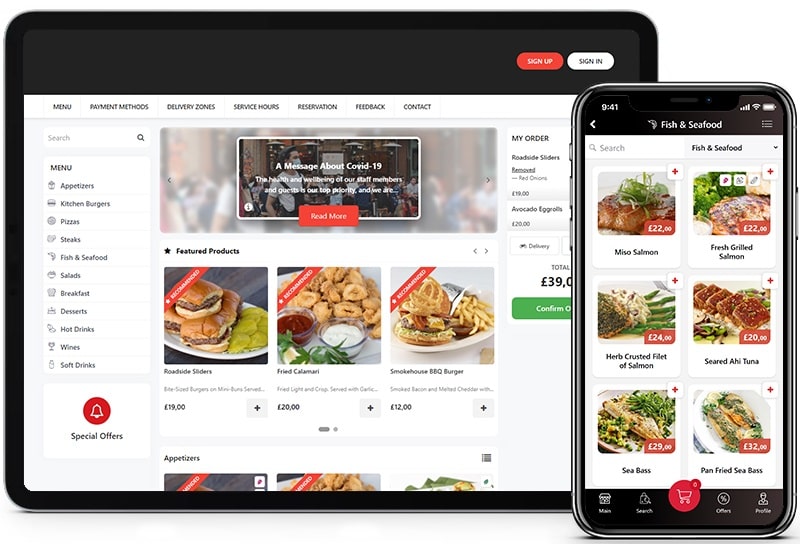
A web app for restaurant ordering enables diners to browse menus, place orders, and pay from a mobile browser or desktop without downloading a native app. These browser-based systems use responsive design, progressive web app (PWA) techniques, and integrations with point-of-sale (POS) systems to streamline service, increase average order value, and reduce order errors.
- Understand the core features: menu management, ordering flow, payments, and kitchen routing.
- Design for performance and accessibility using PWA, responsive UI, and WCAG practices.
- Address security and compliance: PCI DSS for payments and data protection regulations such as GDPR.
- Choose integrations: POS, kitchen display systems (KDS), inventory, and analytics.
Why choose a web app for restaurant ordering
Web apps work across devices and platforms, reducing friction for guests who prefer not to download an app. Progressive web apps support offline caching, fast load times, and push notifications, while responsive design ensures menu legibility and ease of use on phones, tablets, and desktops. For multi-location operations, a single web app can be updated centrally and rolled out through content delivery networks (CDNs) to lower latency near customers.
Core features and user experience
Menu and catalog management
Menus should support categories, modifiers (size, add-ons), dietary labels, photos, and real-time availability. Dynamic pricing, happy hour rules, and localized menus by location are common requirements.
Ordering flow and UX
Clear calls-to-action, a persistent cart, estimated prep times, and upsell suggestions improve conversion. Guest flows typically include dine-in (table number or QR code), curbside, pickup, and delivery. Accessibility considerations (WCAG) and simple forms reduce abandonment.
Payments and receipts
Support for contactless payments, tokenized card processing, digital receipts, and gratuity selection simplifies checkout. Payment integrations must meet industry standards; PCI DSS compliance and strong encryption for payment data are essential. Third-party payment processors often provide SDKs and compliance guidance.
Integrations: POS, KDS, inventory, and analytics
Point-of-sale (POS) integration
Real-time syncing with POS systems prevents double-selling and keeps inventory accurate. Common approaches include REST APIs, webhooks, and middleware sync services. Order routing should create the same order records in the POS as in-store transactions to maintain reporting consistency.
Kitchen display systems and order routing
Kitchen display systems (KDS) or printers receive order tickets with modifiers and timestamps. Proper routing (kitchen vs. bar vs. expeditor) and prep time visibility improve throughput and reduce mistakes.
Inventory and menu automation
Inventory-aware menus automatically hide sold-out items. Integrations with inventory systems and recipe costing help operations control waste and maintain margins.
Technical architecture and performance
Frontend considerations
Use responsive frameworks, optimize images, lazy-load assets, and implement service workers for PWAs. Minimize time-to-interactive to reduce cart abandonment. Accessibility (semantic HTML and ARIA) helps reach more users and improves SEO.
Backend and APIs
Scalable microservices or serverless functions can handle orders, inventory updates, and notifications. Secure APIs with rate limiting, authentication (OAuth or API keys), and idempotency for order creation prevent duplicates.
Data, analytics, and A/B testing
Collect metrics on conversion rate, average order value, abandonment points, and popular modifiers. Use analytics and A/B testing to refine menu layout, pricing, and promotional placements. Ensure data handling aligns with privacy regulations.
Security, privacy, and compliance
Payment security and PCI DSS
Adhere to PCI DSS requirements when processing card data or use tokenization and hosted payment pages to reduce scope. Regular security scans and penetration testing are recommended.
Data protection
Comply with regional privacy laws such as GDPR in the EU or national data protection regulations by minimizing stored personal data, providing clear privacy notices, and offering data access and deletion controls.
Accessibility and safety
Follow Web Content Accessibility Guidelines (WCAG) for menus, forms, and checkout. Also maintain food safety and labeling accuracy; coordination with food safety authorities and local health departments is part of operational compliance.
Operations and rollout
Staff training and change management
Train front-of-house and kitchen staff on new workflows, order screens, and ticket handling. Clear signage for guests (QR codes, table IDs) reduces confusion.
Testing and monitoring
Perform load testing before peak times and monitor error rates, latency, and user sessions in real time. Implement logging and alerting for failed payments or integration issues.
Costs and ROI considerations
Evaluate initial development, hosting, integration, and ongoing maintenance vs. expected reductions in order errors, labor time saved, and increased ticket size from upsells. Track KPIs such as repeat customer rate, average order value, and conversion rate to assess ROI.
Industry context and resources
Trade and research groups publish benchmarks and best practices for digital ordering and foodservice operations; consult the National Restaurant Association for industry guidance and research (resource). For payment standards, refer to the PCI Security Standards Council and regional data protection authorities for privacy guidance.
FAQ
What is a web app for restaurant ordering and how does it differ from a native app?
A web app for restaurant ordering runs in a browser and can be accessed via a URL, offering cross-platform compatibility without an app store installation. Native apps are platform-specific downloads that can offer deeper device integration but require separate builds for each platform.
How can a restaurant ensure payment security when using a web ordering solution?
Use tokenized payments, hosted forms, or third-party payment processors to limit PCI DSS scope. Implement HTTPS, secure storage for tokens, and regular security audits.
What integrations are essential for a reliable online ordering workflow?
Key integrations include POS synchronization, kitchen display systems (KDS), payment gateways, inventory systems, and analytics platforms to ensure accurate orders, reporting, and inventory tracking.
How should accessibility and mobile performance be addressed?
Follow WCAG for accessible markup, ensure keyboard navigation and readable contrast, and optimize performance through image compression, code splitting, and service workers for fast load times on mobile networks.