
10 AI Avatar Online Tools Every Creator Should Know About
-

- Published Updated
- 1,981 views
Creating realistic AI avatars demands more than just technical know-how—it requires professional insight. As a seasoned digital creator experienced in visual storytelling, I’ve tested multiple tools to assess efficiency, animation fluidity, and overall output realism. My goal is to help creators achieve seamless production without unnecessary complexity.
After extensive hands-on evaluation, I’ve shortlisted the best AI avatar generator platforms that combine speed, precision, and flexibility. Each recommendation balances usability, export quality, and creative control to support professional-grade avatar creation workflows.
Handpicked List of the Best AI Avatar Online Tools
Here’s my handpicked list of the best AI avatar online tools, each carefully chosen for reliability, ease of use, and creative flexibility. I’ve personally tested these platforms to ensure they deliver high-quality results for both beginners and experienced creators. These tools make generating digital avatars fast, enjoyable, and professional, no matter your skill level.
Tool |
Key Features |
Best For |
CapCut |
1000+ avatar styles; photo/video-to-avatar; built-in voice sync; real-time editor |
AI video generators & YouTube Shorts creators |
DeepMotion |
Video-to-motion capture; full-body animation; engine-ready exports |
Motion-capture driven avatars |
Daz 3D (Daz Studio) |
High-detail rendering; morphing assets; marketplace integrations |
Photoreal character creation |
Adobe Character Animator |
Webcam-driven puppeteering; live lip-sync; After Effects linkage |
Live 2D puppeteering |
FaceGen Modeler |
Photo-to-face 3D; demographic sliders; export to FBX/OBJ |
3D face generation |
Animaze |
Live streaming avatars; scene controls; 2D/3D hybrid support |
Live streaming avatars |
iClone (Reallusion) |
Real-time 3D animation; motion libraries; physics-based rendering |
Real-time 3D animation |
Cartoon Animator |
Bone rigging; facial puppeteering; behavior packs |
2D character animation |
Hour One |
Script-to-video; presenter avatars; fast turnaround |
Virtual presenter videos |
Mixo |
Auto-rigging; animation library; instant character prep |
Fast rigging and animation |
Reviewing 10 Must-Try Online AI Avatar Creators for 2026
Over the years, I have personally explored these AI avatar platforms for a variety of creative projects, ensuring that my insights are drawn from actual, hands-on experience. This long-term testing allows me to evaluate each tool’s usability, performance, and overall effectiveness with confidence.
When selecting the most reliable AI avatar creators, I focused on key factors that matter for both professional and personal use:
- Customization Options: I looked for platforms that allow fine-tuning of avatars, including voice modulation, facial expressions, body gestures, and appearance adjustments.
- Realism and Accuracy: Avatars needed to deliver lifelike movement, expressions, and lip-sync for immersive digital content.
- Ease of Use: I prioritized intuitive interfaces suitable for beginners, yet powerful enough for experienced creators.
- Speed and Efficiency: Quick avatar creation without compromising quality or requiring complex workflows was essential.
- Output Quality: High-definition video and image outputs ensure avatars can be used in marketing, training, and social content.
- AI Integration: Automatic voice generation, gesture recognition, background handling, and animation features enhance creative flexibility.
- Platform Versatility: Tools compatible with multiple platforms (Web, Windows, iOS, Android) were considered highly valuable for cross-device workflows.
These criteria reflect my need for versatility and quality. Each of the 10 tools listed below strikes a balance between usability and capability, making them excellent for beginners while remaining useful as your skills develop. Having worked in digital content creation for over a decade, I continue to rely on these applications for fast, high-quality avatar generation and anticipate using them for years to come.
CapCut
CapCut’s AI avatar generator, powered by its advanced AI video generator system creates lifelike talking avatars in minutes with customizable styles and realistic lip-sync. The site provides more than one thousand digital human types to suit different creative requirements. Personalization has over one hundred and fifty voices and customizable backgrounds and frames. One tap turns the available video into a talking avatar to be used efficiently.
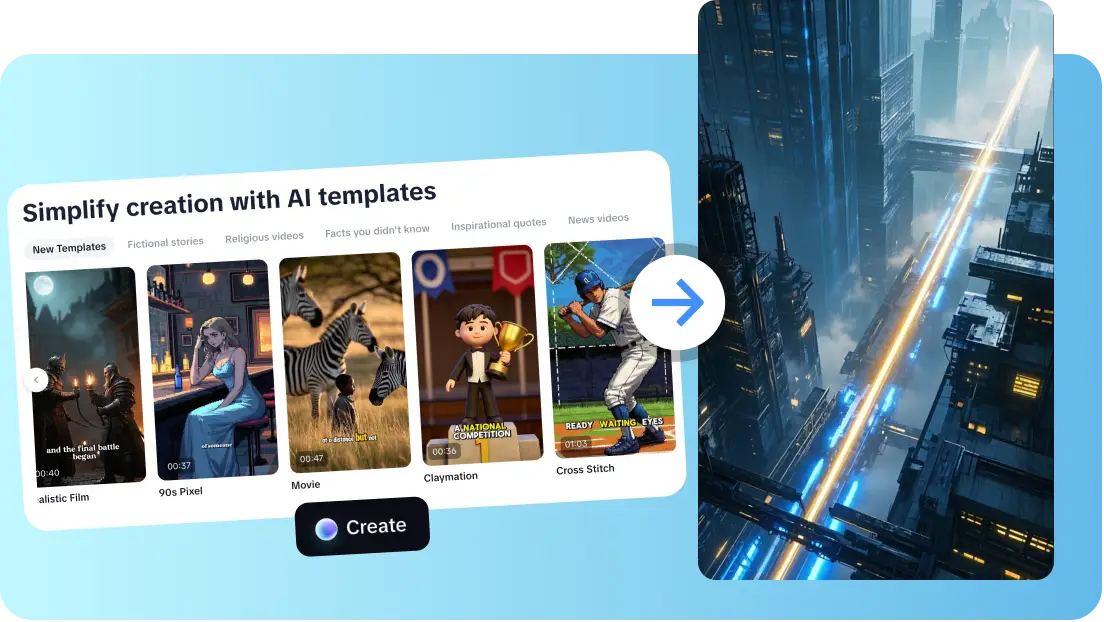
It is possible to transform photos into expressive talking characters with CapCut YouTube Shorts maker within seconds. Effects, subtitles, covers and export are handled with built-in editing tools and do not need external applications. This single workflow accelerates the production process and minimizes the switching of tools. Output promotes quality exports that can be used as social and marketing content. CapCut suits creators who want lightweight, fined-tuning avatars with no complicated pipelines. Templates are fast to iterate on and templates support brand-neutral avatars. Workflow saves hours daily.
Advantages
- Wide avatar library covering many digital human styles.
- Fast conversion from photo or video to talking avatar.
- Built-in voice selection with many AI voice options.
- All-in-one editing reduces need for additional software.
- Exports suited to social platforms and marketing campaigns.
Disadvantages
- Some features require pro account to access.
Key Features
- Avatar Styles: 1,000+ human categories for diverse looks and personalities.
- Voice Library: 150+ AI voices across accents, tones, and languages.
- Photo-to-Avatar: Instantly animate uploaded photos into speaking avatars.
- Video-to-Avatar: Convert videos into animated avatars with a single tap.
- Editing Suite: Includes effects, auto-subtitles, and cover customization.
- Export Options: High-quality formats optimized for social media platforms.
- Templates: Prebuilt templates for quick, consistent video creation.
- Background Customization: Add or remove backgrounds easily within the editor.
- Available on: Web, Windows, iOS, Android
- Overall: 4.9/5
- Beginner-Friendly Tools: 5/5
- Price: Free standard version; Pro starting at $19.99/month
Personal Experience:
I tested CapCut to create a weekend promotion reel. I uploaded a photo and the avatar was generated instantly. I selected an enthusiastic voice and added a vertical social template. The avatar moved naturally, smiled, and waved. With background customization, effects, and subtitles, the final video was export-ready in under five minutes. The engagement was noticeably higher than my regular posts. The intuitive workflow saves me hours daily. CapCut is my go-to for rapid, professional social avatar videos.
DeepMotion
DeepMotion is dedicated to motion capture of the body and face using AI-based pose estimation. It transforms normal video into 3D motion. The data is compatible with exported avatars in common engines. The service accelerates mocap among indie groups and individual developers. They have web processing and PC-friendly exports. Output is connected with game engines to provide real-time playback.
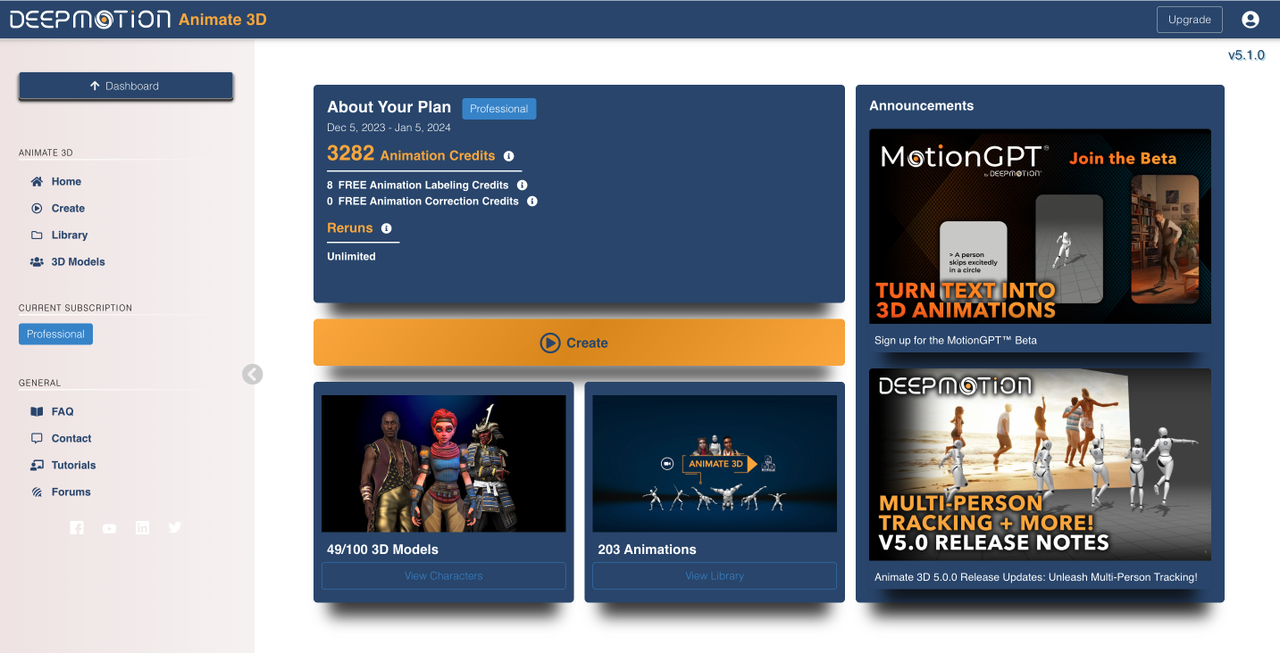
Key Features
- Video-to-Motion Capture: Converts ordinary video into 3D movement data.
- Engine Export: Works seamlessly with major game engines.
- Real-Time Processing: Quick motion tracking for live demos.
- Facial & Body Capture: Tracks both facial expressions and full-body movement.
- Pose Estimation: Accurate AI-generated motion for avatars.
- Custom Animations: Allows editing and fine-tuning of movements.
- Lightweight Workflow: Minimal setup needed for indie developers.
- Batch Export: Supports multiple clips efficiently.\
- Available on: Web, Windows
- Overall: 4.5/5
- Beginner-Friendly Tools: 4/5
- Price: Starter $15/month; Professional $117/month
Personal Experience:
I experimented with DeepMotion to animate a video of a friend dancing. The system captured body and facial motions accurately. I exported the result to Unity for testing, and it worked immediately. Adjusting gestures was straightforward, though complex sequences required minor tweaks. I liked how quickly I could generate 3D motion without renting motion-capture suits. DeepMotion is excellent for indie developers needing realistic movement.
Daz 3D (Daz Studio)
Daz Studio is a developer of photoreal characters that are prepared to be rendered and animated. The system includes morphable face and body sliders. There are a lot of free and paid resources that increase diversity. Export also has industry animation pipeline formats. Daz is excellent where realism and minute control are important. Lighting, shaders, and posing will take time to learn.

Key Features
- Morphable Faces & Bodies: Precise sliders for fine adjustments.
- Asset Marketplace: Extensive library of characters, props, and outfits.
- Rendering Tools: High-quality photorealistic output.
- Animation-Ready: Export in formats compatible with industry pipelines.
- Lighting Control: Adjustable shaders and lights for realistic scenes.
- Scene Composition: Combine multiple assets in one scene.
- Pose Presets: Save and apply custom poses easily.
- Texture Editing: Fine-tune surfaces and materials.
- Available on: Windows, Mac
- Overall: 4.4/5
- Beginner-Friendly Tools: 3.5/5
- Price: Daz Plus $8.99/month; Daz Premium $18.98/month
Personal Experience:
I built a futuristic avatar using Daz Studio. The morphing sliders allowed me to adjust facial and body features precisely. Rendering took some time, but the final results were photorealistic. I experimented with poses and props, which helped me craft a professional-looking 3D character. The learning curve was noticeable, but the creative control is unmatched for realism.
Adobe Character Animator
Adobe Character Animator is a real-time tracking of facial expression and puppets of 2D characters. Puppet movement and lip sync are driven by webcam input. It is connected with other creative suites to develop refined productions. Recorded segments and live-streams are simple. The tool is advantageous in broadcast-style workflows in which performance is important. Ready-made behaviors hasten the establishment of standard puppet actions.
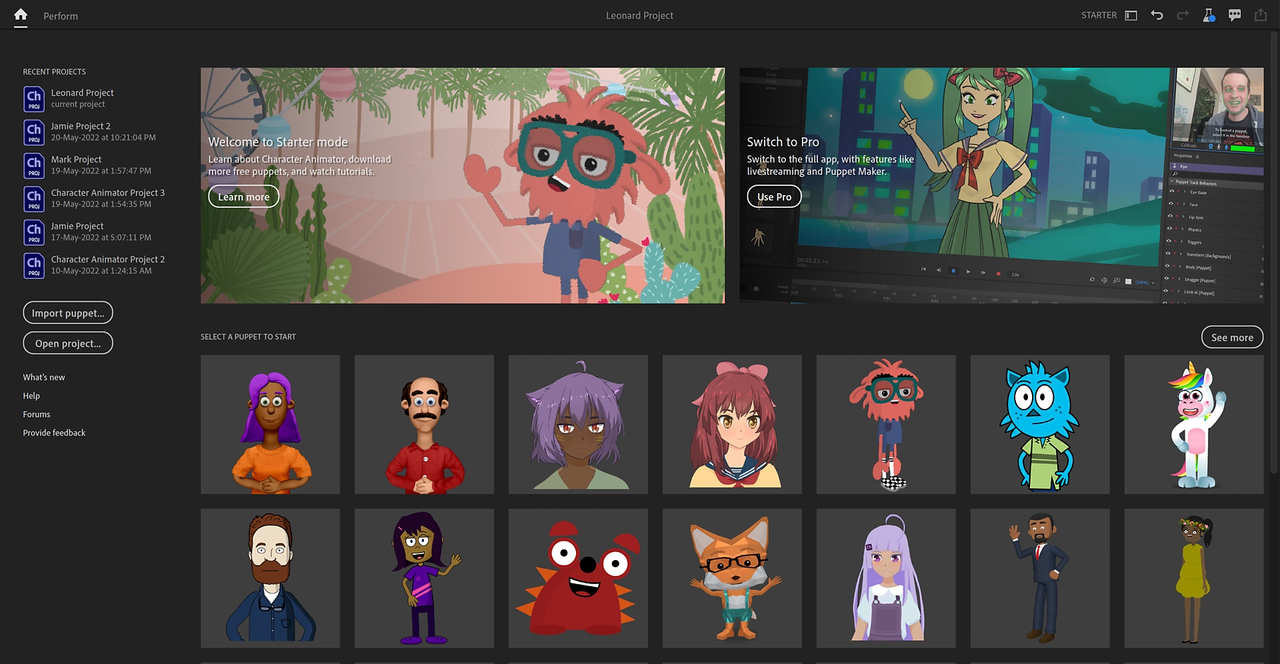
Key Features
- Real-Time Puppeting: Webcam-driven animation of 2D avatars.
- Audio Lip-Sync: Accurate syncing from recorded or live audio.
- Behavior Presets: Prebuilt actions for quicker animation setup.
- Integration: Works seamlessly with Creative Cloud tools.
- Scene Management: Combine multiple puppets in one scene.
- Recording & Streaming: Supports both live streams and pre-recorded videos.
- Facial Tracking: Capture subtle expressions with webcam input.
- Export Options: Render animations in multiple formats.
- Available on: Windows, Mac
- Overall: 4.3/5
- Beginner-Friendly Tools: 3.5/5
- Price: $69.99/month via Creative Cloud
Personal Experience:
I created a 2D explainer video using Adobe Character Animator. The puppet captured my facial movements perfectly, and lip-sync was accurate. Integrating props and additional puppets was smooth. I enjoyed the live recording feature, but setup took longer than CapCut. The tool excels in broadcast-quality outputs but requires some prior knowledge to use efficiently.
FaceGen Modeller
FaceGen Modeller is a program that creates realistic 3D faces based on photos or random seeds. It permits sculpting and demographic sliders. Exported faces are connected to 3D modelers or game engines. The tool is appropriate to character prototyping and game development. Quality faces are quickly available to be further rigged and animated.
Key Features
- Photo-to-Face: Quickly generate realistic 3D facial models.
- Morph Sliders: Adjust age, gender, ethnicity, and facial traits.
- Export Formats: Compatible with common 3D engines.
- Batch Generation: Produce multiple faces efficiently.
- Detail Control: Fine-tune facial features for accuracy.
- Texture Mapping: Apply high-resolution skin textures.
- Custom Expressions: Edit expressions for animations.
- Preview Mode: Check results before exporting.
- Available on: Windows
- Overall: 4.2/5
- Beginner-Friendly Tools: 3.5/5
- Price: Demo Free; Core $300; Pro $900 one-time
Personal Experience:
I tested FaceGen to create avatars for a game prototype. I uploaded a few photos and used morph sliders to adjust features. Exporting to Blender was seamless. The facial details were accurate, but additional rigging was needed for full animation. The tool is excellent for realistic faces but not suited for quick social content.
Animaze
Animaze will allow the performance of avatars in real time during streaming and calls. It takes the input of webcams and transfers it to 2D or 3D avatars. Scene controls and performance overlays enhance value in presentation. Animaze is compatible with virtual backgrounds and transitions. The app is suitable to the streamers and online presenters who want personality in streams.

Key Features
- Live Animation: Tracks webcam input to animate avatars in real-time.
- Scene Overlays: Switch backgrounds and visual layers easily.
- 2D & 3D Avatars: Supports multiple avatar types.
- Gesture Capture: Recognizes hand and head movements.
- Custom Scenes: Build personalized environments.
- Streaming Integration: Works with OBS, Zoom, and other platforms.
- Quick Setup: Minimal configuration needed.
- Export Recording: Capture sessions for reuse.
- Available on: Windows, Mac
- Overall: 4.1/5
- Beginner-Friendly Tools: 4/5
- Price: Plus $19.99/month; Pro $99.99/month
Personal Experience:
I used Animaze for a live webinar. The avatar mirrored my expressions instantly and responded to gestures. Switching scenes mid-session was seamless. It’s perfect for interactive presentations or live streaming without complex hardware.
iClone (Reallusion)
iClone provides 3D pipelines and character pipelines in real-time. It is compatible with Character Creator with rigged avatars. Motion libraries are used to speed up character animation. Cinema tools, physics and camera systems are used to create cinematic sequences. The engine is in good taste with creators who require fast iteration and final renders of one toolchain.

Key Features
- Real-Time Preview: View 3D scenes and animations instantly.
- Character Integration: Works seamlessly with Character Creator avatars.
- Motion Library: Ready-to-use motion packs accelerate animation workflows.
- Physics & Cameras: Integrated rigs for realistic physics and cinematic shots.
- Scene Editing: Compose environments and props with ease.
- Animation Export: Render projects for film or game engines.
- Facial & Body Animation: Control detailed expressions and gestures.
- Template Use: Prebuilt scenes for faster production.
- Available on: Windows
- Overall: 4.3/5
- Beginner-Friendly Tools: 3.5/5
- Price: Character-Based Pricing; $299 for five characters
Personal Experience:
I used iClone to animate a 3D avatar for a short cinematic clip. The real-time preview helped me refine gestures and camera angles quickly. Motion libraries significantly reduced production time. While the interface was initially complex, the control over cinematic details was outstanding. iClone is excellent when you need high-quality 3D animations in one tool.
Cartoon Animator
Cartoon Animator eases the process of creating and animating 2D characters. It facilitates bone-rigging and facial puppeting. Drag-and-drop actions accelerate schedules. Export formats are compatible with popular video editors. The tool suits creators who prefer stylized, expressive 2D avatars that do not require many resources.

Key Features
- Bone Rigging: Quickly set up 2D character skeletons.
- Facial Puppeting: Animate expressions naturally in real-time.
- Behavior Packs: Prebuilt actions speed up animation creation.
- Layered Animation: Combine multiple movements and effects easily.
- Customizable Props: Add items to avatars for storytelling.
- Export Options: Compatible with major video editors.
- 2D & Stylized Art: Works with expressive, cartoon-style avatars.
- Scene Templates: Ready-to-use setups for social or marketing videos.
- Available on: Windows, Mac
- Overall: 4.0/5
- Beginner-Friendly Tools: 4/5
- Price: PRO Edition $99; Pipeline Edition $199
Personal Experience:
I created a series of 2D cartoon avatars for short explainer videos. The bone rigging was intuitive, and facial puppeting allowed for expressive storytelling. Using behavior packs accelerated animation setup, saving hours. Cartoon Animator is lightweight, fast, and ideal for stylized content. However, it lacks realistic 3D capabilities.
Hour One
Hour One is a video player that turns scripts into virtual presenter videos with actor-style avatars. A talking avatar is created as a result of text input. The platform focuses on training, marketing, and explainer video processes. Avatars look natural and have speech that is synchronized. The production time is low due to quick turn around. This is an effective solution to large-scale scripted content.

Key Features
- Script-to-Video: Text input generates talking avatars instantly.
- Natural Speech: AI voices synced to avatar lip movements.
- Virtual Presenters: Prebuilt avatars for professional content.
- Fast Turnaround: Generates videos quickly for campaigns.
- Scene Control: Customize avatar environment and background.
- Export Options: Video outputs compatible with multiple platforms.
- Voice Modulation: Select tone and pacing for narration.
- Consistency: Maintain uniform avatar appearance across videos.
- Available on: Web
- Overall: 4.1/5
- Beginner-Friendly Tools: 4.5/5
- Price: Lite ~$25–$30/month; Business ~$95–$112/month
Personal Experience:
I tested Hour One for a training video. I typed the script, chose a professional avatar, and selected a natural AI voice. Within minutes, the video was ready. The avatar appeared realistic and engaged viewers well. I appreciated the quick turnaround and simplicity. Hour One is perfect for anyone producing bulk scripted content with minimal setup.
Mixamo
Mixamo offers fast skeleton rigging and retargeting of 3D characters. Upload model or select one in the library. Use animations, download baked clips to use in games or video. Mixamo is good at eliminating the rigging tasks. It accelerates proof-of-concept and prototype animation processes.

Key Features
- Automatic Rigging: Convert characters into animated skeletons instantly.
- Animation Library: Large selection of prebuilt motions.
- Retargeting: Apply animations to different character models.
- Fast Export: Download baked clips for engines and tools.
- 3D Compatibility: Works with Blender, Unity, Unreal, and more.
- Prototyping: Quickly test animation sequences.
- Customization: Adjust speed, looping, and transitions.
- Free Access: No subscription required.
- Available on: Web
- Overall: 4.0/5
- Beginner-Friendly Tools: 4/5
- Price: 100% Free
Personal Experience:
I uploaded a 3D model and used Mixamo to auto-rig it. I selected an animation from the library, and it fit perfectly. Retargeting was straightforward, allowing me to test multiple movements quickly. Mixamo is excellent for prototyping, especially when speed and simplicity are priorities. I used it for several game development tests, and it saved hours compared to manual rigging.
How to Choose the Best AI Avatar Online Tool for Your Workflow
I’ve spent countless hours testing AI avatar platforms to understand what truly makes a tool effective for creators. From quick social media clips to detailed 3D motion captures, I’ve found that selecting the right tool goes beyond features—it’s about how it fits your workflow, supports your creative goals, and delivers results consistently.
- Customization and Control: You want a platform that lets you adjust facial expressions, gestures, and avatar appearance. Fine-tuning ensures your avatars reflect your brand or project vision accurately.
- Realism and Motion: Look for tools that provide lifelike movements, natural lip-sync, and realistic expressions. You’ll save time when your avatars feel authentic without excessive manual tweaking.
- Ease of Use: You should be able to navigate the interface intuitively. Even advanced features should be easy to access, so you can focus on creativity rather than learning curves.
- Speed and Efficiency: Quick avatar generation without complicated setups is essential. You’ll benefit from platforms that minimize waiting times while maintaining high-quality output.
- Output Flexibility: Your avatars may need to appear in social media posts, marketing videos, or interactive demos. You want export options that maintain quality and work across different platforms seamlessly.
- AI-Enhanced Features: Look for built-in AI tools like voice synthesis, automatic gesture recognition, or background handling. You can streamline production by letting the AI handle repetitive tasks efficiently.
- Platform Compatibility: Choose a tool accessible on multiple devices, including web, desktop, or mobile. You’ll gain the flexibility to work wherever you are without disrupting your workflow.
By prioritizing these criteria, you can select an AI avatar platform that not only fits your current projects but also grows with your creative needs. I rely on these benchmarks whenever I evaluate new tools, and they consistently guide me to the most effective and time-saving solutions.
Conclusion
All individuals select tools based on personal requirements and costs. CapCut was found to be the most available and integrated to quick avatar content in workflow testing. Its AI video generator capabilities and YouTube Shorts maker features reduce tool friction. That accelerates development and release. Other tools occupy those niche holes of creators who require deep mocap or photorealism. CapCut is preferred when it comes to rapid socially oriented output. According to real-life experience, CapCut is the best recommendation to those creators who want high output and professional results and less time to set up.
FAQs
Which online tools have the function of AI avatar?
CapCut is one of the most accessible and capable online AI avatar tools. It allows users to generate avatars from photos or videos, add AI voices, and export finished clips directly for social media or marketing use.
Which tool should be used for game-ready AI avatar animation?
Mixamo and DeepMotion online AI avatar tools fit game pipelines best for rigging and motion capture exports.
Are free features in CapCut adequate for professional-looking AI avatar videos?
Yes. CapCut's free online AI avatar tools features handle many professional needs, though some advanced items require upgrade.
Which tool is best for quick AI avatar social clips and vertical content?
CapCut online AI avatar tools is ideal for quick AI avatar social clips and vertical formats, including short-form platforms.
Publishing note:
This article was submitted by Rahul Gupta. IndiBlogHub provides the publishing platform. Contributor articles may include AI-assisted writing; publication does not imply endorsement by Team IndiBlogHub.
Please review our Disclaimer and Privacy Policy for more information.
